jpg compression quality in windows 7 poorer than xp

Can you make a screenshot of the issue in action? I looked at my own jpegs, it is normal as far as image quality goes... I don't see any image degradation in anyway... If I use Picasa's Preview, when I zoomed in - it will apply a light gaussian blur to the image, making it to look a bit smoother...

zzz2496
 

My Computer

Computer Manufacturer/Model Number
Self Built
OS
Windows7 Ultimate 64bit
CPU
Intel Core 2 Quad Q6600
Motherboard
Abit IN9-32X-MMAX
Memory
DDR2 Adata 4GB
Graphics Card(s)
Nvidia GeForce GTX 285 1024 and Nvidia GeForce 8800GT 512
Sound Card
Asus Xonar HDAV 1.3
Monitor(s) Displays
Dell 2407WFP and BenQ 2400v and Philips 150v3
Screen Resolution
3840x1200 and 1024x768
Hard Drives
2 WDC 1TB
1 WDC 1.5TB
1 WDC 640GB
1 WDC 320GB
1 Seagate 200GB
PSU
Corsair TX 850W
Case
Cooler Master HAF932
Cooling
Arctic Cooling Freezer Extreme and plenty of fans...
Keyboard
MicrosoftNaturalKeyboard 4000/Apple Alu keyboard/Dinovo mini
Mouse
Logitech G5/MarbleMouseTrackball/PerformanceMX/SpacePilotPRO
Internet Speed
1.5Mbps down/384Kbps up
Other Info
APC SURT 1000XL
Logitech Z-560
Wiimote
Mikrotik Router
Linksys (now Cisco) SD2008 8 port Gigabit switch
Linksys WRT54G (acting as AP)
Apple wireless Aluminium keyboard
Apple Magic Mouse
Xbox360 wired controller
Its NOT a display or graphics issue.

When using the email photos button at top or side of the windows folder, this creates an email (in outlook or default program) with the photos already attached.

Its these photos from Windows 7 have more compression, distortion, and are overall less smooth. See my comparison attached.
 

Attachments

  • XP7Compare.jpg
    XP7Compare.jpg
    234 KB · Views: 95

My Computer

OS
Windows 7
Click the image I attached to see. To me it is quite plain & easy to see. There IS a difference. I created this by using the same method, one using XP, one using 7.
 

My Computer

OS
Windows 7
I have looked at this carefully and frankly I can't see any difference at all!
 

My Computer

Computer type
PC/Desktop
OS
Microsoft Windows 7 Home Premium 64-bit 7601 Multiprocessor Free Service Pack 1
CPU
Intel(R) Core(TM) i7-3770 CPU @ 3.40GHz
Motherboard
ASUSTeK COMPUTER INC. P8H77-M
Memory
8.00 GB
Graphics Card(s)
Intel(R) HD Graphics 4000
Sound Card
On Board
Monitor(s) Displays
Dell 24"
Screen Resolution
1920 x 1080
Hard Drives
(1) INTEL SSDSC2CT180A3 ATA Device (2) ST500DM002-1BD142 ATA Device (3) WDC WD3200AAKS-75L9A0 ATA Device (4) Generic- Compact Flash USB Device (5) Generic- MS/MS-Pro USB Device (6) Generic- SD/MMC USB Device (7) Generic- SM/xD-Picture USB
PSU
500w Corsair
Case
Cooler Master
Cooling
3 Fans
Keyboard
Logitech MK300
Mouse
Logitech WOM
Internet Speed
75Mb
Antivirus
Norton 360
Browser
Firefox, Opera, IE

My Computer

Computer Manufacturer/Model Number
Self Built
OS
Windows7 Ultimate 64bit
CPU
Intel Core 2 Quad Q6600
Motherboard
Abit IN9-32X-MMAX
Memory
DDR2 Adata 4GB
Graphics Card(s)
Nvidia GeForce GTX 285 1024 and Nvidia GeForce 8800GT 512
Sound Card
Asus Xonar HDAV 1.3
Monitor(s) Displays
Dell 2407WFP and BenQ 2400v and Philips 150v3
Screen Resolution
3840x1200 and 1024x768
Hard Drives
2 WDC 1TB
1 WDC 1.5TB
1 WDC 640GB
1 WDC 320GB
1 Seagate 200GB
PSU
Corsair TX 850W
Case
Cooler Master HAF932
Cooling
Arctic Cooling Freezer Extreme and plenty of fans...
Keyboard
MicrosoftNaturalKeyboard 4000/Apple Alu keyboard/Dinovo mini
Mouse
Logitech G5/MarbleMouseTrackball/PerformanceMX/SpacePilotPRO
Internet Speed
1.5Mbps down/384Kbps up
Other Info
APC SURT 1000XL
Logitech Z-560
Wiimote
Mikrotik Router
Linksys (now Cisco) SD2008 8 port Gigabit switch
Linksys WRT54G (acting as AP)
Apple wireless Aluminium keyboard
Apple Magic Mouse
Xbox360 wired controller
Its NOT a display or graphics issue.

When using the email photos button at top or side of the windows folder, this creates an email (in outlook or default program) with the photos already attached.

Its these photos from Windows 7 have more compression, distortion, and are overall less smooth. See my comparison attached.
Really ... there is a little difference :sarc: but why ... it is to think ....
 

My Computer

Computer type
PC/Desktop
Computer Manufacturer/Model Number
Self Assembled
OS
Microsoft Windows 10 Pro Insider Preview 64-bit
CPU
Intel(R) Core(TM) i3-4130 CPU @ 3.40GHz
Motherboard
Gigabyte Technology Co., Ltd. B85M-D3H
Memory
Corsair Vengence 4GB x2 (8.00GB Dual-Channel DDR3 @ 798MHz)
Graphics Card(s)
2047MB GeForce GTS 450 (ZOTAC International)
Sound Card
Onboard (Realtek High Definition Audio)
Monitor(s) Displays
LG Flatron E2040T
Screen Resolution
1600x900
Hard Drives
Western Digital 1 TB
Seagate 500 GB
PSU
Corsair VS550
Case
Cooler Master K380
Cooling
Cooler Master Seidon 120V Plus
Keyboard
Logitech MK260r
Mouse
Logitech MK260r
Internet Speed
PMPL Broadband
Antivirus
Windows Defender + MBAM
Browser
Firefox
Other Info
Dell Studio 15" Laptop
I should clarify (not sure if I already have), that this zooming problem is when zooming to the point that the image has to be upscaled (i.e. to the point where it goes past the intended resolution). This zooming problem does not occur until the image reaches this point. Therefore, the problem exists in the way Win 7 upscales (or whatever you want to call it) an image as compared to XP. Zooming in on a high resolution image within its intended range of display resolution yields no problems. So, Arc is sort of right in saying this stems from the image itself just not being high enough resolution to zoom in as far as I am, but also shows this problem of how XP displays a blurrier image in a smoother format than the blocky/pixelated way Windows 7 does.

Does that make more sense?
 

My Computer

OS
XP / Win7 x64 Pro
CPU
Intel Quad-Core Q9450 @ 3.2GHz
Motherboard
Asus P5-E
Memory
2x2GB GSkill DDR2
Graphics Card(s)
NVIDIA GeForce 8600 GTS (EVGA)
Monitor(s) Displays
Dell 2408WFP
Screen Resolution
1920x1200
Looking at the images, I would guess that the compression ratio is the same. The amount of artifacting looks exactly the same BUT it appears that the Windows 7 one has been "Sharpened". Look specifically at the bricks.

If you load the XP one into photoshop and sharpen it it will look like the 7 one.

There is definately a difference, but exactly whats causing it... dunno.
 

My Computer

Computer Manufacturer/Model Number
Scratch built
OS
Windows 7 x64 Ultimate
CPU
i7 960
Motherboard
Asus P6X58D
Memory
12 Gig Corsair Dominator
Graphics Card(s)
Nvidia 480
Sound Card
Maudio Delta 44 + breakout box
Monitor(s) Displays
Dell UltraSharp U2410 24in and Samsung 21 dual monitors
Screen Resolution
1920x1200 and 1280x1024
Hard Drives
Primary: Intel X-25M G2 160G SSD
Secondary: Segate baracuda 1.0 TB
HDs in AHCI mode.
PSU
Corasair TX850
Case
Cooler Master HAF
Cooling
Corsair H50
Keyboard
Logitech G15 + N52 game pad
Mouse
Logitech MX518
Internet Speed
15kbs down 4.5kbps up
Other Info
WEI 7.6
CPU & RAM 7.6
Graphics 7.9
Hard disk 7.7
I am loosing this thread I think. We started off with Windows 7 email photos being of lesser quality the XP. There does appear to be a very small difference and one can't help thinking "Does it really matter that much?" If you have an important image to send you would send it surely as an attachment at as higher quality as the recipient was able to receive!
We now seem to have gone into the hazy area of zooming. OK there seems to be a difference between XP and Win 7 but I for one can only see the difference when the two are put side by side! Not that many people have a dual boot system so again I ask "Does it really matter that much?"
 

My Computer

Computer type
PC/Desktop
OS
Microsoft Windows 7 Home Premium 64-bit 7601 Multiprocessor Free Service Pack 1
CPU
Intel(R) Core(TM) i7-3770 CPU @ 3.40GHz
Motherboard
ASUSTeK COMPUTER INC. P8H77-M
Memory
8.00 GB
Graphics Card(s)
Intel(R) HD Graphics 4000
Sound Card
On Board
Monitor(s) Displays
Dell 24"
Screen Resolution
1920 x 1080
Hard Drives
(1) INTEL SSDSC2CT180A3 ATA Device (2) ST500DM002-1BD142 ATA Device (3) WDC WD3200AAKS-75L9A0 ATA Device (4) Generic- Compact Flash USB Device (5) Generic- MS/MS-Pro USB Device (6) Generic- SD/MMC USB Device (7) Generic- SM/xD-Picture USB
PSU
500w Corsair
Case
Cooler Master
Cooling
3 Fans
Keyboard
Logitech MK300
Mouse
Logitech WOM
Internet Speed
75Mb
Antivirus
Norton 360
Browser
Firefox, Opera, IE
I am loosing this thread I think. We started off with Windows 7 email photos being of lesser quality the XP. There does appear to be a very small difference and one can't help thinking "Does it really matter that much?" If you have an important image to send you would send it surely as an attachment at as higher quality as the recipient was able to receive!
We now seem to have gone into the hazy area of zooming. OK there seems to be a difference between XP and Win 7 but I for one can only see the difference when the two are put side by side! Not that many people have a dual boot system so again I ask "Does it really matter that much?"
Not at all ! It is absolutely true that the little difference is not traceable if the two are not placed side by side .
 

My Computer

Computer type
PC/Desktop
Computer Manufacturer/Model Number
Self Assembled
OS
Microsoft Windows 10 Pro Insider Preview 64-bit
CPU
Intel(R) Core(TM) i3-4130 CPU @ 3.40GHz
Motherboard
Gigabyte Technology Co., Ltd. B85M-D3H
Memory
Corsair Vengence 4GB x2 (8.00GB Dual-Channel DDR3 @ 798MHz)
Graphics Card(s)
2047MB GeForce GTS 450 (ZOTAC International)
Sound Card
Onboard (Realtek High Definition Audio)
Monitor(s) Displays
LG Flatron E2040T
Screen Resolution
1600x900
Hard Drives
Western Digital 1 TB
Seagate 500 GB
PSU
Corsair VS550
Case
Cooler Master K380
Cooling
Cooler Master Seidon 120V Plus
Keyboard
Logitech MK260r
Mouse
Logitech MK260r
Internet Speed
PMPL Broadband
Antivirus
Windows Defender + MBAM
Browser
Firefox
Other Info
Dell Studio 15" Laptop
My input on zooming is the product of the OP's original complaint about Windows 7 just displaying images poorly as compared to XP. So, I believed it was in the same vein of problems. From what has been posted, there appears to be very little difference, however I have been trying to make time to post what I'm seeing as well, which is an even further exacerbation of the comparison recently posted. I just have not had time as I recently wiped out my XP drive.

I don't blame anyone in here for not fully understanding what is being talked about as there is yet to be a clear comparison of what we're talking about. However, the problem does exist and we're simply searching for any answer as to why. The question isn't whether it matters or not, it's why and how it has changed from XP to Win 7, of which we still don't have an answer.
 

My Computer

OS
XP / Win7 x64 Pro
CPU
Intel Quad-Core Q9450 @ 3.2GHz
Motherboard
Asus P5-E
Memory
2x2GB GSkill DDR2
Graphics Card(s)
NVIDIA GeForce 8600 GTS (EVGA)
Monitor(s) Displays
Dell 2408WFP
Screen Resolution
1920x1200
FINALLY... what everyone has been waiting for. Here is a case-in-point comparison of what I'm talking about:

Windows 7 zoom on a small(er) size image:

cropw7.png


XP zoom on the same image at the same zoom:

cropxp.png


Do you see how smooth the upscaling/zoom is on XP as compared to the Win 7 image that is severely pixelated and blocky, as if there is zero smoothing going on?
 

My Computer

OS
XP / Win7 x64 Pro
CPU
Intel Quad-Core Q9450 @ 3.2GHz
Motherboard
Asus P5-E
Memory
2x2GB GSkill DDR2
Graphics Card(s)
NVIDIA GeForce 8600 GTS (EVGA)
Monitor(s) Displays
Dell 2408WFP
Screen Resolution
1920x1200
Well being a photographer. My opinion is that I do NOT want the OS "Smoothing out" images when I zoom in on them. I want to see the pixels.

They probably got a ton of complaints about the smoothed zoom.

Obviously no one solution is going to please everyone. Sounds like a good idea for a "preference". :)

Have you tried looking for maybe registry settings for the image viewer? I'd do it right now but am at work on my Ecccs Peee machine :D
 

My Computer

Computer Manufacturer/Model Number
Scratch built
OS
Windows 7 x64 Ultimate
CPU
i7 960
Motherboard
Asus P6X58D
Memory
12 Gig Corsair Dominator
Graphics Card(s)
Nvidia 480
Sound Card
Maudio Delta 44 + breakout box
Monitor(s) Displays
Dell UltraSharp U2410 24in and Samsung 21 dual monitors
Screen Resolution
1920x1200 and 1280x1024
Hard Drives
Primary: Intel X-25M G2 160G SSD
Secondary: Segate baracuda 1.0 TB
HDs in AHCI mode.
PSU
Corasair TX850
Case
Cooler Master HAF
Cooling
Corsair H50
Keyboard
Logitech G15 + N52 game pad
Mouse
Logitech MX518
Internet Speed
15kbs down 4.5kbps up
Other Info
WEI 7.6
CPU & RAM 7.6
Graphics 7.9
Hard disk 7.7
It even does the pixelation with 3rd party image viewers. I tried Fastone Image Viewer as well with no improvement.

The bottom line on this, though, is that I even notice it without zooming on both pictures and video, and first came across it when playing videos that were upscaled/zoomed/larger than native resolution when I was first trying out Win 7. So, even if it doesn't matter for pictures and could be considered a "feature" for photographers who like to see the pixels, the point is that it is an OS-level "problem" (or "preference" or whatever we'd like to term it) for the people who just want to see things smoothed like in XP rather than crappy and pixelated.
 

My Computer

OS
XP / Win7 x64 Pro
CPU
Intel Quad-Core Q9450 @ 3.2GHz
Motherboard
Asus P5-E
Memory
2x2GB GSkill DDR2
Graphics Card(s)
NVIDIA GeForce 8600 GTS (EVGA)
Monitor(s) Displays
Dell 2408WFP
Screen Resolution
1920x1200
FliGi7, I use FastStone Image Viewer, I use Google Picasa image viewer, none of them inhibits what your screenshot shows. I'll post several screenshots when I'm back. In FastStone there's an option of preview resizer, in Google Picasa, it does the upscaling automatically. I'm interested as of why this happen. I have an XP box that does exactly like what your 7 did, everything when zoomed in is very pixelated.

If I were you, I'd look at the video driver first... at least my old XP box did that (few years back) because of defective display driver.

zzz2496
 

My Computer

Computer Manufacturer/Model Number
Self Built
OS
Windows7 Ultimate 64bit
CPU
Intel Core 2 Quad Q6600
Motherboard
Abit IN9-32X-MMAX
Memory
DDR2 Adata 4GB
Graphics Card(s)
Nvidia GeForce GTX 285 1024 and Nvidia GeForce 8800GT 512
Sound Card
Asus Xonar HDAV 1.3
Monitor(s) Displays
Dell 2407WFP and BenQ 2400v and Philips 150v3
Screen Resolution
3840x1200 and 1024x768
Hard Drives
2 WDC 1TB
1 WDC 1.5TB
1 WDC 640GB
1 WDC 320GB
1 Seagate 200GB
PSU
Corsair TX 850W
Case
Cooler Master HAF932
Cooling
Arctic Cooling Freezer Extreme and plenty of fans...
Keyboard
MicrosoftNaturalKeyboard 4000/Apple Alu keyboard/Dinovo mini
Mouse
Logitech G5/MarbleMouseTrackball/PerformanceMX/SpacePilotPRO
Internet Speed
1.5Mbps down/384Kbps up
Other Info
APC SURT 1000XL
Logitech Z-560
Wiimote
Mikrotik Router
Linksys (now Cisco) SD2008 8 port Gigabit switch
Linksys WRT54G (acting as AP)
Apple wireless Aluminium keyboard
Apple Magic Mouse
Xbox360 wired controller
If I were you, I'd look at the video driver first... at least my old XP box did that (few years back) because of defective display driver.

zzz2496

I've tried many different video drivers for my card. From XP, to Vista, to beta 7 drivers, to now having the latest NVIDIA with a completely clean Win 7 install. Nothing changes this.
 

My Computer

OS
XP / Win7 x64 Pro
CPU
Intel Quad-Core Q9450 @ 3.2GHz
Motherboard
Asus P5-E
Memory
2x2GB GSkill DDR2
Graphics Card(s)
NVIDIA GeForce 8600 GTS (EVGA)
Monitor(s) Displays
Dell 2408WFP
Screen Resolution
1920x1200
I've come to the conclusion that this problem is most likely due to the new(er) EVR Video and Image Renderer released starting with Windows Vista and coming to Windows 7. Windows XP used VMR9 for displaying images and videos. So, I suppose the only way this could ever be fixed would be to revert back to the VMR9 engine for your image and video display applications. I guess I'll have to play around with things and see how to do that.

Here's some links of related info and posts about the same type problems with no solution:

http://msdn.microsoft.com/en-us/library/dd374574(VS.85).aspx
http://www.comprousa.com/forums/viewtopic.php?f=12&t=1032
http://forums.animesuki.com/showthread.php?t=77791
http://www.sevenforums.com/media-center/14816-media-player-classic-homecinema-vmr9-issues.html
http://social.msdn.microsoft.com/Fo...t/thread/bce66e94-d182-4f39-a1ba-130d6c05827d
http://shark007.net/forum/Thread-VMR-9-vs-VMR-7
 

My Computer

OS
XP / Win7 x64 Pro
CPU
Intel Quad-Core Q9450 @ 3.2GHz
Motherboard
Asus P5-E
Memory
2x2GB GSkill DDR2
Graphics Card(s)
NVIDIA GeForce 8600 GTS (EVGA)
Monitor(s) Displays
Dell 2408WFP
Screen Resolution
1920x1200
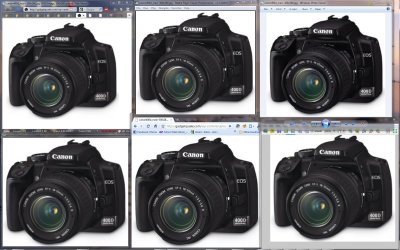
Here you go, machine spec as listed in my profile..
screenshot.jpg
From top left to bottom right:
Top row = Firefox-->Media Player Classic HC-->Windows Photo Viewer
Bottom row = Picasa picture viewer --> Google chrome --> FastStone Image viewer

The ones that are "pixelated" is MPC-HC and Windows Photo Viewer.

zzz2496
 

My Computer

Computer Manufacturer/Model Number
Self Built
OS
Windows7 Ultimate 64bit
CPU
Intel Core 2 Quad Q6600
Motherboard
Abit IN9-32X-MMAX
Memory
DDR2 Adata 4GB
Graphics Card(s)
Nvidia GeForce GTX 285 1024 and Nvidia GeForce 8800GT 512
Sound Card
Asus Xonar HDAV 1.3
Monitor(s) Displays
Dell 2407WFP and BenQ 2400v and Philips 150v3
Screen Resolution
3840x1200 and 1024x768
Hard Drives
2 WDC 1TB
1 WDC 1.5TB
1 WDC 640GB
1 WDC 320GB
1 Seagate 200GB
PSU
Corsair TX 850W
Case
Cooler Master HAF932
Cooling
Arctic Cooling Freezer Extreme and plenty of fans...
Keyboard
MicrosoftNaturalKeyboard 4000/Apple Alu keyboard/Dinovo mini
Mouse
Logitech G5/MarbleMouseTrackball/PerformanceMX/SpacePilotPRO
Internet Speed
1.5Mbps down/384Kbps up
Other Info
APC SURT 1000XL
Logitech Z-560
Wiimote
Mikrotik Router
Linksys (now Cisco) SD2008 8 port Gigabit switch
Linksys WRT54G (acting as AP)
Apple wireless Aluminium keyboard
Apple Magic Mouse
Xbox360 wired controller
Thanks, zzz! This (possibly) confirms that a lot of people have the same problem/issue/"feature" I'm talking about but just don't notice it as much as I do for my uses. It is very comforting to have this sanity check to see that it isn't such a rarity, just something overlooked by most.

I'm gonna try installing mpc-hc, actually, and play around with the rendering options to see if they help (which could help me get a better idea of which settings would work better for video as well).
 

My Computer

OS
XP / Win7 x64 Pro
CPU
Intel Quad-Core Q9450 @ 3.2GHz
Motherboard
Asus P5-E
Memory
2x2GB GSkill DDR2
Graphics Card(s)
NVIDIA GeForce 8600 GTS (EVGA)
Monitor(s) Displays
Dell 2408WFP
Screen Resolution
1920x1200
Back
Top