Windows 7 Forums


Windows 7: WMP 12 Constantly Updating Library!

02 May 2009   #1

Windows 7 RTM / Windows Vista SP2
 
 
WMP 12 Constantly Updating Library!

Well, the title says it all. Everytime I open WMP 12, it starts updating my music library. All of my music is in the library, but yet it keeps updating it. I'm just wondering if any of you out there have this problem, and if so, is it really updating something or is it a bug or what? It's driving me a little crazy. thanks for any help on this.

My System SpecsSystem Spec

02 May 2009   #2

Windows 7 Ultimate x64.
Ellesmere Port, UK.


It updates the library in wmp from your saved files. It is not a bug or anything but what it is basically doing is rescanning where you save your music to. Once it has done the scan and added the new items it will then settle down and resume as normal. All is good
My System SpecsSystem Spec
02 May 2009   #3

Windows 7 RTM / Windows Vista SP2


OK, thank you so much for replying. So it will keep updating until it has found every file? The reason I ask is that it will update for at least 10 minutes at a time and then say that the update is complete. Then the next time I open media player it does the same thing. I have around 30 gigabytes in music, so that may be why it's taking so long. Who knows! Anyway, thanks for the response.
My System SpecsSystem Spec
.


02 May 2009   #4

Windows 7 Ultimate x64
Milton Keynes, United Kingdom


WMP12 will check each time it's run to make sure that any changes with the files are recorded within the player. It's normal for it to take a bit of time as you have so much data, but it shouldn't affect any performance.
My System SpecsSystem Spec
02 May 2009   #5

Win 7 7201 x64
England


I had my "My Music" file as a sub-folder of "My Documents" and even if I left WMP on for a couple of hours to index everything, I'd close it and it would start all over again with an empty library.

I had to move "My Music" out of "My Documents" in the end it it was fine.
My System SpecsSystem Spec
02 May 2009   #6

Windows 7 RTM / Windows Vista SP2


hmmm. well, that's interesting. but my problem is a little different in that all of my music is there, it just keeps updating. "Updating Media Library" in the bottom corner it says.
My System SpecsSystem Spec
02 May 2009   #7

Slackware / Windows 7 x64 7100
Sarasota


Quote   Quote: Originally Posted by Meyithi View Post
I had my "My Music" file as a sub-folder of "My Documents" and even if I left WMP on for a couple of hours to index everything, I'd close it and it would start all over again with an empty library.

I had to move "My Music" out of "My Documents" in the end it it was fine.
No need to do that at all.

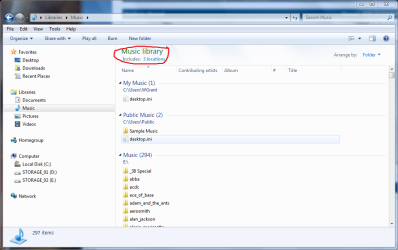
If you go to Libraries > Music.............you will see Includes: X Locations. Click on it and add another location where your music is. Simple...........

WMP 12 Constantly Updating Library!-capture.png
My System SpecsSystem Spec
02 May 2009   #8

Win 7 7201 x64
England


Quote   Quote: Originally Posted by SqdnGuns View Post
No need to do that at all.

If you go to Libraries > Music.............you will see Includes: X Locations. Click on it and add another location where your music is. Simple...........

Attachment 9478
Yeah I know, but I only had the one location and it was a sub-folder in "My Documents" and no matter what I did WMP would forget my library whenever I closed it down. Only thing I could do to fix it was to physically move the folder out of "My Documents" and it was fine.

Incidentally, Libraries seem to track the physical location of folders so if you move them you don't have to tell your Library of the new location, which is a nice feature.
My System SpecsSystem Spec
09 May 2009   #9

Windows XP


Hi guys,
i've the same problem! Every time i open WMP it starts scanning my drive using half of cpu and in the bottom there's "updating media library", or "retrieving media informations for ...." it works for a couple of hours, then it says "update complete", or something similar. If i close WMP and reopen it, it starts scanning again... but the main problem is that it uses a lot of cpu!
Windows 7 runs fine, but media player 12 sucks!!
My System SpecsSystem Spec
10 May 2009   #10

Windows 7 Ultimate x64


Quote   Quote: Originally Posted by skynet View Post
Hi guys,
i've the same problem! Every time i open WMP it starts scanning my drive using half of cpu and in the bottom there's "updating media library", or "retrieving media informations for ...." it works for a couple of hours, then it says "update complete", or something similar. If i close WMP and reopen it, it starts scanning again... but the main problem is that it uses a lot of cpu!
Windows 7 runs fine, but media player 12 sucks!!
You need to tell WMP to NOT download media information:
  1. When in Player view, right-click the main Media Player window, then select "More options..."
  2. Open the "Library" tab
  3. Remove the check from "Retrieve additional information from the Internet"
  4. Click "OK"
My System SpecsSystem Spec
Reply

 WMP 12 Constantly Updating Library! problems?


Thread Tools


Similar help and support threads for: WMP 12 Constantly Updating Library!
Thread Forum
Unable to create the file "New Library.library.ms General Discussion
Windows live mail 2011 "updating your changes" constantly... grrr Browsers & Mail
Library Conundrum: 'Arrange By Folders' is Missing in Custom Library! General Discussion
Windows Media Updating Library Media Center
Windows Media Player not updating library Music, Pictures & Video


All times are GMT -5. The time now is 05:07 AM.


Seven Forums Android App Seven Forums IOS App Follow us on Facebook

Windows 7 Forums is an independent web site and has not been authorized,
sponsored, or otherwise approved by Microsoft Corporation.
"Windows 7" and related materials are trademarks of Microsoft Corp.
© Designer Media Ltd
  

1 2 3 4 5 6 7 8 9 10 11 12 13 14 15 16 17 18 19 20 21 22 23 24 25 26 27 28 29 30 31 32