Windows 7 Forums


Windows 7: Image Preview in Win7

10 May 2010   #1

Windows 7
 
 
Image Preview in Win7

Hi all,

I have looked up at all possible solutions in this Forum but unable to resolve this issue.

I am unable to Preview any images as displayed in http://i.imgur.com/UUwTZ.jpg

Steps followed:

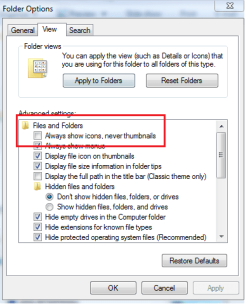
1. Always show icons is disabled in Folder options.
2. Default program for Image is Windows Photo Viewer
3. In System Properties --> Advanced Settings --> Save Taskbar thumbnail previews is unchecked.
4. Tried Default settings in Folder options.

Any other pointers ?

Regards,
Ratish

My System SpecsSystem Spec

10 May 2010   #2
Arc

Windows 7 Home Premium 64 Bit SP 1


My System SpecsSystem Spec
10 May 2010   #3

Windows 7
 
 
No luck

I have already tried those steps.

attached are the screenshots for the same.

any further pointers ?
Attached Thumbnails
Image Preview in Win7-folder-options.png   Image Preview in Win7-local-policy-group-editor.jpg   Image Preview in Win7-system-properties.jpg  
My System SpecsSystem Spec
.


10 May 2010   #4
whs

Vista, Windows7, Mint Mate, Zorin, Windows 8
Florida in winter, Black Forest/Germany


As a test, try another picture viewer. For example this one which is an excellent picture viewer - far superior to the Windows facilities.
My System SpecsSystem Spec
10 May 2010   #5
Arc

Windows 7 Home Premium 64 Bit SP 1


Quote   Quote: Originally Posted by Ratish View Post
I have already tried those steps.

attached are the screenshots for the same.

any further pointers ?
You may try the option three there.
Quote   Quote: Originally Posted by Arc View Post
My System SpecsSystem Spec
11 May 2010   #6

Windows 7
 
 
Tried the 3rd Step

tried the 3rd step in http://www.sevenforums.com/tutorials...e-disable.html

but still no luck

FastStone does the trick but would love to get my explorer working again
My System SpecsSystem Spec
11 May 2010   #7

Lion
Heven & Hel


Which image viewer opens when you dbl clik on an image?

Or go here, Control Panel\All Control Panel Items\Default Programs\Set Associations and select .jpg and set it to Windows photo viewer and check.

Do you use any 3P AV or firewall in place??
My System SpecsSystem Spec
11 May 2010   #8

Windows 7


yes, set the default type to Windows Photo viewer still unable to view the images.

and just the windows firewall (can't remove it - office restrictions)
My System SpecsSystem Spec
11 May 2010   #9
Arc

Windows 7 Home Premium 64 Bit SP 1


Is it saying that you dont have proper permission or something like that ? Then you may install Take Ownership Shortcut and apply it to take ownership of the folder and see what happens.

But first please go to the actual file location and open it, post a screenshot of that open folder as attachment using the paper clip icon in the toolbar (last item) of the reply box.
My System SpecsSystem Spec
Reply

 Image Preview in Win7 problems?


Thread Tools


Similar help and support threads for: Image Preview in Win7
Thread Forum
Solved Image preview missing Music, Pictures & Video
Solved Set first image as Folder preview. Customization
Preview image shortcut Windows 7 Music, Pictures & Video
Preview looks warmer than the image actually is Graphic Cards
no image preview - help Music, Pictures & Video


All times are GMT -5. The time now is 10:16 PM.


Seven Forums Android App Seven Forums IOS App Follow us on Facebook

Windows 7 Forums is an independent web site and has not been authorized,
sponsored, or otherwise approved by Microsoft Corporation.
"Windows 7" and related materials are trademarks of Microsoft Corp.
© Designer Media Ltd
  

1 2 3 4 5 6 7 8 9 10 11 12 13 14 15 16 17 18 19 20 21 22 23 24 25 26 27 28 29 30 31 32