| Windows 7: Fullscreen lagging |
21 May 2010
|
#1 | | Windows 7 Professional x64 |
Fullscreen lagging I've tried many different players (divx, VLC, GOM Player, Media Player Classic, etc), but for every player, when ever I view a video in full screen, the video lags. The videos alternate between playing in really choppy images for a while to the video playing extremely fast for a couple of seconds. The audio is completely fine and streaming videos online/watching YouTube is no problem for me.
While some people believe their video issues can be solved by switching compatibility modes or that the lagging has to do with the player going into invisible mode (whatever it's called), I've tried the compatibility modes and disabling the invisible feature and the videos still lagged.
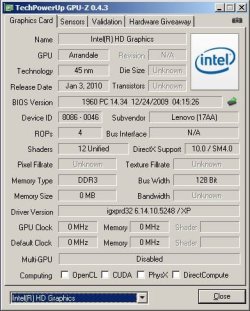
I got a new Lenovo T410 for college and my specs are: Windows 7 Professional x64, Intel(R) Core(TM) i5 CPU M 520 @ 2.40GHz , 4.00 GB Memory, Intel(R) Graphics Media Accelerator HD for my graphics card.
Any ideas? | My System Specs |
| System Manufacturer/Model Number LENOVO/2516CTO OS Windows 7 Professional x64 CPU Intel(R) Core(TM) i5 CPU M 520 @ 2.40GHz Memory 4.00 GB Graphics Card Intel(R) Graphics Media Accelerator HD Sound Card Conexant 20585 SmartAudio HD Monitor(s) Displays 1440 x 900 |
21 May 2010
|
#2 | | Win 8 Release candidate 8400 |

Quote: Originally Posted by captcaptain I've tried many different players (divx, VLC, GOM Player, Media Player Classic, etc), but for every player, when ever I view a video in full screen, the video lags. The videos alternate between playing in really choppy images for a while to the video playing extremely fast for a couple of seconds. The audio is completely fine and streaming videos online/watching YouTube is no problem for me.
While some people believe their video issues can be solved by switching compatibility modes or that the lagging has to do with the player going into invisible mode (whatever it's called), I've tried the compatibility modes and disabling the invisible feature and the videos still lagged.
I got a new Lenovo T410 for college and my specs are: Windows 7 Professional x64, Intel(R) Core(TM) i5 CPU M 520 @ 2.40GHz , 4.00 GB Memory, Intel(R) Graphics Media Accelerator HD for my graphics card.
Any ideas? could be many things. You dont have tons of ram for 64 bit, networking, etc.
Are you viewing them from HD or download? | My System Specs | | System Manufacturer/Model Number HP Pavillion dv-7 1005 Tx OS Win 8 Release candidate 8400 CPU 2@2.4 Memory 4 gigs Graphics Card Nvidia 9600M Sound Card HD built-in Monitor(s) Displays 17" Wxga Screen Resolution 1440x900 Cooling none Internet Speed 45Mb down 5Mb up |
22 May 2010
|
#3 | | Windows 7 Professional x64 |
| My System Specs | | System Manufacturer/Model Number LENOVO/2516CTO OS Windows 7 Professional x64 CPU Intel(R) Core(TM) i5 CPU M 520 @ 2.40GHz Memory 4.00 GB Graphics Card Intel(R) Graphics Media Accelerator HD Sound Card Conexant 20585 SmartAudio HD Monitor(s) Displays 1440 x 900 |
22 May 2010
|
#4 | | MS Windows 7 Ultimate SP1 64-bit Austin, Texas |
And just as an experiment,
Disable your anti-virus program.
If that doesn't give you satisfactory results, then WIN key | type MSCONFIG | Enter key | Startup tab
Now uncheck everything not from microsoft or from your laptop company.
Don't panic, you can always come back and uncheck them.
I keep most things unchecked on my system. | My System Specs | | System Manufacturer/Model Number Toshiba Satellite S875D-S7239 laptop OS MS Windows 7 Ultimate SP1 64-bit CPU AMD A10-4600M Motherboard AMD Pumori (Socket FT1) Memory 6.00 GB Dual-Channel DDR3 @ 798MHz (11-11-12-28) Graphics Card AMD Radeon HD 7660G Sound Card High Definition Audio Device Monitor(s) Displays Generic PnP Monitor (1600x900@60Hz) Screen Resolution 1600x900@60Hz Keyboard Standard PS/2 Keyboard Mouse HP Wireless Optical Mobile Mouse Model FHA-3410 Hard Drives SSD 119GB Corsair CSSD-V128GB2 ATA Device Internet Speed What the local pub, local coffee shop offers. Other Info Optical Drive:MATSHITA BD-CMB UJ160B ATA Device
Also have an Asus ha1002xp netbook with Win 7 Ultimate installed. |
22 May 2010
|
#5 | | window's 7 bermuda triangle |
could be many process working behind when your video is played. you have 4gb ram which is not a question to me | My System Specs | | OS window's 7 CPU core 2 quad Motherboard gigabyte Memory 2gb corsair Graphics Card ati hd4850 Monitor(s) Displays lg Screen Resolution 1600 X 900 Case power logic Other Info none of the spec above is accurate |
23 May 2010
|
#6 | | Windows 7 Ultimate x64 Northern Ireland |
Most online video is flash content, so your having this problem when using onboard graphics.
Check if theres an update available or even better some modded video drivers. | My System Specs | | System Manufacturer/Model Number Custom Build OS Windows 7 Ultimate x64 CPU Phenom II X3 720 BE @3.2Ghz Motherboard ASRock A770DE AM3 Memory 4GB Corsair XMS2 DDR2-800 Graphics Card Nvidia GTS 250 512MB w/ Accelero Twin Turbo Monitor(s) Displays 24" Benq LED G2420HDBL Screen Resolution 1920x1080 Keyboard Microsoft 3000 Mouse Microsoft 5000 PSU Earthwatts 380 w/ Noctua R8 Case Antec 300 Cooling AC Alpine 64 Hard Drives 120GB Corsair Force3 SSD, 1TB [WD] Caviar Internet Speed 14MBit/sec Other Info Logitech Z520 Speakers
Wireless Xbox 360 GamePad |
23 May 2010
|
#7 | | W7 Professional X64 The Great SouthWest, Arizona |
Are all your drivers up to date? Try using your Thinkvantage updates or go here to get a look at the latest updates available.
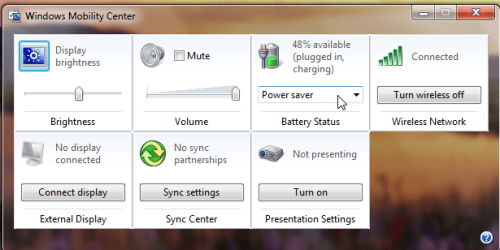
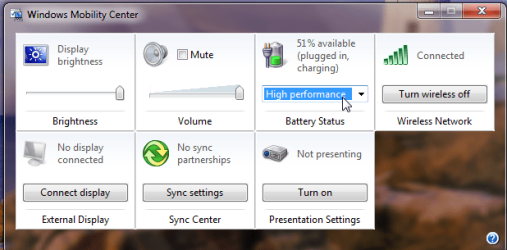
You may also want to check your Power Manager settings and make sure you're not operating in Battery Maximum Life. Some preset settings will throttle down the CPU. You can also go into BIOS (press F1 when the Thinkpad splash screen comes on when first booting) and check the Power Configuration settings there.
I'm using Power Source Optimized btw.
Last edited by emerald08; 23 May 2010 at 08:13 PM..
Reason: typo
| My System Specs | | System Manufacturer/Model Number Lenovo Thinkpad T400 OS W7 Professional X64 CPU 2.26 ghz Penryn Core2Duo 1066mhz FSB/3mb L2 Cache Memory 4gb Graphics Card Intel X4500HD Sound Card Intel Corporation 82801I (ICH9 Family) HD Audio Controller Monitor(s) Displays 19" External WS Acer 1440X900 Screen Resolution 1440 X 900 WXGA+ w/ LED Keyboard T61 Chicony KB on my T400 :) Hard Drives 256gb Patriot Torqx SSD
500 gb Seagate 7200rpm Internet Speed Slow DSL Other Info use my T400 for school and plug in the monitor for extracurricular goodness :) |
24 May 2010
|
#8 | | MS Windows 7 Ultimate SP1 64-bit Austin, Texas |
CaptCaptain,
The easiest way to simply change your "Power Plan" is: WIN + X key combo
I've included a snapshot showing where you change the power, although the display is rather intuitively obvious.
If you desire to change some of your "Power" setting, then WIN key | type Power Options | Enter key
Oh yes, WIN key is the one with the funny-looking, wavy flag on it. | My System Specs | | System Manufacturer/Model Number Toshiba Satellite S875D-S7239 laptop OS MS Windows 7 Ultimate SP1 64-bit CPU AMD A10-4600M Motherboard AMD Pumori (Socket FT1) Memory 6.00 GB Dual-Channel DDR3 @ 798MHz (11-11-12-28) Graphics Card AMD Radeon HD 7660G Sound Card High Definition Audio Device Monitor(s) Displays Generic PnP Monitor (1600x900@60Hz) Screen Resolution 1600x900@60Hz Keyboard Standard PS/2 Keyboard Mouse HP Wireless Optical Mobile Mouse Model FHA-3410 Hard Drives SSD 119GB Corsair CSSD-V128GB2 ATA Device Internet Speed What the local pub, local coffee shop offers. Other Info Optical Drive:MATSHITA BD-CMB UJ160B ATA Device
Also have an Asus ha1002xp netbook with Win 7 Ultimate installed. |
31 May 2010
|
#9 | | Windows 7 Professional x64 |
Without a dedicated video card, the heavily encoded HD videos will shatter (especially, the 1080p).
Probably, you have the Intel GMA 950.
Try to download different videos from Youtube (you can use Keepvid) and play them (use different players, like VLC, GOM, MPC-HC).
Do all the videos shatter? This way, you can narrow down the problem. | My System Specs | | OS Windows 7 Professional x64 CPU Core i5 520M Graphics Card ATI HD 5650 |
08 Jun 2010
|
#10 | | |
Same problem here... I have exactly the same problem. Same system/config as you, except I run Win XP.
I've tried the latest video drivers. Didn't help.
I've tried battery/power mgmt settings. Didn't help.
I've noticed that the problem only starts when the video window reaches a certain size. If you stream the video without using full-screen, it's fine.
Slowly increasing the video-window (by dragging the corners) works fine, until a certain point, when the system starts to struggle and the lagging/skipping starts.
This is the same for DivX and Flash. And it happens on streamed videos from various websites. And it even happens on saved video files (not streamed).
Help anyone? | My System Specs | | Fullscreen lagging problems? All times are GMT -5. The time now is 06:26 AM. | |