Windows 7 Forums


Windows 7: Downloading to video folder

29 May 2010  
kenC

Windows 7 Home Premium X64 SP1
171 posts
 
 
Downloading to video folder

I've always downloaded videos to My Videos, but now I'm having a problem. I get this message:
------------------------------------------------------------------
mp4 could not be saved, because you cannot change the contents of that folder.

Change the folder properties and try again, or try saving in a different location.
----------------------------------------------------------------------
As far as I know I haven't changed anything. I've changed the download location to Documents at the moment and having no problems with that.
But how do I change properties for the video folder?

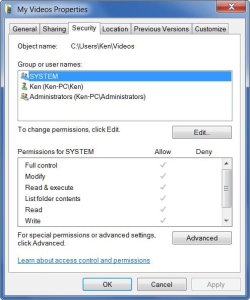
At the moment it's showing 'System' 'Ken' and 'Administrators' and full permissions for everything but 'Special Permissions' (there's a tick against everything)


I'd enclose a pic. but the stupid snipping tool only seems to save every other night!!
My System SpecsSystem Spec

29 May 2010  
Jacee

Windows 7 Ultimate 32bit SP1
7,144 posts


Ken you can use (free) Fast Stone Capture since 'snipping tool' is being temperamental A+ Freeware - Multimedia & Design - FastStone Capture 5.3 (last freeware version)
My System SpecsSystem Spec
29 May 2010  
Jonathan_King

Windows 7 Professional x64
13,991 posts
Rednecksville


Can you download any other kind of files to the Videos location?
My System SpecsSystem Spec
.


29 May 2010  
kenC

Windows 7 Home Premium X64 SP1
171 posts


<<Can you download any other kind of files to the Videos location?>>

Haven't tried that yet - it's late, I'll give it a go tomorrow.

Strange thing is - If I d/load to another folder (docs - downloads) that's fine and the file plays. However, if I try to to move or copy it into Videos it still tells me I don't have permission
I've also found that I can't delete files from 'videos' since I don't have 'permissions'
My System SpecsSystem Spec
29 May 2010  
Jacee

Windows 7 Ultimate 32bit SP1
7,144 posts


Right click and choose to take 'ownership'
My System SpecsSystem Spec
29 May 2010  
kenC

Windows 7 Home Premium X64 SP1
171 posts


Jacee - thanks, will give it a try. I like the snipping tool but after it apparently takes the snip it doesn't give me any opportunity to save - despite clicking 'save' of course!
My System SpecsSystem Spec
29 May 2010  
kenC

Windows 7 Home Premium X64 SP1
171 posts


Jacee - my post above was in response to your snipping tool post.

Right clicking on the file gives me a context menu of over 20 items - none of which is 'take ownership' Neither does right clicking on an empty space in 'Videos''
Thanks for your time though ;-)
My System SpecsSystem Spec
29 May 2010  
kenC

Windows 7 Home Premium X64 SP1
171 posts


Here's the window from the Video folder permissions:
Attached Thumbnails
Downloading to video folder-2010-05-30_015935.jpg  
My System SpecsSystem Spec
29 May 2010  
Grimmjow

Windows 7 Ultimate x32
1,005 posts
Macedonia


My System SpecsSystem Spec
30 May 2010  
kenC

Windows 7 Home Premium X64 SP1
171 posts


Thanks - I've now got the 'take ownership 'shortcut - however, there's nothing to right-click on! As i said in my first post, I get a box telling me I can't save. Right clicking in My Videos does nothing.

Anyway, this morning I did a System restore and things seem to be OK - videos are going into My Videos.

Two days ago I upgraded my Nokia N95 phone by installing a Nokia program. It backed up my phone first, including the videos that were on it. Maybe that's what caused the problem. The System Restore got rid of the prog.

Anyway, I got a snipping tool replacement out of it ;-)

Thanks to everyone who posted.
My System SpecsSystem Spec
Reply

 Downloading to video folder problems?


Thread Tools


Similar help and support threads for: Downloading to video folder
Thread Forum
Problem with downloading files and video buffering Browsers & Mail
Solved Streaming Video freezes computer after downloading SP1 BSOD Help and Support
Are there any way to play Audio, Video while Downloading? Music, Pictures & Video
Downloading Photoshop from folder Software


All times are GMT -5. The time now is 04:17 AM.


Windows 7 Forums is an independent web site and has not been authorized,
sponsored, or otherwise approved by Microsoft Corporation.
"Windows 7" and related materials are trademarks of Microsoft Corp.
© Designer Media Ltd