|
|
|
|||||||||||||||||||||||||||||||||||||||||||||||||||||||||||||||||||||||||||||||||||||||||||||||||||
| 15 Jul 2010 | #1 |
|
|
Windows 7 Gif Viewer Works perfectly
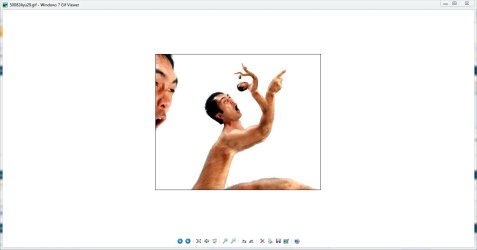
I got the windows picture and fax viewer to work and display ANIMATED gifs on vista and Windows 7 please look here Windows 7 Gif viewer and for those leery of clicking on a new members link
Code:
http://www.goofwear.com/windows/ Also here is my video |
| My System Specs |
| 15 Jul 2010 | #2 |
|
Thanks buddy, works great for me.
|
| My System Specs |
| 13 Apr 2011 | #3 |
|
|
Sorry for bump, is this legit?
|
| My System Specs |
| 30 Jun 2011 | #4 |
|
|
Yes this is legit, totally understandable it the Internet its hard to always trust people.
|
| My System Specs |
| 01 Aug 2011 | #5 |
|
|
Doesn't seem to work on my 64 bit build.
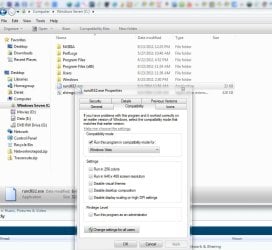
I get a dllrun pop up error. Also, it says at the start of installing viewer to right click rundll.exe and set compatibility to XP SP2 or 3 and all I got after right click was "compatibility troubleshoot" as an option.[IMG]http://i053.*******.ru/1108/88/34ef2ed33a6e.jpg[/IMG] |
| My System Specs |
| 02 Aug 2011 | #6 |
|
|
Ok I just checked my compatibility on my windows 7 64bit and on Windows 7 you need to set it to vista. That should fix it. if not right click the installer and click run as admin. there is a registry key that needs to be install and you pc or antivirus may not let it install. If that doesent not work install this registry key. It is the same on in my installer.
Also did you se this here Index of ./downloads/64bit/ you can use this for the 64bit that way windows does not complain and say are you sure you want to run this program every time you click a pitcher. |
| My System Specs |
| 02 Aug 2011 | #7 |
|
|
Yes I did see that in your index but since it was "rundll.exe" I wasn't sure what to do with it.
I don't see this program in the start menu or add remove programs. What's with that? Set what to Vista? How is this done? How do I run the "gif.reg"? |
| My System Specs |
| 22 Aug 2011 | #8 |
|
|
I guess your done with assisting on this thread?
|
| My System Specs |
| 23 Aug 2011 | #9 |
|
|
No sorry about that I still post. Its just I never vist or log in here cause no one ever posts. I just logged in casue I got an email saying. Some one posted. The reason it dosent show up in the programfolder or start menus is because the simple installer I used exctracts th 4 files to the c drive and then runs a batch file to install the registey key and then deletes the batch file and registry key when finished. I chose the c drive because the registry file needs to the excat location of the exe and dll file. ... the gif.reg file is ran automaticly after you install it. If not the us 7zip and extract the install file and then run the reg file by double clicking it. Hope that helps if not let me know.
|
| My System Specs |
| 23 Aug 2011 | #10 |
|
I just got that error too, but after going to C, right clicking on the rundll32.exe, compatibility tab, change it to Vista, apply.
I ran the .reg file too. It now works for me on my Seven Pro 64 SP1.
|
| My System Specs |
| Similar help and support threads for2: Windows 7 Gif Viewer Works perfectly | ||||
| Thread | Forum | |||
|
|
General Discussion | |||
| Windows Media player does not show video audio works perfectly AVI | Music, Pictures & Video | |||
| Sometimes pc cannot find perfectly working wirelss, why? | Network & Sharing | |||
| Win 7 installed perfectly. But will not boot. | Installation & Setup | |||
|
|
General Discussion | |||
| Windows dont resize "perfectly"? | General Discussion | |||
| Well Build 7077 works perfectly and my surround sound!! | Sound & Audio | |||
| Our Sites |
Site Links |
About Us |
Find Us |
|
Windows 7 Forums is an independent web site and has not been authorized,
sponsored, or otherwise approved by Microsoft Corporation.
"Windows 7" and related materials are trademarks of Microsoft Corp.
© Designer Media Ltd All times are GMT -5. The time now is 10:02. |
|