Windows 7 Forums


Windows 7: Windows 7 Ultimate 64 bit "limited access" Wireless Network Connection

27 Jul 2010   #1
wAk

Windows 7 Ultimate 64 bit
 
 
Windows 7 Ultimate 64 bit "limited access" Wireless Network Connection

I just did a clean install on my windows 7 ultimate 32 bit computer to 64 bit. At first, my wireless internet was working fine, but it suddenly dropped to "limited access". I'm using a Linksys WUSB100 ver. 2 wireless network USB adapter. I've already tried downloading the latest driver for windows 7 64 bit, 3.0.3.0 from the Linksys website. I've also tried restarting my computer and the wireless modem. I did a system restore to the point where it was last working but it still isn't working. I can't think of anything else to do, please help.

My System SpecsSystem Spec

27 Jul 2010   #2

Windows 7


information   Information
I hope this helps unidentified-network

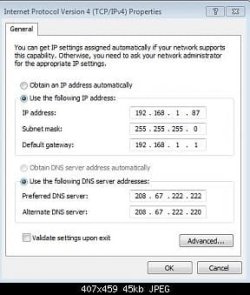
Try entering you Ip and Dns. Look at mine
and all the pictures are in order.
Note   Note
I am using Open Dns


Name:  1.JPG
Views: 13488
Size:  10.0 KB
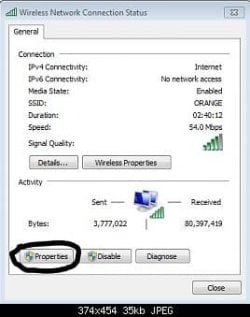
Open network and sharing center and click on connections (your network name)

Windows 7 Ultimate 64 bit "limited access" Wireless Network Connection-2.jpg
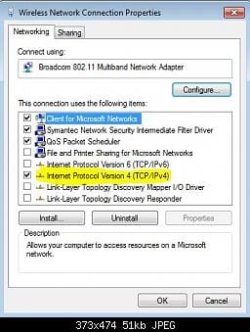
Click on Properties.

Windows 7 Ultimate 64 bit "limited access" Wireless Network Connection-3.jpg
click on Internet Protocol Version 4

Windows 7 Ultimate 64 bit "limited access" Wireless Network Connection-4.jpg
Enter your (computer)Ip address, Subnet mask,(router ip) Ip address, Preferred Dns Sever and Alternate Dns server.


information   Information
normally it is the same as mine


Ip address: 192.168.1.2
Subnet mask: (will come up automatically) 255.255.255.0
Ip address: 192.168.1.1

Using open dns

Preferred Dns sever: 208.67.222.222
Alternate Dns sever: 208.27.222.220

Last edited by ritesh; 28 Jul 2010 at 12:23 AM..
My System SpecsSystem Spec
28 Jul 2010   #3

Windows 7 Ultimate 64-bit


Is it a good idea to diable IPv6? I know most sites dont use it... yet, but why did you disable it?
My System SpecsSystem Spec
.


28 Jul 2010   #4

Windows 7 Ult, Windows 8 Pro,
San Diego


It's not required that you disable IPv6, doing that hardly ever solves any problems. Ipv6 is only used for the Homegroup network which is used only on the LAN.

I'm not sure why anyone would think that using a static IP would solve a wireless connection problem so I don't think that is the solution. This is most likely a driver or a wireless modem-router problem.
My System SpecsSystem Spec
28 Jul 2010   #5

Windows 7 Professional SP1 64-bit
Virginia


Do you have any actual problems using the internet?

You could try this: 10 tips for improving your wireless network
My System SpecsSystem Spec
29 Jul 2010   #6

Windows 7


Quote   Quote: Originally Posted by letsdoamazing View Post
Is it a good idea to diable IPv6? I know most sites dont use it... yet, but why did you disable it?
Quote:
It's not required that you disable IPv6, doing that hardly ever solves any problems. Ipv6 is only used for the Homegroup network which is used only on the LAN.

I'm not sure why anyone would think that using a static IP would solve a wireless connection problem so I don't think that is the solution. This is most likely a driver or a wireless modem-router problem.

I didn't know. I wanted to try disabling it and see if it improves my internet speed.

Unfortunately, it didn't.
My System SpecsSystem Spec
Reply

 Windows 7 Ultimate 64 bit "limited access" Wireless Network Connection problems?


Thread Tools


Similar help and support threads for: Windows 7 Ultimate 64 bit "limited access" Wireless Network Connection
Thread Forum
Wireless Network shows "Limited Access" Network & Sharing
"No Network Access" and "Limited Connection/Connectivity" ? Network & Sharing
BSOD = "Limited Access" on wireless network BSOD Help and Support
Solved Internet wireless connection: "Limited Connectivity" in one machine! Network & Sharing


All times are GMT -5. The time now is 06:33 PM.


Seven Forums Android App Seven Forums IOS App Follow us on Facebook

Windows 7 Forums is an independent web site and has not been authorized,
sponsored, or otherwise approved by Microsoft Corporation.
"Windows 7" and related materials are trademarks of Microsoft Corp.
© Designer Media Ltd
  

1 2 3 4 5 6 7 8 9 10 11 12 13 14 15 16 17 18 19 20 21 22 23 24 25 26 27 28 29 30 31 32