Windows 7 Forums Search
Welcome to Windows 7 Forums. Our forum is dedicated to helping you find solutions with any problems, errors or issues you are experiencing with Windows 7. The Windows 7 forum also covers news and updates and has an extensive Windows 7 tutorial section that covers a wide range of tips and tricks.


Windows 7 - Old Network Shares Still Appear In Windows Explorer

 
08-20-2010   #1


Windows 7 Professional x64 RTM


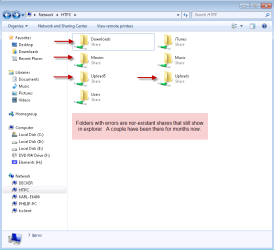
Old Network Shares Still Appear In Windows Explorer

The title sums it up really. Shares that no longer exist are still showing up in other PCs connected to the LAN. Some of the shares have been gone for months now, but still are listed. I've deleted any Homegroups which I had been previously playing with and unshared all shares on the host PC.

Any idea how to get rid of these shares?

Attached Thumbnails
Old Network Shares Still Appear In Windows Explorer-8-20-2010-10-49-00-am.png  
My System SpecsSystem Spec
08-20-2010   #2


start an administrative command prompt
Type net share "users" /d
replace "users" with the username the share is listed under... keep doing so on all your machines until the share list is current
My System SpecsSystem Spec
08-20-2010   #3


Windows 7 Professional x64 RTM


Thanks for the suggestion Madtown. I would've tried that had I not already tried recreating the shares on the server and then unshare them which worked.

I figured out how to fix it. I recreated the shares using the same share name, then unshared them.

Edit: I should also add that when recreating the share it already shared as if it was never deleted on the server, although it was. I also get the following message when unsharing the folder:

Code:
[Window Title]
Sharing
 
[Content]
There are 1 file(s) open by 2 user(s) connected to Uploads. If you stop sharing Uploads, the files will close, which may cause these users to lose data. Do you want to continue?
 
[Yes] [No]
I just click yes, switch back to the client, refresh the network shares and the share will now be gone.
My System SpecsSystem Spec
.


08-20-2010   #4


if it worked.. good deal.. never would've occurred to me to try that.
My System SpecsSystem Spec
08-20-2010   #5


Mad ... there is no user listed when I look at the shares on my Win 7 or XP systems. Where do you find this information?

I f I do a net share from a Command Prompt. the only data I get is:

Share name Resource Remark
My System SpecsSystem Spec
Reply

 Old Network Shares Still Appear In Windows Explorer problems?


Thread Tools


Similar Threads for: Old Network Shares Still Appear In Windows Explorer
Thread Forum
Linux Network shares with Windows 7 Home Premium 64-bit Network & Sharing
BSOD when accessing network or network shares via Wireless Crashes and Debugging
network shares red x Network & Sharing
Windows 7 - no 'Network' shares Network & Sharing
Windows 7 Ultimate, can not access network shares Network & Sharing


All times are GMT -5. The time now is 05:27 PM.


Windows 7 Forums is an independent web site and has not been authorized,
sponsored, or otherwise approved by Microsoft Corporation.
"Windows 7" and related materials are trademarks of Microsoft Corp.
© Designer Media Ltd
  

1 2 3 4 5 6 7 8 9 10 11 12 13 14 15 16 17 18 19 20 21 22 23 24 25 26 27 28 29 30