Windows 7 Forums


Windows 7: How to enable/disable/configure MAC style taskbar?

18 Sep 2010   #1

winxp
 
 
How to enable/disable/configure MAC style taskbar?

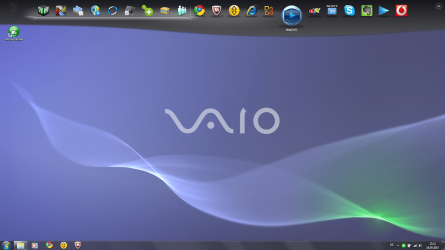
I am sitting in front of a Windows 7 computer which has a MAC style taskbar at the top border of the screen (in addition to the "normal" taskbar as known from WinXP).

Is this an add-on of built-in in all Windows 7 systems?

How do I enable/disable it?

How do I configure it?

Peter

My System SpecsSystem Spec

18 Sep 2010   #2

Windows 7 Ultimate
The Southern Hinterlands


They are probably using Rocket Dock..
My System SpecsSystem Spec
19 Sep 2010   #3

winxp


Quote   Quote: Originally Posted by Tews View Post
They are probably using Rocket Dock..
No, it looks different like this: See attachment
Attached Thumbnails
How to enable/disable/configure MAC style taskbar?-special-taskbar-sony-vaio-win7.png  
My System SpecsSystem Spec
.


Reply

 How to enable/disable/configure MAC style taskbar? problems?


Thread Tools


Similar help and support threads for: How to enable/disable/configure MAC style taskbar?
Thread Forum
Taskbar Always On Top - Disable or Enable Tutorials
Taskbar - Resize - Enable or Disable Tutorials
Taskbar - Enable or Disable Moving Tutorials
Preview taskbar enable/disable Customization
How to enable/disable preview of windows in my taskbar? Customization


All times are GMT -5. The time now is 09:07 PM.


Seven Forums Android App Seven Forums IOS App Follow us on Facebook

Windows 7 Forums is an independent web site and has not been authorized,
sponsored, or otherwise approved by Microsoft Corporation.
"Windows 7" and related materials are trademarks of Microsoft Corp.
© Designer Media Ltd
  

1 2 3 4 5 6 7 8 9 10 11 12 13 14 15 16 17 18 19 20 21 22 23 24 25 26 27 28 29 30 31 32