Windows 7 Forums Search
Welcome to Windows 7 Forums. Our forum is dedicated to helping you find solutions with any problems, errors or issues you are experiencing with Windows 7. The Windows 7 forum also covers news and updates and has an extensive Windows 7 tutorial section that covers a wide range of tips and tricks.


Windows 7 - Can't turn on Network Discovery in Win 7

 
11-09-2010   #1


Windows 7 32 bit


Can't turn on Network Discovery in Win 7

I've been unable to join a Homegroup with my other PC. When I turn on Network Discovery on the second PC and Save Settings, it always returns to Off. This is a fresh update to Win 7 from Vista.

My System SpecsSystem Spec
11-09-2010   #2


Windows 7 RTM X64


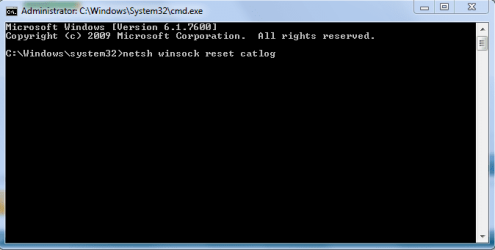
To fix this problem you usually need to reset winsock.

At your command prompt run as Admin, type the command highlighted in bold below then hit enter and you should be prompted to reboot. The picture below shows how.

Elevated Command Prompt

Test to see that the Network Discovery button stays on after another reboot.

You may need to set your networking services to Automatic in services.msc

netsh winsock reset catalog (reset winsock entries)
Attached Thumbnails
Can't turn on Network Discovery in Win 7-netsh-reset.png  
My System SpecsSystem Spec
11-09-2010   #3


Windows 7 32 bit


No change

I checked the networking services and ran the netsh command as admin, but Network Discovery still insists on staying Off. My original problem is that this PC (#2) was not able to join the Homegroup on my first machine. I was getting messages saying that IPv6 needed to be enabled even though I confirmed several times that it is enable on both machines. At that time, machine #2 wanted to join #1 Homegroup, but the IPv6 message persisted. Now, #2 can't even see #1 as it wants now to create a Homegroup.

Very frustrating! I installed Win 7 to get easier sharing capability.

My System SpecsSystem Spec
.


11-09-2010   #4


Some possibilities here. It's for Vista but still applies: Re: Cannot turn on Network Discovery and File Sharing
My System SpecsSystem Spec
11-09-2010   #5


Windows 7 32 bit


Still Trying

Eveything check on the sevices started and ping checks. Take a look at this.

Microsoft Windows [Version 6.1.7600]
Copyright (c) 2009 Microsoft Corporation. All rights reserved.
C:\Windows\system32>nbtstat -n
Local Area Connection:
Node IpAddress: [192.168.0.4] Scope Id: []
NetBIOS Local Name Table
Name Type Status
---------------------------------------------
JENNIFER-PC <00> UNIQUE Registered
WORKGROUP <00> GROUP Registered
JENNIFER-PC <20> UNIQUE Registered
WORKGROUP <1E> GROUP Registered
WORKGROUP <1D> UNIQUE Registered
..__MSBROWSE__.<01> GROUP Registered
Wireless Network Connection:
Node IpAddress: [0.0.0.0] Scope Id: []
No names in cache
C:\Windows\system32>ipconfig /all
Windows IP Configuration
Host Name . . . . . . . . . . . . : Jennifer-PC
Primary Dns Suffix . . . . . . . :
Node Type . . . . . . . . . . . . : Hybrid
IP Routing Enabled. . . . . . . . : No
WINS Proxy Enabled. . . . . . . . : No
Wireless LAN adapter Wireless Network Connection:
Media State . . . . . . . . . . . : Media disconnected
Connection-specific DNS Suffix . :
Description . . . . . . . . . . . : Intel(R) Wireless WiFi Link 4965AGN
Physical Address. . . . . . . . . : 00-1D-E0-22-AB-91
DHCP Enabled. . . . . . . . . . . : Yes
Autoconfiguration Enabled . . . . : Yes
Ethernet adapter Local Area Connection:
Connection-specific DNS Suffix . :
Description . . . . . . . . . . . : Realtek RTL8168B/8111B Family PCI-E Gigab
it Ethernet NIC (NDIS 6.0)
Physical Address. . . . . . . . . : 00-1B-24-EA-9B-85
DHCP Enabled. . . . . . . . . . . : Yes
Autoconfiguration Enabled . . . . : Yes
IPv4 Address. . . . . . . . . . . : 192.168.0.4(Preferred)
Subnet Mask . . . . . . . . . . . : 255.255.255.0
Lease Obtained. . . . . . . . . . : Tuesday, November 09, 2010 8:27:44 PM
Lease Expires . . . . . . . . . . : Tuesday, November 09, 2010 11:27:48 PM
Default Gateway . . . . . . . . . : 192.168.0.1
DHCP Server . . . . . . . . . . . : 192.168.0.1
DNS Servers . . . . . . . . . . . : 209.18.47.61
209.18.47.62
NetBIOS over Tcpip. . . . . . . . : Enabled
C:\Windows\system32>
My System SpecsSystem Spec
11-09-2010   #6


Windows 7 32 bit


Network Discovery

Well, for the moment my network discovery problem is solved by way of a different thread in the same subject. Seems to have bee some soecific services settings.

However, I still can't join the Homegroup on PC #2 with PC #1. I am sill told IPv6 need to be enabled when I know it is on both PCs. Any clue?
My System SpecsSystem Spec
11-10-2010   #7


Windows 7 RTM X64


The IPv6 problem is a bit different and requires that you adjust the registry or create a new key in the registry if it's not there.

This is a common problem, please follow the steps below to fix this problem.

1. Temporarily disable Firewall and third party antivirus program on the computer for a test.

2. Verify relevant services
=========================
a. Click "Start", type "services.msc" (without quotation marks) in Search Bar and press Enter.

Note: If you are prompted for an administrator password or confirmation, type your password, or click Continue.

b. Right click the "Peer Networking Grouping" service and choose Properties.
c. Please check if the service is started; if not, please click the Start button and see if it works.
d. You may also choose Automatic next to Startup type.
e. Click OK.
f. Please repeat the above steps with another service: PNRP Machine Name Publication Service.

3. Modify IPv6 registry key to enable IPV6
==========================
a. Click Start, type regedit in Search Bar, and then click regedit in the Programs list.

Note: If you are prompted for an administrator password or confirmation, type your password or click Continue.

b. Locate and then click the following registry subkey:

HKEY_LOCAL_MACHINE\SYSTEM\CurrentControlSet\services\TCPIP6\Parameters

c. Check whether the "DisabledComponents" registry key exists. If so, let's move on the next steps.

d. Double click the "DisabledComponents" registry key and modify the value to 0.

(If the key doesn't exist, please create the key above and assign the value 0)

e. Exit Registry Editor, and then restart the computer.

Source> HomeGroup get an error of must have IPv6 enabled
My System SpecsSystem Spec
Reply

 Can't turn on Network Discovery in Win 7 problems?


Thread Tools


Similar Threads for: Can't turn on Network Discovery in Win 7
Thread Forum
Network Discovery - Turn On or Off in Windows 7 Tutorials
i can"t turn on network discovery Network & Sharing
Can't turn on network discovery! Network & Sharing
Can't turn on Network Discovery etc.. Network & Sharing
Network Discovery property will not turn ON Network & Sharing


All times are GMT -5. The time now is 05:33 PM.


Windows 7 Forums is an independent web site and has not been authorized,
sponsored, or otherwise approved by Microsoft Corporation.
"Windows 7" and related materials are trademarks of Microsoft Corp.
© Designer Media Ltd
  

1 2 3 4 5 6 7 8 9 10 11 12 13 14 15 16 17 18 19 20 21 22 23 24 25 26 27 28 29 30