Windows 7 Forums Search
Welcome to Windows 7 Forums. Our forum is dedicated to helping you find solutions with any problems, errors or issues you are experiencing with Windows 7. The Windows 7 forum also covers news and updates and has an extensive Windows 7 tutorial section that covers a wide range of tips and tricks.


Windows 7 - Can you change the Network number?

 
12-01-2010   #1


Windows 7 64 Bit Home Premium SP1


Can you change the Network number?

OK, this is not a critical matter or anything, but it annoys us obsessive-compulsive types!

I just upgraded my router and now my wired connection icon in the taskbar, and the Home Network in Network and Sharing Center says "Network 2".
There is only one network. On my XP computer it is "Local Area Network 4".

Can that be changed? Where? How?

My System SpecsSystem Spec
12-01-2010   #2


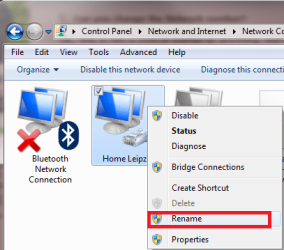
Right click connection icon in taskbar notification area, choose Open Network and Sharing Center. Choose Change adapter settings from the left pane link list. Right click the connection you want to rename, choose Rename from the context menu and name it as you wish.

Can you change the Network number?-rename_network_connection.png

Kari
My System SpecsSystem Spec
12-01-2010   #3


Windows 7 RTM X64


Quote   Quote: Originally Posted by TVeblen View Post
OK, this is not a critical matter or anything, but it annoys us obsessive-compulsive types!

I just upgraded my router and now my wired connection icon in the taskbar, and the Home Network in Network and Sharing Center says "Network 2".
There is only one network. On my XP computer it is "Local Area Network 4".

Can that be changed? Where? How?
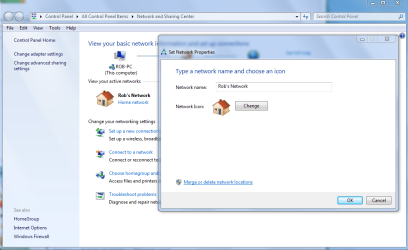
You can also rename the network by clicking on the little house. The picture makes it clear.

The one Kari posted will rename the network connection on the right side of the page, mine will rename the one with the little house.
Attached Thumbnails
Can you change the Network number?-rename-network.png  
My System SpecsSystem Spec
.


12-01-2010   #4


Windows 7 64 Bit Home Premium SP1


Quote   Quote: Originally Posted by chev65 View Post
You can rename the network by clicking on the little house. The picture makes it clear.
Way too easy
How could I have missed that?

Thank You!
My System SpecsSystem Spec
12-01-2010   #5


Windows 7 RTM X64


Quote   Quote: Originally Posted by TVeblen View Post
Quote   Quote: Originally Posted by chev65 View Post
You can rename the network by clicking on the little house. The picture makes it clear.
Way too easy
How could I have missed that?

Thank You!
Clicking on that little house threw off awhile back also, it's so easy that you can miss it, if it was a snake it would have bit you kind of deals.
My System SpecsSystem Spec
12-01-2010   #6


Quote   Quote: Originally Posted by chev65 View Post
Clicking on that little house threw off awhile back also, it's so easy that you can miss it, if it was a snake it would have bit you kind of deals.
It's a bit funny that to change your network type (Home, Public, Work), the link is clearly marked, but there's no indication that to change connection name you just have to click the house next to that link
Name:  network_name_and_type.PNG
Views: 1092
Size:  6.3 KB
My System SpecsSystem Spec
12-01-2010   #7


Windows 7 Professional 32-bit///Vista Home Premium 32-bit


OMG!!

So easy on Vista, and hidden in PLAIN SIGHT in Windows 7.

LOL

Thank you
My System SpecsSystem Spec
01-13-2012   #8


Windows 7 home premium x64


You guys saved my life! Yes, I'm one of those obssessive types haha...

Thanks guys, it was way too easy
My System SpecsSystem Spec
Reply

 Can you change the Network number? problems?


Thread Tools


Similar Threads for: Can you change the Network number?
Thread Forum
Product Key Number - Change Tutorials
Start Menu - Change Number of Recent Programs to Display Tutorials
Flip 3D - Change Number of Windows Displayed Tutorials
How to change the Max number of open windows General Discussion
Jump Lists - Change Number of Recent Items to Display Tutorials


All times are GMT -5. The time now is 05:36 PM.


Windows 7 Forums is an independent web site and has not been authorized,
sponsored, or otherwise approved by Microsoft Corporation.
"Windows 7" and related materials are trademarks of Microsoft Corp.
© Designer Media Ltd
  

1 2 3 4 5 6 7 8 9 10 11 12 13 14 15 16 17 18 19 20 21 22 23 24 25 26 27 28 29 30