Windows 7 Forums


Windows 7: XP accessing Win7: Access is denied

02 Dec 2010  
enchant

Windows 7 Ultimate x64
5 posts
 
 
XP accessing Win7: Access is denied

Up to now, I've been purely an XP user, but I recently inherited a computer running Windows 7. Since it's a more powerful machine than my existing file server, I figured I'd swap it in. But I'm unable to create/edit files on it from any of the WinXP machines in the house. I've searched all over the net and tried many many things.


I'd like to make the entire C: drive accessible to other machines on my LAN, but I'll be happy to get access to specify directories on it. The one I've been working with is C:\http

It took a lot of work, but I can now at least see that drive from my XP machine. However, when I try to copy anything into it, I get:
Cannot copy xxx: Access is denied.
Make sure the disk is not full or write protected and that the file is not currently in use.

If I try to simply create a new text document in that directory, I get:
Unable to create the file 'New Text Document.txt'
Access is denied.

Under Advanced sharing settings, I have the following configured:
Network discovery: ON
File and printer sharing: ON
Public folder sharing: ON
Password protected sharing: OFF
Homegroup connections: Use user accounts and passwords...

I have the following security settings for that http directory:


Can anyone help? I'm totally lost. Thanks.
My System SpecsSystem Spec

02 Dec 2010  
Kari

Windows 7 x64 Ultimate
12,755 posts
A Finnish immigrant in Leipzig, Germany


Hi Enchant, welcome to the Seven Forums.

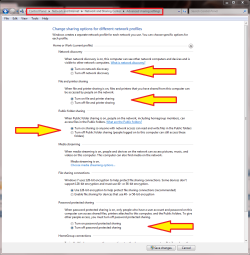
With these settings on Seven I have no problems to save from XP to Seven:

XP accessing Win7: Access is denied-seven_xp_sharing.png

The last one, password protected sharing is of course up to you to decide if you want to use passwords or not.

Kari
My System SpecsSystem Spec
02 Dec 2010  
enchant

Windows 7 Ultimate x64
5 posts


Hi Kari - thanks for the quick response!

It appears that my settings are identical to yours.
My System SpecsSystem Spec
.


02 Dec 2010  
chev65

Windows 7 Ult, Windows 8 Pro,
7,893 posts
San Diego


Quote   Quote: Originally Posted by enchant View Post
Up to now, I've been purely an XP user, but I recently inherited a computer running Windows 7. Since it's a more powerful machine than my existing file server, I figured I'd swap it in. But I'm unable to create/edit files on it from any of the WinXP machines in the house. I've searched all over the net and tried many many things.

I'd like to make the entire C: drive accessible to other machines on my LAN, but I'll be happy to get access to specify directories on it. The one I've been working with is C:\http

It took a lot of work, but I can now at least see that drive from my XP machine. However, when I try to copy anything into it, I get:
Cannot copy xxx: Access is denied.
Make sure the disk is not full or write protected and that the file is not currently in use.

If I try to simply create a new text document in that directory, I get:
Unable to create the file 'New Text Document.txt'
Access is denied.

Under Advanced sharing settings, I have the following configured:
Network discovery: ON
File and printer sharing: ON
Public folder sharing: ON
Password protected sharing: OFF
Homegroup connections: Use user accounts and passwords...

I have the following security settings for that http directory:


Can anyone help? I'm totally lost. Thanks.
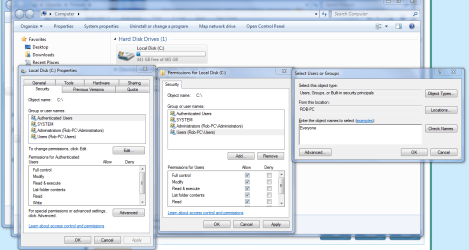
To gain access and full permissions to the actual drive, besides setting up the regular permissions of the drive, you need to right click on the drive itself "choose properties" then use the Security tab to allow access to the entire drive.

The picture below shows where you need to type in "Everyone" for full access.
Attached Thumbnails
XP accessing Win7: Access is denied-sharing-c-drive-everyone.png  
My System SpecsSystem Spec
02 Dec 2010  
brady

7 Pro
1,438 posts
San Diego


unless it's a "shared" directory, the everyone group won't cover people. You'll want to "share" the directory now and add the everyone group to the "share".
My System SpecsSystem Spec
02 Dec 2010  
enchant

Windows 7 Ultimate x64
5 posts


I *think* that's what I've got. Does this look right?
My System SpecsSystem Spec
02 Dec 2010  
enchant

Windows 7 Ultimate x64
5 posts


Quote   Quote: Originally Posted by brady View Post
unless it's a "shared" directory, the everyone group won't cover people. You'll want to "share" the directory now and add the everyone group to the "share".
I'm sorry, I don't know what you mean by adding to the "share".
My System SpecsSystem Spec
02 Dec 2010  
brady

7 Pro
1,438 posts
San Diego


That is what your "Security" tab will look like, yes... You'll need to now "share" the C: (NEVER EVER RECOMMENDED!) with the same permission sets...


* you will be opening your root folders to anything and everything *
My System SpecsSystem Spec
02 Dec 2010  
chev65

Windows 7 Ult, Windows 8 Pro,
7,893 posts
San Diego


Quote   Quote: Originally Posted by enchant View Post
I *think* that's what I've got. Does this look right?
No it's not the same, these are the regular permissions of the drive which is accessed through the "Sharing" tab you need these permissions set as you have them but more importantly you need to go into the "Security" tab as I mentioned earlier and then add "Everyone" where the picture shows.

Full drive access isn't made easy on purpose because it's considered a Security risk so it's best to share the User folder rather than the entire C drive. This is only for the Win 7 machine.

If you need full access to drives or directories on the XP machine it may help to take ownership of the drive or the directory you need to access from the Win 7 machine.
The link below shows you how.
Take Ownership Shortcut

Last edited by chev65; 02 Dec 2010 at 12:18 PM..
My System SpecsSystem Spec
02 Dec 2010  
enchant

Windows 7 Ultimate x64
5 posts


Ok, I just stumbled upon something interesting that might solve my problem, but I'm more confused than ever.

Here is a view from my WinXP machines explorer window:


Now as far as I can tell, the two directories that I've marked as #1 and #2 are the same. I get the access denied if I'm trying to write to #1, but if I click on #2, I can write to it. Is this normal?

Thanks again for all the help.
My System SpecsSystem Spec
Reply

 XP accessing Win7: Access is denied problems?


Thread Tools


Similar help and support threads for: XP accessing Win7: Access is denied
Thread Forum
Remote shutdown Win7 32-bit access denied Network & Sharing
Access to the path 'C:\Documents and Settings' is denied - Win7-32 Bit General Discussion
Solved Dual Boot - Win7 and XP - Access denied to files when booting in Win7 General Discussion
WIN7 Client Access Denied on WIN2000 Server Network & Sharing
Access Denied to D:\ after installing WIN7 Installation & Setup


All times are GMT -5. The time now is 12:12 AM.


Windows 7 Forums is an independent web site and has not been authorized,
sponsored, or otherwise approved by Microsoft Corporation.
"Windows 7" and related materials are trademarks of Microsoft Corp.
© Designer Media Ltd