Windows 7 Forums


Windows 7: Way to wake up computer from remote desktop?

11 Dec 2010   #1

Windows 7 Home Premium x64 OEM --> RTM clean install
The Mighty Maspujols, Spain
 
 
Way to wake up computer from remote desktop?

Brink, I have this on my 2 machines - 7HP x64 and workhorse XP Pro x86. Question: when I remote desktop from 7 to the workhorse (torrents, music server) and put it to sleep, is there a way to wake it up again? Remote desktop fails to connect as expected.

Can you advise please?
Thx


Last edited by Brink; 11 Dec 2010 at 10:05 AM.. Reason: moved
My System SpecsSystem Spec

11 Dec 2010   #2

64-bit Windows 7 Ultimate SP1 & Windows 8 Enterprise
Texas


Hello Allen,

In Device Manager, double click on your actual network adapter listedunder "Network adapters". Next, double check to make sure that you have both items boxed in red below checked to see if that may be able to help wake it up.

Way to wake up computer from remote desktop?-device_manager.jpg

Hope this helps,
Shawn
My System SpecsSystem Spec
11 Dec 2010   #3

Windows 7 Home Premium x64 OEM --> RTM clean install
The Mighty Maspujols, Spain


Thank you sir, have toyed with that a little, though the remote PC seems to wake up frequently without prompting (as your screengrab).

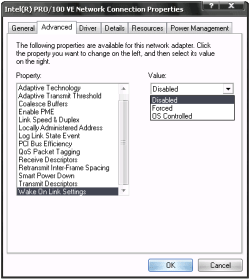
I thought it might be something to do with these 2 screen grabs (below) from the Advanced tab, not the Power Management tab, but I lost all LAN and had to system restore.
Attached Thumbnails
Way to wake up computer from remote desktop?-wol.png   Way to wake up computer from remote desktop?-wol2.png  

Last edited by allend66; 11 Dec 2010 at 01:03 PM.. Reason: clarify
My System SpecsSystem Spec
.


11 Dec 2010   #4

64-bit Windows 7 Ultimate SP1 & Windows 8 Enterprise
Texas


I would leave the left screenshot as "OS Controlled", and the right screenshot doesn't matter since it's only for QoS.
My System SpecsSystem Spec
12 Dec 2010   #5

Windows 7 Home Premium x64 OEM --> RTM clean install
The Mighty Maspujols, Spain


Left screenshot is set at "Forced". I'm reluctant to change it because it now works...

I've tried mc-wol and it seems to work great now. I had tried WakeOnLan which worked for the first few minutes then timed out ... it seemed to forget to listen for magic packets. --> uninstalled.

Solved, and rep'd - thanks.
My System SpecsSystem Spec
12 Dec 2010   #6

64-bit Windows 7 Ultimate SP1 & Windows 8 Enterprise
Texas


You're most welcome Allen. I'm happy to hear that you got it working.

Yeah, I wouldn't change it either since it's working now.
My System SpecsSystem Spec
Reply

 Way to wake up computer from remote desktop? problems?


Thread Tools


Similar help and support threads for: Way to wake up computer from remote desktop?
Thread Forum
Remote Desktop - Only Connects With IP Not Computer Name? Network & Sharing
Remote Desktop Client 6.1 Cannot connect to remote computer Network & Sharing
Can I wake up my computer by using the sleep button on my wmc remote? Media Center
How to host my Computer for remote desktop connection Network & Sharing
Remote wake MCE from xbox / Wake on Lan Media Center


All times are GMT -5. The time now is 09:27 PM.


Seven Forums Android App Seven Forums IOS App Follow us on Facebook

Windows 7 Forums is an independent web site and has not been authorized,
sponsored, or otherwise approved by Microsoft Corporation.
"Windows 7" and related materials are trademarks of Microsoft Corp.
© Designer Media Ltd
  

1 2 3 4 5 6 7 8 9 10 11 12 13 14 15 16 17 18 19 20 21 22 23 24 25 26 27 28 29 30 31 32