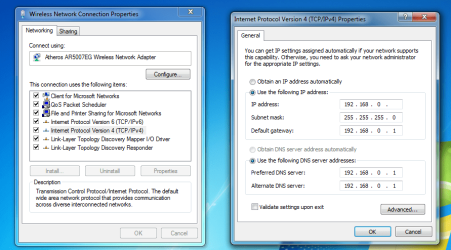
| Windows 7: unindentified network - no default gateway |
16 Dec 2010
|
| | Window 7 Ultiamte 32bit 34 posts Netherlands |
unindentified network - no default gateway today i was just watching video on youtube and then suddenly i have no internet connection, there is an exclaimation mark on the LAN thing and when i type ipconfig/all in cmd, it shows that i have no default gateway.
can anyone help pleasEEE !!! | My System Specs |
| System Manufacturer/Model Number Sony Vaio VGN-NR21S/S OS Window 7 Ultiamte 32bit CPU Intel Core 2 Duo processor T5450 1.66 GHz Memory 3GB/Go DDR2 SDRAM Graphics Card NVIDIA Geforce 8400M GT GPU Monitor(s) Displays 15.4 WXGA (1280 x 800) X-black LCD Screen Resolution 1280x800 Hard Drives 250 GB/Go |
16 Dec 2010
|
| | Windows 7 Professional 64 bit 235 posts Tennessee |
You've lost your IP. The one you see listed is an APIPA (Automatic Private IP Addressing) address. Does Windows say the cable is unplugged ?? Do the lights work on the NIC ??
We'll need more information too. What type of Internet access do you have ?? How do you connect ?? (via a router, is there a switch involved, etc.)
Let us know and we'll go from there. | My System Specs | | System Manufacturer/Model Number Dell Optiplex OS Windows 7 Professional 64 bit Memory 4096 |
16 Dec 2010
|
| | Win7 & Win8 64bit 1,745 posts SoCal |
Hi joeykhor,
Try disabling/enabling your LAN connection. Right click on the network connection icon from the taskbar, choose disable then enable it back.
You may also unplug the network cable from your computer and/or from the router then plug it back in. You may also plug it in to another LAN Port.
If you're connected to a Modem=> Router you may try to Power Cycle the Devices: http://www.labnol.org/tech/power-cycle-modem-router/13625/
If none of the above works, then try to do a System Restore. System Restore
Please let us know. | My System Specs | | System Manufacturer/Model Number Lenovo Desktop/Samsung Laptop OS Win7 & Win8 64bit CPU Intel i5 Internet Speed Charter-20 Mbps Antivirus Avast Browser FF, IE9 and Chrome |
17 Dec 2010
|
| | Windows 7 Ult, Windows 8 Pro, 7,893 posts San Diego |

Quote: Originally Posted by joeykhor today i was just watching video on youtube and then suddenly i have no internet connection, there is an exclaimation mark on the LAN thing and when i type ipconfig/all in cmd, it shows that i have no default gateway.
can anyone help pleasEEE !!! Usually just resetting the router will fix this sort of problem. Should be a small hole on the side of the router for this. | My System Specs | | System Manufacturer/Model Number Home built OS Windows 7 Ult, Windows 8 Pro, CPU Q9650-4.275GHz, E8600 4.5GHz, E6750-3.8GHz Motherboard Evga 780i FTW Memory G.Skill PC2 9600 1200Mhz 5 5 5 15 2T Graphics Card GTX480 Sound Card Asus Xonar D2 Monitor(s) Displays HannsG Screen Resolution 1680X1050 Keyboard Logitech G15 Mouse Logitech G9 PSU ThermalTake Toughpower 1000Watt modular Case ThermalTake XaserV Cooling Xigmatek S1283 Hard Drives GSkill Phoenix Pro 120GB SSD Internet Speed T1 |
18 Dec 2010
|
| | Window 7 Ultiamte 32bit 34 posts Netherlands |
i tried reseting the router but it doesnt help and i already did what 2xg said, it still doesnt help, usually i have to wait a few hours then it will work again, but then the next day the same thing will happen again... and i am connected to the internet with wire, local area network and i am using a router, well it's a router + modem in one... any solution ? | My System Specs | | System Manufacturer/Model Number Sony Vaio VGN-NR21S/S OS Window 7 Ultiamte 32bit CPU Intel Core 2 Duo processor T5450 1.66 GHz Memory 3GB/Go DDR2 SDRAM Graphics Card NVIDIA Geforce 8400M GT GPU Monitor(s) Displays 15.4 WXGA (1280 x 800) X-black LCD Screen Resolution 1280x800 Hard Drives 250 GB/Go |
18 Dec 2010
|
| | Windows 7 Ult, Windows 8 Pro, 7,893 posts San Diego |

Quote: Originally Posted by joeykhor i tried reseting the router but it doesnt help and i already did what 2xg said, it still doesnt help, usually i have to wait a few hours then it will work again, but then the next day the same thing will happen again... and i am connected to the internet with wire, local area network and i am using a router, well it's a router + modem in one... any solution ? If that is the case then either the router/modem is defective or your ISP is having problems. I would call your ISP. | My System Specs | | System Manufacturer/Model Number Home built OS Windows 7 Ult, Windows 8 Pro, CPU Q9650-4.275GHz, E8600 4.5GHz, E6750-3.8GHz Motherboard Evga 780i FTW Memory G.Skill PC2 9600 1200Mhz 5 5 5 15 2T Graphics Card GTX480 Sound Card Asus Xonar D2 Monitor(s) Displays HannsG Screen Resolution 1680X1050 Keyboard Logitech G15 Mouse Logitech G9 PSU ThermalTake Toughpower 1000Watt modular Case ThermalTake XaserV Cooling Xigmatek S1283 Hard Drives GSkill Phoenix Pro 120GB SSD Internet Speed T1 |
18 Dec 2010
|
| | Window 7 Ultiamte 32bit 34 posts Netherlands |
i dont think so because only my computer has problem, there are 2 laptops and another pc are connected and have no problem at all. | My System Specs | | System Manufacturer/Model Number Sony Vaio VGN-NR21S/S OS Window 7 Ultiamte 32bit CPU Intel Core 2 Duo processor T5450 1.66 GHz Memory 3GB/Go DDR2 SDRAM Graphics Card NVIDIA Geforce 8400M GT GPU Monitor(s) Displays 15.4 WXGA (1280 x 800) X-black LCD Screen Resolution 1280x800 Hard Drives 250 GB/Go |
18 Dec 2010
|
| | Windows 7 Ult, Windows 8 Pro, 7,893 posts San Diego |

Quote: Originally Posted by joeykhor i dont think so because only my computer has problem, there are 2 laptops and another pc are connected and have no problem at all. So the problem is confined to this one machine but it only happens at certain times?
Obviously you will want to try a different network driver but your A/V software may be involved as well. | My System Specs | | System Manufacturer/Model Number Home built OS Windows 7 Ult, Windows 8 Pro, CPU Q9650-4.275GHz, E8600 4.5GHz, E6750-3.8GHz Motherboard Evga 780i FTW Memory G.Skill PC2 9600 1200Mhz 5 5 5 15 2T Graphics Card GTX480 Sound Card Asus Xonar D2 Monitor(s) Displays HannsG Screen Resolution 1680X1050 Keyboard Logitech G15 Mouse Logitech G9 PSU ThermalTake Toughpower 1000Watt modular Case ThermalTake XaserV Cooling Xigmatek S1283 Hard Drives GSkill Phoenix Pro 120GB SSD Internet Speed T1 |
18 Dec 2010
|
| | Windows 7 Professional x64 20 posts |
Is this ethernet port on-board? meaning do you connect it to your motherboard if so i would consider testing your NIC Card just because the lights are on it might be going out soon... since you said you connect in 2 hours laters if i were you i would go out and buy affordable nic card to test it. | My System Specs | | OS Windows 7 Professional x64 |
18 Dec 2010
|
| | Win7 & Win8 64bit 1,745 posts SoCal |
Try to uninstall/reinstall your network adapter from Device Manager.
Any Security/Firwall Software installed in your computer?
Let's try repairing the TCP/IP and Winsock. If this doesn't work for you then it might be worth replacing your network adapter.
Click on Start=> All Programs => Accessories and right click on Command Prompt, select "Run as Administrator" to open a command prompt.
Reset IPv4 TCP/IP stack to installation defaults. netsh int ipv4 reset reset.log press enter
Reset IPv6 TCP/IP stack to installation defaults. netsh int ipv6 reset reset.log press enter
Reset WINSOCK entries to installation defaults: netsh winsock reset catalog press enter
Restart the computer after.
Please let us know. | My System Specs | | System Manufacturer/Model Number Lenovo Desktop/Samsung Laptop OS Win7 & Win8 64bit CPU Intel i5 Internet Speed Charter-20 Mbps Antivirus Avast Browser FF, IE9 and Chrome unindentified network - no default gateway problems? All times are GMT -5. The time now is 03:15 AM. | |