
Windows 7 Forums


Windows 7: Homegroup Asks for password

20 Dec 2010  
Bituser

Windows 7 Home Premium x64
297 posts
New Zealand
 
 
Homegroup Asks for password

My homegroup keeps asking for a password even though password protected sharing is turned off.
I click Homegroup >> OTHER-PC >>> SHARED FOLDER
Then a message pops up saying:
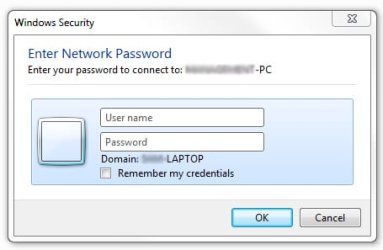
Homegroup Asks for password-capture.jpg

I have tried typing the username/password for my computer and username/password for the other computer, but it keeps telling me the password is wrong.

Please help,
Thanks.

My System SpecsSystem Spec

20 Dec 2010  
brady

7 Pro
1,438 posts
San Diego


Did you 'want' it to ask for password? Or are you aksking how to get rid of the password prompt?
My System SpecsSystem Spec
20 Dec 2010  
chev65

Windows 7 Ult, Windows 8 Pro,
7,893 posts
San Diego


Quote   Quote: Originally Posted by Fastboy42 View Post
My homegroup keeps asking for a password even though password protected sharing is turned off.
I click Homegroup >> OTHER-PC >>> SHARED FOLDER
Then a message pops up saying:
Attachment 125042

I have tried typing the username/password for my computer and username/password for the other computer, but it keeps telling me the password is wrong.

Please help,
Thanks.
Assuming you have the password protected options turned off in the Advanced Sharing settings.
You should check the time and date in Windows and make sure they match the other computers in your network. The time and date needs to be in sync on all network machines.

If they are off by too much you will get the prompt and sharing won't work correctly, not to mention Windows updates won't work right.

This is a common problem as you can see in the Technet link below, read about half way down the page.
http://social.technet.microsoft.com/...5-9ec78a037f4c
My System SpecsSystem Spec
.


20 Dec 2010  
Bituser

Windows 7 Home Premium x64
297 posts
New Zealand


Quote:
Did you 'want' it to ask for password? Or are you aksking how to get rid of the password prompt?
Yes I am trying to stop it from asking for a password.

Quote:
Assuming you have the password protected options turned off in the Advanced Sharing settings.
You should check the time and date in Windows and make sure they match the other computers in your network. The time and date needs to be in sync on all network machines.

If they are off by too much you will get the prompt and sharing won't work correctly, not to mention Windows updates won't work right.

This is a common problem as you can see in the Technet link below, read about half way down the page.
http://social.technet.microsoft.com/...5-9ec78a037f4c
Thanks, I syncronized the clocks even though they were only 2 seconds off. I have ensured Ipv6 is enabled, but its not working still.

I would like to add that this worked perfectly for months, it's only just stopped.

The computer I am using is windows seven premium x64 and the computer I am trying to connect to is the same OS.

Its got me stumped.

Thanks.
My System SpecsSystem Spec
21 Dec 2010  
chev65

Windows 7 Ult, Windows 8 Pro,
7,893 posts
San Diego


The only other thing that can cause this is if you turned on password protected sharing in the Advanced sharing settings. I did notice that your showing the connection to a Domain?

You do realize that Homegroups does not work in a Domain? You would need to leave the Homegroup to fix that problem.
My System SpecsSystem Spec
Reply

 Homegroup Asks for password problems?


Thread Tools


Similar help and support threads for: Homegroup Asks for password
Thread Forum
Solved Lenovo laptop locked me out. Asks for password which I did not set General Discussion
File sharing SOMETIMES asks for password Network & Sharing
Homegroup Asks for user name/password Network & Sharing
Asks for Password when coming out of sleep mode General Discussion
Cant print. Asks for my password but states its wrong Network & Sharing


All times are GMT -5. The time now is 03:57 PM.


Windows 7 Forums is an independent web site and has not been authorized,
sponsored, or otherwise approved by Microsoft Corporation.
"Windows 7" and related materials are trademarks of Microsoft Corp.
© Designer Media Ltd