|
Welcome to Windows 7 Forums. Our forum is dedicated to helping you find solutions with any problems, errors or issues you are experiencing with Windows 7. The Windows 7 forum also covers news and updates and has an extensive Windows 7 tutorial section that covers a wide range of tips and tricks.
Windows 7 - Win7 refuses to network with Win7/ Vista |
01-04-2011
|
#1 | | |
Win7 refuses to network with Win7/ Vista DT (desktop, wired)
LT (laptop, wireless)
DT 1 - Windows 7 Ultimate x64 (main PC)
DT 2 - Windows Vista x86
LT 1 - Windows 7 Ultimate x64
LT 2 - Windows 7 Home x64 (work laptop)
-All on the same workgroup-
-All run through D-Link Router-
My issue: I recently upgraded DT 1 to Windows 7 x64 from x86 and now cannot network or homegroup to any of my other computers or wireless printer. Networking was fine in Windows 7 x86. I have tried many internet solutions without success. LT 1 and LT 2 homegroup with each other and network with DT 2 just fine, DT 1 is the only PC excluded from this. I have all my sharing settings set and I have gone through the network set-up many times, fiddled with my router settings a little bit, but came up with nothing.
When I search for other PC's on my network (from DT 1) I find no other PC's or the wireless printer. When I search from any other PC I find and have access to everything except DT 1!
I have Sophos Anti-virus and firewall, disabling the firewall makes no difference (windows firewall already disabled).
I cannot see the wireless printer in the 'network discovery' but it shows up when I need to print and prints just fine.
When I go to: control panel\ network and sharing and click the "see full map" I can see LT 1 and LT 2 as wireless items, so they do exists, but what gives?
Thanks for your time on this.
Caspersim
| My System Specs | | |
01-04-2011
|
#2 | | |

Quote: Originally Posted by Caspersim DT (desktop, wired)
LT (laptop, wireless)
DT 1 - Windows 7 Ultimate x64 (main PC)
DT 2 - Windows Vista x86
LT 1 - Windows 7 Ultimate x64
LT 2 - Windows 7 Home x64 (work laptop)
-All on the same workgroup-
-All run through D-Link Router-
My issue: I recently upgraded DT 1 to Windows 7 x64 from x86 and now cannot network or homegroup to any of my other computers or wireless printer. Networking was fine in Windows 7 x86. I have tried many internet solutions without success. LT 1 and LT 2 homegroup with each other and network with DT 2 just fine, DT 1 is the only PC excluded from this. I have all my sharing settings set and I have gone through the network set-up many times, fiddled with my router settings a little bit, but came up with nothing.
When I search for other PC's on my network (from DT 1) I find no other PC's or the wireless printer. When I search from any other PC I find and have access to everything except DT 1!
I have Sophos Anti-virus and firewall, disabling the firewall makes no difference (windows firewall already disabled).
I cannot see the wireless printer in the 'network discovery' but it shows up when I need to print and prints just fine.
When I go to: control panel\ network and sharing and click the "see full map" I can see LT 1 and LT 2 as wireless items, so they do exists, but what gives?
Thanks for your time on this.
Caspersim
I am a bit confused. In the above you say homegroup, and workgroup. It has to be one or the other. Which one is it? | My System Specs | | System Manufacturer/Model Number HP Pavillion dv-7 1005 Tx OS WCP ONLY CPU 2@2.4 Memory 4 gigs Graphics Card Nvidia 9600M Sound Card HD built-in Monitor(s) Displays 17" Wxga Screen Resolution 1440x900 Cooling none Internet Speed 45Mb down 5Mb up |
01-05-2011
|
#3 | | |
One or the other?
All four of my PC's are on the same workgroup. Always good for any networking.
The two laptops are on a homegroup (Windows 7 only). This was done very simply, as soon as I set up one homegroup the other laptop was able to connect.
DT 1 can't find the homegroup or any other networked PC's. I have tried to create the homegroup from DT 1, but then the laptops can't find the homegroup.
Something is blocking connections to and from DT 1 (Windows 7 x64). What is it?
The internet works just fine.
This operating system was installed only a few weeks ago. It is fully updated. | My System Specs | | |
01-05-2011
|
#4 | | Windows 7 Home Premium 64bit-HP OEM SP1 Installed |

Quote: Originally Posted by zigzag3143 
Quote: Originally Posted by Caspersim DT (desktop, wired)
LT (laptop, wireless)
DT 1 - Windows 7 Ultimate x64 (main PC)
DT 2 - Windows Vista x86
LT 1 - Windows 7 Ultimate x64
LT 2 - Windows 7 Home x64 (work laptop)
-All on the same workgroup-
-All run through D-Link Router-
My issue: I recently upgraded DT 1 to Windows 7 x64 from x86 and now cannot network or homegroup to any of my other computers or wireless printer. Networking was fine in Windows 7 x86. I have tried many internet solutions without success. LT 1 and LT 2 homegroup with each other and network with DT 2 just fine, DT 1 is the only PC excluded from this. I have all my sharing settings set and I have gone through the network set-up many times, fiddled with my router settings a little bit, but came up with nothing.
When I search for other PC's on my network (from DT 1) I find no other PC's or the wireless printer. When I search from any other PC I find and have access to everything except DT 1!
I have Sophos Anti-virus and firewall, disabling the firewall makes no difference (windows firewall already disabled).
I cannot see the wireless printer in the 'network discovery' but it shows up when I need to print and prints just fine.
When I go to: control panel\ network and sharing and click the "see full map" I can see LT 1 and LT 2 as wireless items, so they do exists, but what gives?
Thanks for your time on this.
Caspersim
I am a bit confused. In the above you say homegroup, and workgroup. It has to be one or the other. Which one is it? I thought basically ALL networked computers running Windows were part of a workgroup, and in addition Windows 7 computers could be part of a homegroup. Now Im confused. | My System Specs | | System Manufacturer/Model Number HP p6680t OS Windows 7 Home Premium 64bit-HP OEM SP1 Installed CPU Intel Core i5-650 3.2GHz Motherboard MS-7613 (Iona-GL8E) Intel H57 Express Chipset Memory 6GB DDR3 1333Mhz SDRAM Graphics Card Intergrated Intel H57 Sound Card Intergrated Realtek 7/1 Monitor(s) Displays HP 3310m 23" diagonal widescreen flat panel monitor Screen Resolution 1920 x 1080 Keyboard HP USB Mouse HP Optical PSU 300W Case HP Piano Black Cooling Couple Fans Hard Drives 1 TB (7,200) SATA 3Gb/s
1.5 TB External Internet Speed 3-6.0 Mbps Average around 5.0 Mbps AT&T DSL Other Info Security Includes NIS 2011, Malwarebytes, Superantispyware, & SpywareBlaster. Acronis True Home Image 2011 for Backup |
01-05-2011
|
#5 | | |

Quote: Originally Posted by Caspersim One or the other?
All four of my PC's are on the same workgroup. Always good for any networking.
The two laptops are on a homegroup (Windows 7 only). This was done very simply, as soon as I set up one homegroup the other laptop was able to connect.
DT 1 can't find the homegroup or any other networked PC's. I have tried to create the homegroup from DT 1, but then the laptops can't find the homegroup.
Something is blocking connections to and from DT 1 (Windows 7 x64). What is it?
The internet works just fine.
This operating system was installed only a few weeks ago. It is fully updated. Pretty much has to be your A/V software blocking the connection. Uninstall it or configure it to work with Homegroups is all I can suggest.
I can't keep up with the required steps for every single A/V software to work with Homegroups. Your also better off sticking with a workgroup in a mixed Op system network. | My System Specs | | System Manufacturer/Model Number Home built OS Windows 7 RTM X64 CPU Q9650-4.275GHz, E8600 4.5GHz, E6750-3.8GHz Motherboard Evga 780i FTW Memory G.Skill PC2 9600 1200Mhz 5 5 5 15 2T Graphics Card GTX480 Sound Card Asus Xonar D2 Monitor(s) Displays HannsG Screen Resolution 1680X1050 Keyboard Logitech G15 Mouse Logitech G9 PSU ThermalTake Toughpower 1000Watt modular Case ThermalTake XaserV Cooling Xigmatek S1283 Hard Drives GSkill Phoenix Pro 120GB SSD Internet Speed T1 |
01-06-2011
|
#7 | | |
I removed Sophos firewall, left Sophos a/v installed and DT 1 can access the network again. Problem solved. Thank you.
My other network glitches seem to be to the point of pathetic. LT 2 broadcasts a nice 'media device' using Windows Media Player 12 which all networked devices can pick up and use, including the PS3. But DT 1 and LT1 do not broadcast a media device. Their settings and operating systems are pretty much the same, you'd think it might come easier.
Streaming media to my PS3 from DT 1 is my main objective here, I just seem to be taking the long route.
Caspersim | My System Specs | | |
01-06-2011
|
#8 | | |
Ok so removing Sophos fixed the sharing problems with DT1 so first problem is solved.
You can probably go to the Sophos forum to figure out how to configure their firewall to allow for sharing, it's usually based on IP's.
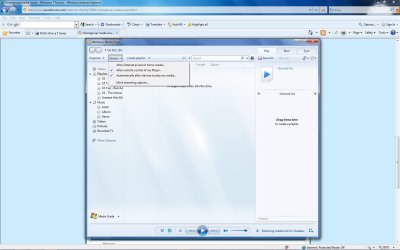
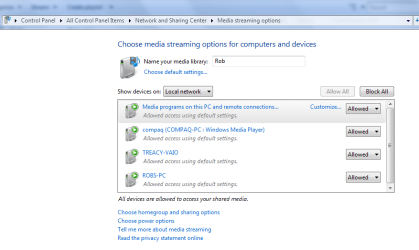
As for the media streaming problem. You need to open up WMP and adjust the settings like in the pictures below. First picture shows where the check marks need to be. Then to check which machines you are sharing your media with, click on the "more streaming options" which gets you to the second page where you can make more adjustments.
I'm not sure about the exact steps required for streaming to or from the PS2 but if it shows up on the list you should be able to allow for sharing permissions with it. | My System Specs | | System Manufacturer/Model Number Home built OS Windows 7 RTM X64 CPU Q9650-4.275GHz, E8600 4.5GHz, E6750-3.8GHz Motherboard Evga 780i FTW Memory G.Skill PC2 9600 1200Mhz 5 5 5 15 2T Graphics Card GTX480 Sound Card Asus Xonar D2 Monitor(s) Displays HannsG Screen Resolution 1680X1050 Keyboard Logitech G15 Mouse Logitech G9 PSU ThermalTake Toughpower 1000Watt modular Case ThermalTake XaserV Cooling Xigmatek S1283 Hard Drives GSkill Phoenix Pro 120GB SSD Internet Speed T1 |
01-06-2011
|
#9 | | |
I will deal with steaming to the PS3. Works fine from both laptops. (go figure)
I adjusted the settings in WMP and nothing has changed.
Under Media Streaming Options I do not have any other devices in the menu, with All Networks drop down menu set.
I changed the SSDP and the uPnP services....nothing.
Very strange, the only thing that seems to be different between the desktop and laptops is that the desktop is wired. | My System Specs | | |
01-06-2011
|
#10 | | |
New development.
Plugged one of the laptops into the router instead of using wireless. I can now see the Media Device of my desktop but now my PS3 can't see the laptop.
So the problem is crossing between wired and wireless networking.
Everything wired can see each other
Everything wireless can see each other
but wired can't see wireless, vice-verse
Is this normal? | My System Specs | | Win7 refuses to network with Win7/ Vista problems? All times are GMT -5. The time now is 06:13 PM. |  |