|
Welcome to Windows 7 Forums. Our forum is dedicated to helping you find solutions with any problems, errors or issues you are experiencing with Windows 7. The Windows 7 forum also covers news and updates and has an extensive Windows 7 tutorial section that covers a wide range of tips and tricks.
Windows 7 - Remote Desktop Connection Windows 7 |
01-23-2011
|
#1 | | Windows 7 Professional 64 bit |
Remote Desktop Connection Windows 7 I have Windows 7 Professional 64 bit. First of all let me say I have searched the forums, searched google and still can't find the solution for getting remote desktop to work AGAIN.
My wife uses it to connect to her school server. The server is used by her ENTIRE district, it is always up and running, absolutely nothing wrong on there end.
We HAD been connected and it worked fine for almost 2 years, all of a sudden it just stopped working. It gives this error:
Remote Desktop can't connect to the remote computer for one of these reasons:
1)Remote access to the server is not enabled.
2)The remote computer is turned off
3)The remote computer is not available on the network
Make sure the remote computer is turned on and connected to the network, and that remote access is enabled.
I have also made sure everything is enabled and checked the settings, followed the guides to double check. I just don't understand why it suddenly doesn't work, Her coworkers it works fine. It is not an issue on the server she is connecting too.
I've disabled firewalls, uninstalled my Norton software... I've even reformatted my PC completely. It still wont connect when I enter her address. I've completely run out of ideas and my last option was calling Microsoft professional help but pay $200? Don't think so.. If anyone has any advice would be most appreciated!
| My System Specs | | OS Windows 7 Professional 64 bit Graphics Card ASUS EAH5750 |
01-23-2011
|
#2 | | Windows 7 Enterprise (x64); Windows Server 2008 R2 (x64) |
Is your ISP blocking the port? I have seen this happen when someone says it worked yesterday and is not working today and nothing change on the workstation or the server. Does one of your Wife's co-workers have the same ISP as you? If so and it is working for them then you know it is not that problem.
I have also seen ISPs update the router/modems software or firmware in the background without you knowing and cause this type of problem. -WS | My System Specs | | System Manufacturer/Model Number Dell OP760 OS Windows 7 Enterprise (x64); Windows Server 2008 R2 (x64) Memory 8GB Monitor(s) Displays 2 Dell 19" LCD Screen Resolution 1280x1024 Keyboard Dell Mouse Dell Optical Internet Speed 40meg |
01-23-2011
|
#3 | | Windows 7 Professional 64 bit |
How can I check if the ISP is blocking the port? Also is the port that 3389 number I've been reading on forums? | My System Specs | | OS Windows 7 Professional 64 bit Graphics Card ASUS EAH5750 |
01-23-2011
|
#4 | | Vista and Windows7, sometimes Ubuntu and Fedora |
The firewall could be another culprit. Turn it off for a test. | My System Specs | | System Manufacturer/Model Number HP, Dell, Gateway - 2 laptops and 2 desktops OS Vista and Windows7, sometimes Ubuntu and Fedora CPU from 1.6GHz Duo to 2.5GHz Quad Monitor(s) Displays 2x HP w2207 Keyboard with trackball - no mices Mouse terrible devices, who wants them Hard Drives 5x HDD, 2x SSD, 6x Externals Internet Speed DSL 6000 |
01-23-2011
|
#5 | | |
Questions that occur:
1) Given that it suddenly stopped working, are you sure that the login information hasn't changed or that the server name is the same?
2) Are others presently able to connect?
3) Are the login credentials the same for all who have access (or all within your user group)?
4) Are you automatically logging in, or is the 'Always ask for credentials' option checked?
5) Are your settings correct in the 'Connect from anywhere' settings under the Advanced tab?
6) And finally, have you checked with the school IT Dept (or whatever dept. or person handles these matters)? If not, I recommend that you do. They should have methods for correcting these issues amongst their users.
James | My System Specs | | OS Win7U 64 RTM CPU Q9550 Motherboard GA-EP45-UD3R Memory 8GB Gskill Graphics Card ASUS|EAH4850/HTDI/1GD3/A Sound Card xfi Plat Monitor(s) Displays Dell 2405fpw Screen Resolution 1920x1200 Keyboard MS Natural Ergonomic 4000 Mouse Logitech MX610 USB Cordless PSU Antec Case Antec Hard Drives Seagate & WD sata Drives |
01-23-2011
|
#6 | | Windows 7 Professional 64 bit |
?
2) Are others presently able to connect? Yes, she called some of her fellow teachers and they are all able to connect.
3) Are the login credentials the same for all who have access (or all within your user group)? Yes the credentials are still the same, it's always been the same since the beginning.
4) Are you automatically logging in, or is the 'Always ask for credentials' option checked? It's where you enter the computer name, it connects, then you enter your user name/password to finish the connection.
5) Are your settings correct in the 'Connect from anywhere' settings under the Advanced tab? Yes they are all set correctly
6) And finally, have you checked with the school IT Dept (or whatever dept. or person handles these matters)? Unfortunately they are not much help. They also have a website that we can connect to through internet explorer to get the same remote set up. For whatever reason that stopped working too. The IT dept really doesn't have any answers, that's why I turned here. | My System Specs | | OS Windows 7 Professional 64 bit Graphics Card ASUS EAH5750 |
01-23-2011
|
#7 | | Windows 7 Professional 64 bit |
Yeah firewall is turned off, my computer is almost at 0 security. Nothing should be holding it back from connecting. | My System Specs | | OS Windows 7 Professional 64 bit Graphics Card ASUS EAH5750 |
01-23-2011
|
#8 | | |
Quote: I've disabled firewalls, uninstalled my Norton software... I've even reformatted my PC completely. It still wont connect when I enter her address. Uninstalling Norton=Good idea. I wouldn't reinstall Norton at all. You can use MSE and Windows Firewall.
That said, when you state that you've disabled firewalls, does this include Windows Firewall (in Control Panel)? If so, I'd re-enable it, as you are leaving yourself unprotected.
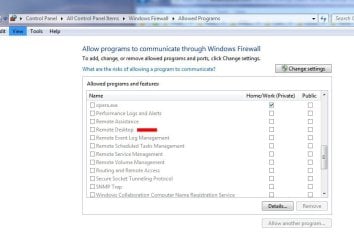
You should, however, check that WF is allowing RD to communicate through WF, as per screenshot: | My System Specs | | OS Win7U 64 RTM CPU Q9550 Motherboard GA-EP45-UD3R Memory 8GB Gskill Graphics Card ASUS|EAH4850/HTDI/1GD3/A Sound Card xfi Plat Monitor(s) Displays Dell 2405fpw Screen Resolution 1920x1200 Keyboard MS Natural Ergonomic 4000 Mouse Logitech MX610 USB Cordless PSU Antec Case Antec Hard Drives Seagate & WD sata Drives |
01-23-2011
|
#9 | | Vista and Windows7, sometimes Ubuntu and Fedora |

Quote: Originally Posted by James Colbert Quote: I've disabled firewalls, uninstalled my Norton software... I've even reformatted my PC completely. It still wont connect when I enter her address. Uninstalling Norton=Good idea. I wouldn't reinstall Norton at all. You can use MSE and Windows Firewall.
That said, when you state that you've disabled firewalls, does this include Windows Firewall (in Control Panel)? If so, I'd re-enable it, as you are leaving yourself unprotected.
You should, however, check that WF is allowing RD to communicate through WF, as per screenshot: Attachment 133875 James, I am sorry, but NIS2011 is far superior to MSE. I run both on 3 different systems each. With MSE I caught already 2 nasties (fortunately I have images). That never happened to me with NIS. | My System Specs | | System Manufacturer/Model Number HP, Dell, Gateway - 2 laptops and 2 desktops OS Vista and Windows7, sometimes Ubuntu and Fedora CPU from 1.6GHz Duo to 2.5GHz Quad Monitor(s) Displays 2x HP w2207 Keyboard with trackball - no mices Mouse terrible devices, who wants them Hard Drives 5x HDD, 2x SSD, 6x Externals Internet Speed DSL 6000 |
01-23-2011
|
#10 | | |

Quote: Originally Posted by whs James, I am sorry, but NIS2011 is far superior to MSE. I run both on 3 different systems each. With MSE I caught already 2 nasties (fortunately I have images). That never happened to me with NIS. Thanks for the tip, whs. I myself stopped using Norton products long ago. I haven't returned to them since, but having read experiences of a segment (not all) of those who have used it and have stability problems and other issues reminiscent of what led me to drop them , I'm not inclined to try them again.
I will say that I have never had an infection that has gone unrecognized before it could change my system in any way. That may be because I am extra cautious about what I do, download or install and employ various hardware means of security.
All this said, what works for some may not work for others, and I respect your POV.
James | My System Specs | | OS Win7U 64 RTM CPU Q9550 Motherboard GA-EP45-UD3R Memory 8GB Gskill Graphics Card ASUS|EAH4850/HTDI/1GD3/A Sound Card xfi Plat Monitor(s) Displays Dell 2405fpw Screen Resolution 1920x1200 Keyboard MS Natural Ergonomic 4000 Mouse Logitech MX610 USB Cordless PSU Antec Case Antec Hard Drives Seagate & WD sata Drives Remote Desktop Connection Windows 7 problems? All times are GMT -5. The time now is 06:14 PM. |  |