How to set up a Remote Desktop Web Connection?

iamdmcgetti

New member
Just what the title states. how can I log in to my home computer w/ Win7 RC over the internet? I can connect to it from another computer on my home network with out any problems. Overall I am very happy w/ the new OS.
 

My Computer

Computer Manufacturer/Model Number
Dell XPS 410
OS
Vista Ultimate Windows 7 Ultimate RC Dual Boot
Memory
4 GB
Update - I can connect to my home computer from work using "RDP". Now
I just need to figure out how to do it from IE using "tsweb" Thanks.
 

My Computer

Computer Manufacturer/Model Number
Dell XPS 410
OS
Vista Ultimate Windows 7 Ultimate RC Dual Boot
Memory
4 GB
remote desktop

Just what the title states. how can I log in to my home computer w/ Win7 RC over the internet? I can connect to it from another computer on my home network with out any problems. Overall I am very happy w/ the new OS.

I wonder if its remote desktop or firewall? have you been able to access fro internet before? do you have a nat firewall in a router?

Ken
 

My Computer

Computer Manufacturer/Model Number
HP Pavillion dv-7 1005 Tx
OS
Win 8 Release candidate 8400
CPU
[email protected]
Memory
4 gigs
Graphics Card(s)
Nvidia 9600M
Sound Card
HD built-in
Monitor(s) Displays
17" Wxga
Screen Resolution
1440x900
Cooling
none
Internet Speed
45Mb down 5Mb up
I wonder if its remote desktop or firewall? have you been able to access fro internet before? do you have a nat firewall in a router?

Ken

No i didn't have it set up before, but if I can connect using RDP that should mean that the router and firewall are set up correctly, shouldn't it?
 

My Computer

Computer Manufacturer/Model Number
Dell XPS 410
OS
Vista Ultimate Windows 7 Ultimate RC Dual Boot
Memory
4 GB
The port that remote desktop uses is TCP 3389 so you need to open that port on your router and or firewall software. As you have stated you can now connect so that port must now be open.
 

My Computer

Computer Manufacturer/Model Number
Home Built
OS
Windows 7 x64
CPU
Intel Core 2 Quad Q6700 @ 3.2 GHz
Motherboard
Gigabyte GA-965P-DQ6
Memory
4 Gig
Graphics Card(s)
ATI Radeon HD 4870
Sound Card
Creative X-Fi XtremeMusic
Monitor(s) Displays
Samsung SyncMaster 226BW
Screen Resolution
1680 x 1050
PSU
Antec TruePower TP-550
Case
Antec P180
Cooling
Zalman CNPS9700, 3 Antec TriCool 120mm
Keyboard
Logitech G15
Try the Free Program TeamViewer :) Just do a Google or Yahoo search for it :geek:

I have used it numerous times now from work to home & viceversa :D
 

My Computer

Computer type
PC/Desktop
Computer Manufacturer/Model Number
Built them myself, Science Experiments !
OS
Win7 Enterprise, Win7 x86 (Ult 7600), Win7 x64 Ult 7600, TechNet RTM on AMD x64 (2.8Ghz)
CPU
AMD fx8350 4ghz, AMD-32 2400mhz, AMD-64 3200mhz, AMDx64 2.8G
Motherboard
SIS 755, ECS-K8M890M-M (Ult 7600), GigaByte & others
Memory
2gb, 4gb on the Ult 7600, 4gb on Technet RTM, 32gb on FX8350
Graphics Card(s)
Draw my own Graphics, several nVidia cards
Sound Card
on motherboard
Monitor(s) Displays
19" flat scr, 28" I-Inc widescr,22" Emprex Widescr, 23" Acer
Screen Resolution
1280 x 1024, 1440 x 900, 1920 x 1080
Hard Drives
6 pata Ide HD's & 2 Sata HD's
added 80gb external on Ult 7600 computer,
numerous extra 1tb, 2TB, 3Tb SATA HD's
A collection of ext HD Docks w/ HDs
PSU
430w, 550w, 600w, 700, 800, etc
Case
All Generic Full Towers
Cooling
Open Air & a few fans, some w/ colored LEDs
Keyboard
Compaq & Dell recycled from GoodWill
Mouse
Made in China Optical Wired Mouse
Internet Speed
Fast Cable InterNet
Antivirus
AVG Free on 24 different Desktops, NO Problems!
Browser
IE 8 is preferred, but use FireFox sometimes
Other Info
Linksys Routers, switches, & Hubs
Too Many USB Flash Drives to count, Biggest is 64GB !
Eight computers in my home network.
Sixteen computers at my business network.
Linked via TeamViewer !
Lots of old used spare computer parts everywhere!

My Computer

Computer Manufacturer/Model Number
Custom
OS
Windows 7 RC 64-bit
CPU
Intel Core 2 4300 @ 1.80GHz
Motherboard
ASUS P5B Plus
Memory
4.00 GB DDR2 800MHz
Graphics Card(s)
nVidia 9800 GTX+
Sound Card
Internal
Monitor(s) Displays
Samsung SyncMaster 906BW
Screen Resolution
1440x900
Hard Drives
500GB - WD
320GB - Seagate
300GB - WD
Case
Centurion 5
Cooling
Fan.. nothing fancy
Keyboard
PS/2 port keyboard (Logitech)
Mouse
Wireless Microsoft Mouse
Internet Speed
30Mbps down / 2Mbps up
Try the Free Program TeamViewer :) Just do a Google or Yahoo search for it :geek:

I have used it numerous times now from work to home & viceversa :D

i know about that software i was trying to use the rdp though. i can connect over the internet using rdp to my xp pro machine with now problem. i think it has something to with not being able to find tsweb software in win7.
 

My Computer

Computer Manufacturer/Model Number
Dell XPS 410
OS
Vista Ultimate Windows 7 Ultimate RC Dual Boot
Memory
4 GB
Hi iamdmcgetti, maybe I can help. I'm not the brightest bulb in the pack but here's what I did to gain access to my home network via the internet when on the road. First I went to https://secure.logmein.com/products/hamachi/vpn.asp and downloaded Hamachi. The free No Configuration VPN software. They have all sorts of solutions but for private home use it's free. I set up Hamachi on all home computers, and on my lappy. I run it as a service on my main desktop and have it start with the OS on all the others. The setup will take you through the steps for naming and password protecting your "network". Once this is up and running on all machines, you have windows explorer access to all network shares. And the bonus is you can then run RDP as if you were connected on your home network. Hope this helps.

RBI :D
 

My Computer

Computer Manufacturer/Model Number
Custom x64 & HP dv6871 x64
OS
Windows 7 Professional RTM Clean Install X2
CPU
E6600 / T5550
Motherboard
ASUS P5B Deluxe WiFi / HP MB w/ Junkios Bios 1.0
Memory
4 GB DDR2 Corsair X2
Graphics Card(s)
NVIDIA 8600M GT / 8400M GS
Sound Card
ON BOARD X2
Monitor(s) Displays
2x Westinghouse L1975nw
Screen Resolution
1440 x 900 / 1280 x 800
Hard Drives
WD1001FALS 1T
WD2500AAKS 250G
WD2500KS 250G
& WD3200BEVT-60CT0 ATA IN THE LAPPY
PSU
HYPER 680 & Hampsters on the wheel in the HP
Case
COOLERMASTER 534
Cooling
ROSEWILL Z³
Keyboard
MICROSOFT COMFORT KEYBOARD
Mouse
2x MICROSOFT WIRELESS OPTICAL MOUSE 4000
Internet Speed
20 Mbps / 3.1 mbps
Other Info
ROUTER: DIR-655 Wireless a/ g/ Draft N
MM: SlingBox Pro
Gaming: Wii
ISP: Comcast
I am glad you asked this question. I had a hard time getting this to work on Vista Ultimate. But it did work. Here are the instructions. They work on Windows 7 Ultimate edition (64 bit).

1. Go to Control Panel, Programs and Features, Turn Windows features on or
off

2. Go to Internet Information Services and select the check boxes for Web
Management Tools and World Wide Web Services. [Web Management Tools
installs IIS 6.0 which is needed for the following download; there is also
some feature in World Wide Web Services that is needed, but I haven't
isolated it yet, so select everything for now]

3. Install tswebsetup.exe from
http://www.microsoft.com/downloads/d...DisplayLang=en

4. Go to C: Program Data, Microsoft, Windows, Start Menu, Programs,
Administrative Tools, Internet Information Services (IIS) Manager [NOT IIS
6.0 Manager]

5. Expand your computer name, expand Web Sites and click on Default Web
Site

6. On the right side of the screen under Edit Site, click Bindings

7. Click on the web site and click Edit

8. Change the port number to your preferred port designation

9. Under Manage Server on the same screen, Start the service

10. Set-up your router and firewall to accept your designated port

AND YOU'RE DONE! [although you might first want to change your Desktop
Background from a DreamScene if you're running one]

To connect from a remote computer, go to http:// IP address:port no/tsweb
and you'll get the Windows Server screen followed by your Vista password
screen

 

My Computer

OS
Windows 7 Ultimate.
that link didnt work for me. I got it to work when i put my local ip address in IE but it didnt work when I put my internet ip address in. I checked windows firewall and enabled remote desktop connection and the port forwarding on my router is set up. I had it working back on xp.

EDIT: I got it working by checking all the boxes in windows firewall. But for some reason when it trys to connect with the computer I am getting an error. both local and over the internet.
 

My Computer

OS
7 pro
Hi iamdmcgetti, maybe I can help. I'm not the brightest bulb in the pack but here's what I did to gain access to my home network via the internet when on the road. First I went to https://secure.logmein.com/products/hamachi/vpn.asp and downloaded Hamachi. The free No Configuration VPN software. They have all sorts of solutions but for private home use it's free. I set up Hamachi on all home computers, and on my lappy. I run it as a service on my main desktop and have it start with the OS on all the others. The setup will take you through the steps for naming and password protecting your "network". Once this is up and running on all machines, you have windows explorer access to all network shares. And the bonus is you can then run RDP as if you were connected on your home network. Hope this helps.

RBI :D

I agree, www.logmein.com is the best and easiest solution. It uses port 80 same as http, so no port forwarding on router and you dont need to know any IP addresses.

I have used RDP with Vista and XP millions of times, however if you have a dynamically assigned IP from your ISP like most of us you need to know the IP of YOUR ROUTER, and your router had to have its ports forwarded properly to the macine you wished to remote. Or you can use DYNDNS and you dont have to worry about your dynamic IP. OR...

If you still must try RDP, and I agree the Win7 enhancements are pretty tempting, then follow this tutorial by NosferatuX: http://www.sevenforums.com/tutorials/3922-remote-desktop-connection-rdc-network.html
 

My Computer

Computer Manufacturer/Model Number
Homebrew PC - "Alpha_Dawg"
OS
Windows 7 Ultimate 64 bit Steve Ballmer Signature Edition
CPU
Intel Core 2 Quad - Q9550 - 2.83GHz stock - OC'd to 3.6GHz
Motherboard
Gigabyte EP45-UD3P
Memory
4GB DDR2 800MHz (PC6400) OCZ Reaper
Graphics Card(s)
Nvidia GE Force 8800 GTS
Sound Card
Asus Xonar DX
Monitor(s) Displays
Samsung SyncMaster 2333HD
Screen Resolution
1920 x 1080
Hard Drives
WD Caviar Black 750GB - 7200RPM - 32MB cache
WD Caviar Green 1.5TB - 5400RPM - 64MB cache
WD Caviar Green 2.0TB - 5400RPM - 64MB cache
PSU
PC Power & Cooling Silencer 750
Case
Gigabyte 3D Aurora
Cooling
Case is Air - 5ea. 120mm fans (mix of Arctic and Xigmatec)
Keyboard
MS Natural Wireless KB
Mouse
MS Wireless Mouse
Internet Speed
50 mbps down/5 mbps up
Other Info
AVerMedia - AVerTVHD G2 Dual Tuner Card
Hi, I have a few questions.

Do I place my internet IP address or local IP address in the IP Managment setup where our port is listed?

When accessing this through mobile, do I input the port number twice. For example port 80 I would input as :8080/tsweb/ ?

How would I access this through a mobile phone? Do I use a VPN app or something else?


Thank you all in advance for your help
 

My Computer

Computer Manufacturer/Model Number
HP
OS
Windows 7
CPU
Quad 2 Core
Memory
6 GB
Monitor(s) Displays
Sharp HD TV 47"
Screen Resolution
1080 x 720 HD
Hard Drives
780G
Keyboard
Wireless
Internet Speed
Road Runner Cable
In the fine print, you say that "the above steps assume that you're not part of a domain." What if I am part of a domain?:cry:
 

My Computer

Computer Manufacturer/Model Number
Hewlett-Packard Compaq Presario/CQ5218F
OS
Windows 7
CPU
AMD Athlon(tm) II x2 215
Memory
3.00 GB (2.75 GB usable)
Other Info
64-bit Operating System
Hi there
You will also need to install the IIS feature - since accessing RDP via the web will be done via a Browser. The remote browser will also need to have ActiveX authority as well so I don't know if you could use Firefox or another non MS Browser.

(I'd prefer to use the "Bog standard" RDP connection rather than use the web specific interface -- but YMMV of course).

In both cases ports and firewalls need to be configured to allow access.

On your HOME router port forward 3389 to the internal Lan address of the computer you want to connect to.

Use something like No-IP if you need a FREE dynamic DNS update - you'll need this type of program if your ISP uses dynamic IP addresses.

http://www.no-ip.com

Cheers
jimbo
 

My Computer

Computer type
PC/Desktop
Computer Manufacturer/Model Number
Custom built, several laptops HP/ASUS
OS
Linux CENTOS 7 / various Windows OS'es and servers
CPU
Intel i7 Intel i5
Memory
8GB, 16GB
Graphics Card(s)
On Motherboard
Sound Card
Realtek HD audio
Monitor(s) Displays
Apple Cinema display, Samsung LCD
Screen Resolution
1920 X 1080
Hard Drives
4 X 1TB SATA
Mouse
Toshiba wireless laser
Internet Speed
> 20MB up
Please use the quote method, I am not sure if anyone is replying to me or the OP. Thanks
 

My Computer

Computer Manufacturer/Model Number
HP
OS
Windows 7
CPU
Quad 2 Core
Memory
6 GB
Monitor(s) Displays
Sharp HD TV 47"
Screen Resolution
1080 x 720 HD
Hard Drives
780G
Keyboard
Wireless
Internet Speed
Road Runner Cable
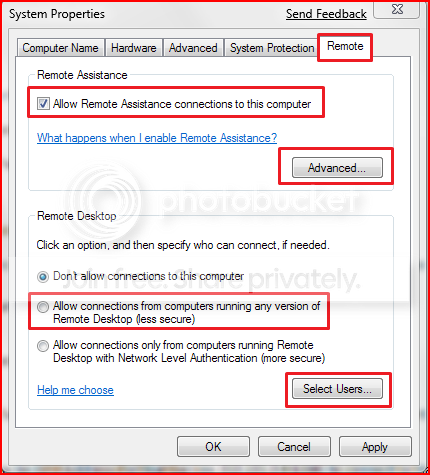
Actually doing this automatically opens up port 3389. There is no need to do it manually.
It's all part of the RDC tutorial.

Note: This automatically adds Remote Desktop exception in Windows Firewall.

SystemProperties.png


Tutorial on using RDC here.
http://www.sevenforums.com/tutorials/3922-remote-desktop-connection-rdc-network.html?filter
 
Last edited:

My Computer

Computer type
PC/Desktop
Computer Manufacturer/Model Number
Home built
OS
Windows 7 Ult, Windows 8.1 Pro,
CPU
Q9650-4.275GHz, E8600 4.5GHz, E6750-3.8GHz
Motherboard
Evga 780i FTW
Memory
G.Skill PC2 9600 1200Mhz 5 5 5 15 2T
Graphics Card(s)
GTX480
Sound Card
Asus Xonar D2
Monitor(s) Displays
HannsG
Screen Resolution
1680X1050
Hard Drives
GSkill Phoenix Pro 120GB SSD
PSU
ThermalTake Toughpower 1000Watt modular
Case
ThermalTake XaserV
Cooling
Xigmatek S1283
Keyboard
Logitech G15
Mouse
Logitech G9
Internet Speed
T1
Mojo567.

Thank you!

I followed your guide. I'm running Windows 7 Pro. I already had RDP working over the default port 3389 port.

I configured as you stated, did IP forwarding for the new port and opened that port in the firewall.

From the station itself I can connected via IE!

From the outside, I do get the connection screen and prompt for what server and login. But I get this error when I attemp to log in:

The client could not connect to the remote computer. Remote connectinos might not be enabled or the computer might be too busy to accept new connections. It is also possible that network problems are prevent your connnection. Pleae try and connect again later.


http://support.microsoft.com/kb/284931
On windows 7, looking at Programs and Features under IIS .. I don't see a remote web desktop connection underWWW Services.
 
Last edited:

My Computer

OS
Windows 7
Personally I havent used RDP since Vista... I set it up with zero problems. Most of the setup was forwarding the port to the PC I wanted to. Use a static (fixed) IP internally on just this PC.

To remote in all I needed to know was my routers IP address... typed it in the RDP screen and I was connected! Turn off your software firewall to test.

I now use logmein.com... free and secure!
 

My Computer

Computer Manufacturer/Model Number
Homebrew PC - "Alpha_Dawg"
OS
Windows 7 Ultimate 64 bit Steve Ballmer Signature Edition
CPU
Intel Core 2 Quad - Q9550 - 2.83GHz stock - OC'd to 3.6GHz
Motherboard
Gigabyte EP45-UD3P
Memory
4GB DDR2 800MHz (PC6400) OCZ Reaper
Graphics Card(s)
Nvidia GE Force 8800 GTS
Sound Card
Asus Xonar DX
Monitor(s) Displays
Samsung SyncMaster 2333HD
Screen Resolution
1920 x 1080
Hard Drives
WD Caviar Black 750GB - 7200RPM - 32MB cache
WD Caviar Green 1.5TB - 5400RPM - 64MB cache
WD Caviar Green 2.0TB - 5400RPM - 64MB cache
PSU
PC Power & Cooling Silencer 750
Case
Gigabyte 3D Aurora
Cooling
Case is Air - 5ea. 120mm fans (mix of Arctic and Xigmatec)
Keyboard
MS Natural Wireless KB
Mouse
MS Wireless Mouse
Internet Speed
50 mbps down/5 mbps up
Other Info
AVerMedia - AVerTVHD G2 Dual Tuner Card
Back
Top