| Windows 7: Homegroup Libraries won't open |
29 Jun 2009
|
#1 | | Windows 7 RC Build 7100 64-bit |
Homegroup Libraries won't open Hi! I'm having trouble sharing my files between two Windows 7 computers, one 32-bit and one 64-bit but both build 7100. I've got the comps connected in a LAN with a Linksys WRT54G ver. 6 router (updated firmware).
The two comps are in the same Homegroup, with the network discovery, file sharing, etc. turned on and password protection turned off. I can see the homegroup libraries of one computer from the other (i.e. the 32-bit homegroup/libraries is visible from the explorer window of the 64-bit comp).
However, I cannot open any of the library folders. I double-click but it does nothing.
As a test, I shared a random folder (Contacts) on the homegroup. The folder is visible from the other comp, but when I try to access it Windows gives the error "The network path was no found (error code 0x80070035)". Diagnosing the problem does nothing.
The same error appears when I try accessing the other comp from the Network explorer. I tried using user accounts and passwords to connect instead of using the homegroup, but the network error also appears.
Any help? | My System Specs |
| OS Windows 7 RC Build 7100 64-bit |
29 Jun 2009
|
#2 | | |
this type of problem is commonly caused by third party firewall or security software. Are you using something like that? | My System Specs | | System Manufacturer/Model Number Too many to list. OS XP, Seven, 2008R2 CPU AMD, Intel, VIA Motherboard Various Memory Corsair, Kingston, etc. Graphics Card ATI, NVIDIA Monitor(s) Displays Samsung Keyboard qwerty Hard Drives Maxtor, Western Digital Internet Speed 22 Mb/s @ home, 1 Gb/s @ server Other Info All of my systems still run fastest on XP 32-bit for the most part. Win7 is fun to play with, but I still prefer XP for raw speed, security, and functionality. |
30 Jun 2009
|
#3 | | |
Yep, and also if both machines have the same user name but different passwords, you may run into problems. If this is the case, make a temporary user account with a new name and try again, to test. | My System Specs | | System Manufacturer/Model Number self built OS 7600.20510 x86 CPU P4 550 3.4 GHz HT running at 3.5 GHz Motherboard MSI PM8M3-V (MS-7211 v1.x) Micro-ATX mainboard Memory OCZ 2 GB(2x1GB) DDR400mHz running @ 414 mHz Graphics Card HIS Radeon HD 3850 IceQ 3 Turbo HDMI Dual DL-DVI AGP Sound Card MOTU Traveler firewire studio interface 192 kHz 24 bit Monitor(s) Displays 22" widescreen Acer X223W LCD, 17" Compaq P75 CRT Screen Resolution 1680x1050 and 1280x1024 Keyboard Logitch Classical Keyboard 200 Mouse Logitech Mediaplay cordless PSU 350W generic Case Cybertronpc, it glows blue Cooling stock cpu fan, Ice-Q 3 gpu and system, many case fans Hard Drives SATA I x2 WD, 400 GB and 120 GB, SATA 2 WD Caviar Black 1 TB Internet Speed 1792/448 kbits/sec Other Info SATA II PCI fake RAID adapter, 1 GB Readyboost, original ATI Remote Wonder (even works with WMC perfectly), Logitech Rumblepad 2 game controller x2 |
30 Jun 2009
|
#4 | | Windows 7 RC Build 7100 64-bit |
Thanks for the help, but I still can't file-share. | My System Specs | | OS Windows 7 RC Build 7100 64-bit |
30 Jun 2009
|
#5 | | |
Since you're using Homegroup, make sure IPv6 is enabled. Also, make sure the IP Helper service is running. To do that, in start menu search box, type services.msc, then hit enter.
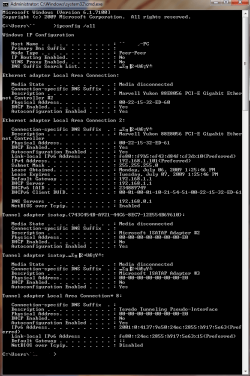
Type cmd in start menu search box, hit enter. Then in the black box, type ipconfig /all, hit enter. Please post a screenshot of this and we will probably be able to help you then if you still need.
Have you tried filesharing using Netbios and homegroups disabled? If you don't know how, we could help with that also. | My System Specs | | System Manufacturer/Model Number self built OS 7600.20510 x86 CPU P4 550 3.4 GHz HT running at 3.5 GHz Motherboard MSI PM8M3-V (MS-7211 v1.x) Micro-ATX mainboard Memory OCZ 2 GB(2x1GB) DDR400mHz running @ 414 mHz Graphics Card HIS Radeon HD 3850 IceQ 3 Turbo HDMI Dual DL-DVI AGP Sound Card MOTU Traveler firewire studio interface 192 kHz 24 bit Monitor(s) Displays 22" widescreen Acer X223W LCD, 17" Compaq P75 CRT Screen Resolution 1680x1050 and 1280x1024 Keyboard Logitch Classical Keyboard 200 Mouse Logitech Mediaplay cordless PSU 350W generic Case Cybertronpc, it glows blue Cooling stock cpu fan, Ice-Q 3 gpu and system, many case fans Hard Drives SATA I x2 WD, 400 GB and 120 GB, SATA 2 WD Caviar Black 1 TB Internet Speed 1792/448 kbits/sec Other Info SATA II PCI fake RAID adapter, 1 GB Readyboost, original ATI Remote Wonder (even works with WMC perfectly), Logitech Rumblepad 2 game controller x2 |
06 Jul 2009
|
#6 | | Windows 7 RC Build 7100 64-bit |
Thanks for the suggestions, but I'm afraid none of them worked. I uploaded the ipconfig screen though. Hope that helps. | My System Specs | | OS Windows 7 RC Build 7100 64-bit |
10 Jul 2009
|
#7 | | |
Strange, looks as tho its using 1.1 as IPv4 dns and .0.1 for IPv6 dns, and this would be a forseeable problem.
did you manually type anything in for IPv6? | My System Specs | | System Manufacturer/Model Number CUSTOM OS XP/win7 x86 build 7127 CPU Athlon64 X2 DUAL 4200+ 2.21ghz Motherboard ASUS K8 PRO SLI Memory 2GB Dual Chan DDR2 Corsair Graphics Card Nvidia 6800GT Sound Card nvidia Monitor(s) Displays 19' LCD Screen Resolution 1280x1024 Keyboard MS wireless Mouse MS Wireless PSU coolermaster 450 Case SUPERFLOWER Cooling 1 HDD bay fan, 5x80mm Case Fans, AEROGATE II Fan/Temp Hard Drives WD 250, 2x500, 2x1TB IDE/USB
WD 250 SATA (system)
SEAGATE 120 Sata Internet Speed fassssssssst |
12 Jul 2009
|
#8 | | Windows 7 RC Build 7100 64-bit |
Nope. IPv6 settings are all automatically obtained. | My System Specs | | OS Windows 7 RC Build 7100 64-bit |
13 Jul 2009
|
#9 | | |
make sure you have the dns servers in IPv4 as 192.168.1.1 - not 0.1 | My System Specs | | System Manufacturer/Model Number CUSTOM OS XP/win7 x86 build 7127 CPU Athlon64 X2 DUAL 4200+ 2.21ghz Motherboard ASUS K8 PRO SLI Memory 2GB Dual Chan DDR2 Corsair Graphics Card Nvidia 6800GT Sound Card nvidia Monitor(s) Displays 19' LCD Screen Resolution 1280x1024 Keyboard MS wireless Mouse MS Wireless PSU coolermaster 450 Case SUPERFLOWER Cooling 1 HDD bay fan, 5x80mm Case Fans, AEROGATE II Fan/Temp Hard Drives WD 250, 2x500, 2x1TB IDE/USB
WD 250 SATA (system)
SEAGATE 120 Sata Internet Speed fassssssssst |
15 Jan 2010
|
#10 | | |
Homegroup Libraries Won't Open So I'm apparently having the exact same problem. I've posted my ipconfig for both machines.
Please help.
MY DESKTOP ---
Microsoft Windows [Version 6.1.7600]
Copyright (c) 2009 Microsoft Corporation. All rights reserved.
C:\Users\Wes Sims>ipconfig/all
Windows IP Configuration
Host Name . . . . . . . . . . . . : Fusion-PC
Primary Dns Suffix . . . . . . . :
Node Type . . . . . . . . . . . . : Hybrid
IP Routing Enabled. . . . . . . . : No
WINS Proxy Enabled. . . . . . . . : No
DNS Suffix Search List. . . . . . : home
Ethernet adapter Local Area Connection:
Connection-specific DNS Suffix . : home
Description . . . . . . . . . . . : NVIDIA nForce Networking Controller
Physical Address. . . . . . . . . : 00-1D-72-B5-A8-7C
DHCP Enabled. . . . . . . . . . . : Yes
Autoconfiguration Enabled . . . . : Yes
Link-local IPv6 Address . . . . . : fe80::fcde:c582:5d73:8a20%11(Preferred)
IPv4 Address. . . . . . . . . . . : 192.168.1.3(Preferred)
Subnet Mask . . . . . . . . . . . : 255.255.255.0
Lease Obtained. . . . . . . . . . : Friday, January 15, 2010 2:49:49 PM
Lease Expires . . . . . . . . . . : Saturday, January 16, 2010 2:49:50 PM
Default Gateway . . . . . . . . . : 192.168.1.1
DHCP Server . . . . . . . . . . . : 192.168.1.1
DHCPv6 IAID . . . . . . . . . . . : 234888562
DHCPv6 Client DUID. . . . . . . . : 00-01-00-01-11-D6-C8-76-00-1D-72-B5-A8-7C
DNS Servers . . . . . . . . . . . : 192.168.1.1
NetBIOS over Tcpip. . . . . . . . : Enabled
Tunnel adapter isatap.home:
Media State . . . . . . . . . . . : Media disconnected
Connection-specific DNS Suffix . : home
Description . . . . . . . . . . . : Microsoft ISATAP Adapter
Physical Address. . . . . . . . . : 00-00-00-00-00-00-00-E0
DHCP Enabled. . . . . . . . . . . : No
Autoconfiguration Enabled . . . . : Yes
Tunnel adapter Teredo Tunneling Pseudo-Interface:
Connection-specific DNS Suffix . :
Description . . . . . . . . . . . : Teredo Tunneling Pseudo-Interface
Physical Address. . . . . . . . . : 00-00-00-00-00-00-00-E0
DHCP Enabled. . . . . . . . . . . : No
Autoconfiguration Enabled . . . . : Yes
IPv6 Address. . . . . . . . . . . : 2001:0:4137:9e50:201d:7aa0:b84c:f521(Pref
erred)
Link-local IPv6 Address . . . . . : fe80::201d:7aa0:b84c:f521%13(Preferred)
Default Gateway . . . . . . . . . : ::
NetBIOS over Tcpip. . . . . . . . : Disabled
C:\Users\Wes Sims>
MY LAPTOP ---
Microsoft Windows [Version 6.1.7600]
Copyright (c) 2009 Microsoft Corporation. All rights reserved.
C:\Users\wes>ipconfig/all
Windows IP Configuration
Host Name . . . . . . . . . . . . : wes-PC
Primary Dns Suffix . . . . . . . :
Node Type . . . . . . . . . . . . : Hybrid
IP Routing Enabled. . . . . . . . : No
WINS Proxy Enabled. . . . . . . . : No
DNS Suffix Search List. . . . . . : home
Ethernet adapter Local Area Connection:
Media State . . . . . . . . . . . : Media disconnected
Connection-specific DNS Suffix . :
Description . . . . . . . . . . . : Atheros AR8131 PCI-E Gigabit Ethernet Con
troller
Physical Address. . . . . . . . . : 00-1F-16-9F-46-A4
DHCP Enabled. . . . . . . . . . . : Yes
Autoconfiguration Enabled . . . . : Yes
Wireless LAN adapter Wireless Network Connection:
Connection-specific DNS Suffix . : home
Description . . . . . . . . . . . : Atheros AR5B91 Wireless Network Adapter
Physical Address. . . . . . . . . : 00-25-56-59-EB-03
DHCP Enabled. . . . . . . . . . . : Yes
Autoconfiguration Enabled . . . . : Yes
Link-local IPv6 Address . . . . . : fe80::2067:8550:641a:ec5%11(Preferred)
IPv4 Address. . . . . . . . . . . : 192.168.1.5(Preferred)
Subnet Mask . . . . . . . . . . . : 255.255.255.0
Lease Obtained. . . . . . . . . . : Friday, January 15, 2010 2:50:52 PM
Lease Expires . . . . . . . . . . : Saturday, January 16, 2010 2:50:53 PM
Default Gateway . . . . . . . . . : 192.168.1.1
DHCP Server . . . . . . . . . . . : 192.168.1.1
DHCPv6 IAID . . . . . . . . . . . : 201336150
DHCPv6 Client DUID. . . . . . . . : 00-01-00-01-12-E0-21-0D-00-1F-16-9F-46-A4
DNS Servers . . . . . . . . . . . : 192.168.1.1
NetBIOS over Tcpip. . . . . . . . : Enabled
Tunnel adapter isatap.home:
Media State . . . . . . . . . . . : Media disconnected
Connection-specific DNS Suffix . : home
Description . . . . . . . . . . . : Microsoft ISATAP Adapter
Physical Address. . . . . . . . . : 00-00-00-00-00-00-00-E0
DHCP Enabled. . . . . . . . . . . : No
Autoconfiguration Enabled . . . . : Yes
Tunnel adapter Teredo Tunneling Pseudo-Interface:
Connection-specific DNS Suffix . :
Description . . . . . . . . . . . : Teredo Tunneling Pseudo-Interface
Physical Address. . . . . . . . . : 00-00-00-00-00-00-00-E0
DHCP Enabled. . . . . . . . . . . : No
Autoconfiguration Enabled . . . . : Yes
IPv6 Address. . . . . . . . . . . : 2001:0:4137:9e50:3070:1c00:b84c:f521(Pref
erred)
Link-local IPv6 Address . . . . . : fe80::3070:1c00:b84c:f521%14(Preferred)
Default Gateway . . . . . . . . . : ::
NetBIOS over Tcpip. . . . . . . . : Disabled
C:\Users\wes> | My System Specs | | Homegroup Libraries won't open problems? All times are GMT -5. The time now is 12:06 PM. | |