
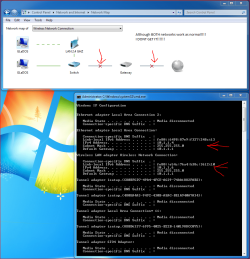
I have done a Upgrade install to freshen up my OS but before that my network was not working properly, even though RIGHT NOW i am able to connect to the internet
check the attached images for some Explanation, ALL the networks WORK, just windows doesn't detect the right, OMG PLEASE HELP, im so desperate to find a solution......
check the attached images for some Explanation, ALL the networks WORK, just windows doesn't detect the right, OMG PLEASE HELP, im so desperate to find a solution......
Attachments

My Computer
At a glance
Win 7 x64intel i7 950 3.06 GHZ @ 4237MHZ6 GB Patriot Sector 7 RAM 3x2GB @1600 MHZGIGABYTE GTX 460 Super OC Dual SLI @ 915 MHZ
- Computer Manufacturer/Model Number
- ASUS, GIGABYTE, SAMSUNG, PIONEER, GW, COOLERMASTER, NZXT
- OS
- Win 7 x64
- CPU
- intel i7 950 3.06 GHZ @ 4237MHZ
- Motherboard
- GIGABYTE X58A-UD5 (rev 2.0)
- Memory
- 6 GB Patriot Sector 7 RAM 3x2GB @1600 MHZ
- Graphics Card(s)
- GIGABYTE GTX 460 Super OC Dual SLI @ 915 MHZ
- Sound Card
- Nvidia Onboard GPU Sound to Logitech Z-5500 5.1
- Monitor(s) Displays
- SynchMaster BX2240 (main), LG-42LB9DF-AD (secondary)
- Screen Resolution
- Both 1920 X 1080 - 1080p
- Hard Drives
- 2x Western Digital 1.0TB Caviar
- PSU
- GW-760SEL (760 Watt)
- Case
- Cooler Master Storm Scout
- Cooling
- CM V6GT CPU Cooler, NZXT Sentry 2 5 fan controller + 3 fans
- Keyboard
- Logitech G19
- Mouse
- Logitech G500 custom Weighted Mouse
- Internet Speed
- ADSL2+ @ 5.5 MB/S


