| Windows 7: Upgrade causing slow browsing, fine internet speed |
11 May 2011
|
#1 | | Windows 7 Professional 32 Bit |
Upgrade causing slow browsing, fine internet speed Hi,
Recently I upgraded from Windows Vista home basic 32 bit to Windows 7 professional 32 bit.
Now however, my browsing speed is very slow and often doesnt work. It seems to especially have trouble with google related stuff (eg Gmail and google maps etc).
However when I finally get a page up, download speed for files are completely normal. Im currently using firefox 4, but I have already tried Chrome and Internet Explorer with no difference between the 3. Ive tried disabling/uninstalling firefox addons, Ive also tried with and with out an active firewall, and turning off my anti virus software. Ive also scanned my computer with my anti virus (Sophos) as well as Spybot Search and Destroy. None of this has helped either.
All other computers in my house hold are all browsing the net fine, including my laptop also using windows 7.
I have really run out of ideas, as my computer was browsing the net fine before upgrading.
Sorry if I have posted this in the wrong place or this has been resolved elsewhere, I am a neewbie to forums, and I couldnt see a similar thread.
Cheers | My System Specs |
| System Manufacturer/Model Number Gigabyte Technology Co., Ltd. OS Windows 7 Professional 32 Bit CPU Intel Core 2 Quad Q9550 2.83GHz Memory 4GB Graphics Card Nvidia GeForce 96000GT 512MB Sound Card High Definition Audio Device Screen Resolution 1920x 1080 x 59Hz Hard Drives 750GB Samsung HD753LJ |
11 May 2011
|
#2 | | Windows 7 x64 pro/ Windows 7 x86 Pro/ XP SP3 x86 |
Are you using the latest network drivers? Also, things like java and flash player and any other plugins you use need to be installed with a new install.
Try changing DNS servers to opendns or google. | My System Specs | | System Manufacturer/Model Number Too many to describe... OS Windows 7 x64 pro/ Windows 7 x86 Pro/ XP SP3 x86 |
11 May 2011
|
#3 | | Windows 7 Professional 32 Bit |
Yes, I have updated/ checked for updates for drivers. I have also re-installed most programs, I definately know I have installed java and flash player.
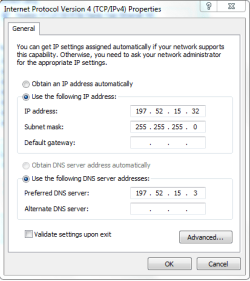
Thanks, Ill have a go at changing DNS servers, not that I know what im doing. Ill read up and have a go.
Cheers | My System Specs | | System Manufacturer/Model Number Gigabyte Technology Co., Ltd. OS Windows 7 Professional 32 Bit CPU Intel Core 2 Quad Q9550 2.83GHz Memory 4GB Graphics Card Nvidia GeForce 96000GT 512MB Sound Card High Definition Audio Device Screen Resolution 1920x 1080 x 59Hz Hard Drives 750GB Samsung HD753LJ |
11 May 2011
|
#4 | | Windows 7 Professional 32 Bit |
Ok, so Ive had a go at changing DNS, I tried using googles DNS, that didnt help. I went to the website for opendns, I dont really understand what was going on, do I have to subscribe or get the free one? which contains ads?
anyways I then logged into my own router and changed my computer to match it.
This has resolved my issue. Thank you so much for you help, its been bugging me out for days! | My System Specs | | System Manufacturer/Model Number Gigabyte Technology Co., Ltd. OS Windows 7 Professional 32 Bit CPU Intel Core 2 Quad Q9550 2.83GHz Memory 4GB Graphics Card Nvidia GeForce 96000GT 512MB Sound Card High Definition Audio Device Screen Resolution 1920x 1080 x 59Hz Hard Drives 750GB Samsung HD753LJ |
11 May 2011
|
#5 | | Windows 7 x64 pro/ Windows 7 x86 Pro/ XP SP3 x86 |
opendns ip addresses are:
208.67.222.222
208.67.220.220
Just input these numbers in the preferred dns server and alternate dns server fields respectively. | My System Specs | | System Manufacturer/Model Number Too many to describe... OS Windows 7 x64 pro/ Windows 7 x86 Pro/ XP SP3 x86 |
11 May 2011
|
#6 | | Windows 7 Professional 32 Bit |
i did try those numbers, randomly enough as they were on a tutorial somewhere on this site, however they didnt work either. But not to worry as I said, Ive got it working now anyways! | My System Specs | | System Manufacturer/Model Number Gigabyte Technology Co., Ltd. OS Windows 7 Professional 32 Bit CPU Intel Core 2 Quad Q9550 2.83GHz Memory 4GB Graphics Card Nvidia GeForce 96000GT 512MB Sound Card High Definition Audio Device Screen Resolution 1920x 1080 x 59Hz Hard Drives 750GB Samsung HD753LJ |
13 May 2011
|
#7 | | Windows 7 Professional 32 Bit |
ok, so typing in the DNS made it work for about 30 mins, and hasnt worked since. Since then I have tried Open DNS (including subscribing and also downloading their DNS updater). So once again Im out of ideas.... | My System Specs | | System Manufacturer/Model Number Gigabyte Technology Co., Ltd. OS Windows 7 Professional 32 Bit CPU Intel Core 2 Quad Q9550 2.83GHz Memory 4GB Graphics Card Nvidia GeForce 96000GT 512MB Sound Card High Definition Audio Device Screen Resolution 1920x 1080 x 59Hz Hard Drives 750GB Samsung HD753LJ |
13 May 2011
|
#8 | | W7 Professional x64 Portland, OR |
Did the issue happen immediately after the upgrade? How did you install the upgrade? | My System Specs | | System Manufacturer/Model Number Pugh Technologies OS W7 Professional x64 CPU AMD Athlon II X3 445 Rana 3.10 GHz Motherboard MSI 870A-G54 Memory PNY XLR DDR3 1600 4x2GB Graphics Card NVIDIA GeForce GTS 450 (fermi) 1GB GDDR5 Sound Card Realtek ALC892 onboard Monitor(s) Displays ASUS VE205t, Viewsonic VX2035WM Screen Resolution 1600x900, 1600x1050 Keyboard Logitec 55 Mouse Razer Deathadder PSU Antec EarthWatts EA650 650W Case ThermalTake Armor A90 Mid Tower Cooling 3x 120mm in, 1x 120mm & 200mm out, self built hydro-cooler Hard Drives 977GB Hitachi Hitachi HDS721010CLA332
244GB Western Digital WDC WD2500AAJS-65B4A0
488GB Western Digital WDC WD5000AAJS-00A8B0
488GB Western Digital WDC WD5000AAKS-00UU3A0 Internet Speed 20 Mbps D/L, 9 Mbps U/L |
13 May 2011
|
#9 | | Windows 7 Professional 32 Bit |
Yer I havent had the internet working properly since the upgrade.
It was upgraded by downloading the iso file from microsoft. I needed to do a fresh install though, as my vista was only home basic. | My System Specs | | System Manufacturer/Model Number Gigabyte Technology Co., Ltd. OS Windows 7 Professional 32 Bit CPU Intel Core 2 Quad Q9550 2.83GHz Memory 4GB Graphics Card Nvidia GeForce 96000GT 512MB Sound Card High Definition Audio Device Screen Resolution 1920x 1080 x 59Hz Hard Drives 750GB Samsung HD753LJ |
13 May 2011
|
#10 | | W7 Professional x64 Portland, OR |
So you did a clean installation? | My System Specs | | System Manufacturer/Model Number Pugh Technologies OS W7 Professional x64 CPU AMD Athlon II X3 445 Rana 3.10 GHz Motherboard MSI 870A-G54 Memory PNY XLR DDR3 1600 4x2GB Graphics Card NVIDIA GeForce GTS 450 (fermi) 1GB GDDR5 Sound Card Realtek ALC892 onboard Monitor(s) Displays ASUS VE205t, Viewsonic VX2035WM Screen Resolution 1600x900, 1600x1050 Keyboard Logitec 55 Mouse Razer Deathadder PSU Antec EarthWatts EA650 650W Case ThermalTake Armor A90 Mid Tower Cooling 3x 120mm in, 1x 120mm & 200mm out, self built hydro-cooler Hard Drives 977GB Hitachi Hitachi HDS721010CLA332
244GB Western Digital WDC WD2500AAJS-65B4A0
488GB Western Digital WDC WD5000AAJS-00A8B0
488GB Western Digital WDC WD5000AAKS-00UU3A0 Internet Speed 20 Mbps D/L, 9 Mbps U/L Upgrade causing slow browsing, fine internet speed problems? All times are GMT -5. The time now is 04:00 AM. | |