| Windows 7: Laptop wireless disconnects periodically (Sony VAIO) |
09 Jul 2011
|
| | Windows 7 14 posts Amsterdam |
Laptop wireless disconnects periodically (Sony VAIO) Hello everyone.
I have a problem with the wireless connection of my laptop. It disconnects about every 30 minutes and then it reconnects after a few seconds. This happens when I'm at one my my parent's houses but not at my friends house. 
This problem is particularly annoying when I'm in the middle of an online game of Age of Empires III because you get kicked out instantly when you lose the connection for even one second. 
I don't know much about modems or routers but if you need more details about them I could look for them.
Also I couldn't find anything on Google or the forums but please send me a link if you find anything.
All help appreciated! | My System Specs |
| System Manufacturer/Model Number Sony Corporation VGN-FW41E_H (VAIO) OS Windows 7 CPU Intel Core 2 Duo CPU T6400 @ 2.00GHz, 2000 Mhz, 2 cores Memory 452,79 GB Graphics Card ATI Mobility Radeon HD 4650 Sound Card ATI HDMI Audio Monitor(s) Displays Laptop monitor Screen Resolution 1600x900 Keyboard Laptop keyboard Hard Drives C: |
09 Jul 2011
|
| | Win7 & Win8 64bit 1,745 posts SoCal |
Hi Nusaik,
That seems to be interference with nearby wireless networks or electronics. Also, depending on how far your laptop is from their wireless router.
Next time that you stop by at your parents home, ask their permission first if they will let you do a minor change in their router settings, if they won't let you, perhaps another option is a wired connection.
On your next visit, please Install and run Xirrus Wi-Fi Inspector.
Click on the 'Show Networks' to display all wireless networks on the xirrus icon on your desktop of if you have one running in a corner. Tap the Printscreen key on your keyboard, open up Paint then choose Edit from the Menu and select Paste, then SAVE it. Upload and attached it here, click on Go Advanced and locate Manage Attachments Tab and attached the file. | My System Specs | | System Manufacturer/Model Number Lenovo Desktop/Samsung Laptop OS Win7 & Win8 64bit CPU Intel i5 Internet Speed Charter-20 Mbps Antivirus Avast Browser FF, IE9 and Chrome |
10 Jul 2011
|
| | Windows 7 14 posts Amsterdam |
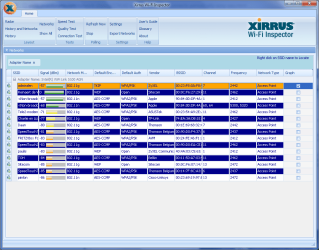
Networks screenshot Hi and thanks for the response. I've attached the screenshot from Xirrus Wi-Fi Inspector. The network Daan seems to have the same channel and frequency as our network (Admiralen) so I'm guessing this could have something to do with it? | My System Specs | | System Manufacturer/Model Number Sony Corporation VGN-FW41E_H (VAIO) OS Windows 7 CPU Intel Core 2 Duo CPU T6400 @ 2.00GHz, 2000 Mhz, 2 cores Memory 452,79 GB Graphics Card ATI Mobility Radeon HD 4650 Sound Card ATI HDMI Audio Monitor(s) Displays Laptop monitor Screen Resolution 1600x900 Keyboard Laptop keyboard Hard Drives C: |
10 Jul 2011
|
| | Windows 7 Ultimate SP1 64-Bit 446 posts Peterborough, England |
Type http://192.168.0.1/ into your browser window and that should bring up your router settings, from where you can change the channel it's currently using. I'd change it to Channel 6.
To get to your router settings you may or may not have to enter a user name and password.
I'm with Sky and the default for my router is Admin for the router name and Sky for the password if that's any help to you. | My System Specs | | System Manufacturer/Model Number HP Pavilion Elite 495UK OS Windows 7 Ultimate SP1 64-Bit CPU Intel Core i7 870 @ 2.93GHz Motherboard MSI 2A9C (CPU1) Memory 8Gb Dual-Channel DDR3 @ 664MHz Graphics Card nVidia GeForce GTX 460 1024MB dedicated RAM Sound Card Realtek HD Audio Monitor(s) Displays HP2310i Screen Resolution 1920 x 1080 Keyboard Logitech K750 solar-powered keyboard Mouse Logitech Wireless M180 mouse PSU 460W Case HP Elite Cooling Air cooled Hard Drives 1x1954GB Hitachi HDS22020ALA 330 (RAID), 1x1954GB Hitachi External for backup and storage Internet Speed 2Mb Other Info Pure Avanti Flow Internet Radio with iPod Dock, 64Gb iPod, HP USB Speakers, Sony MDR-V500 Headphones, Sony Vaio F-Series Laptop |
10 Jul 2011
|
| | Windows 7 14 posts Amsterdam |
Thanks! I'll try changing my channel as soon as I can and I'll post my results | My System Specs | | System Manufacturer/Model Number Sony Corporation VGN-FW41E_H (VAIO) OS Windows 7 CPU Intel Core 2 Duo CPU T6400 @ 2.00GHz, 2000 Mhz, 2 cores Memory 452,79 GB Graphics Card ATI Mobility Radeon HD 4650 Sound Card ATI HDMI Audio Monitor(s) Displays Laptop monitor Screen Resolution 1600x900 Keyboard Laptop keyboard Hard Drives C: |
10 Jul 2011
|
| | Windows 7 Ultimate SP1 64-Bit 446 posts Peterborough, England |
OK, let's hope it does the trick. | My System Specs | | System Manufacturer/Model Number HP Pavilion Elite 495UK OS Windows 7 Ultimate SP1 64-Bit CPU Intel Core i7 870 @ 2.93GHz Motherboard MSI 2A9C (CPU1) Memory 8Gb Dual-Channel DDR3 @ 664MHz Graphics Card nVidia GeForce GTX 460 1024MB dedicated RAM Sound Card Realtek HD Audio Monitor(s) Displays HP2310i Screen Resolution 1920 x 1080 Keyboard Logitech K750 solar-powered keyboard Mouse Logitech Wireless M180 mouse PSU 460W Case HP Elite Cooling Air cooled Hard Drives 1x1954GB Hitachi HDS22020ALA 330 (RAID), 1x1954GB Hitachi External for backup and storage Internet Speed 2Mb Other Info Pure Avanti Flow Internet Radio with iPod Dock, 64Gb iPod, HP USB Speakers, Sony MDR-V500 Headphones, Sony Vaio F-Series Laptop |
10 Jul 2011
|
| | Win7 & Win8 64bit 1,745 posts SoCal |
Thanks for the Xirrus snap shot provided. That's a very busy neighborhood you have there. Definitely try changing the wireless channel to 6, let's hope that would do the trick.
Also, you may try refreshing your wireless connection by removing all current wireless profiles then reconnect again. Make sure that you type in the correct encryption to ensure a proper connection. Wireless Network - Remove 
Quote: Originally Posted by Nusaik Hi and thanks for the response. I've attached the screenshot from Xirrus Wi-Fi Inspector. The network Daan seems to have the same channel and frequency as our network (Admiralen) so I'm guessing this could have something to do with it? | My System Specs | | System Manufacturer/Model Number Lenovo Desktop/Samsung Laptop OS Win7 & Win8 64bit CPU Intel i5 Internet Speed Charter-20 Mbps Antivirus Avast Browser FF, IE9 and Chrome |
25 Jul 2011
|
| | Windows 7 14 posts Amsterdam |
Thanks for the help everyone!
Changing the channel solved my problem. | My System Specs | | System Manufacturer/Model Number Sony Corporation VGN-FW41E_H (VAIO) OS Windows 7 CPU Intel Core 2 Duo CPU T6400 @ 2.00GHz, 2000 Mhz, 2 cores Memory 452,79 GB Graphics Card ATI Mobility Radeon HD 4650 Sound Card ATI HDMI Audio Monitor(s) Displays Laptop monitor Screen Resolution 1600x900 Keyboard Laptop keyboard Hard Drives C: |
25 Jul 2011
|
| | Win7 & Win8 64bit 1,745 posts SoCal |
Thanks for posting back Nusaik. Glad it all worked out okay for you. | My System Specs | | System Manufacturer/Model Number Lenovo Desktop/Samsung Laptop OS Win7 & Win8 64bit CPU Intel i5 Internet Speed Charter-20 Mbps Antivirus Avast Browser FF, IE9 and Chrome |
25 Jul 2011
|
| | Windows 7 Ultimate SP1 64-Bit 446 posts Peterborough, England |
Great to hear. Thanks for the update. | My System Specs | | System Manufacturer/Model Number HP Pavilion Elite 495UK OS Windows 7 Ultimate SP1 64-Bit CPU Intel Core i7 870 @ 2.93GHz Motherboard MSI 2A9C (CPU1) Memory 8Gb Dual-Channel DDR3 @ 664MHz Graphics Card nVidia GeForce GTX 460 1024MB dedicated RAM Sound Card Realtek HD Audio Monitor(s) Displays HP2310i Screen Resolution 1920 x 1080 Keyboard Logitech K750 solar-powered keyboard Mouse Logitech Wireless M180 mouse PSU 460W Case HP Elite Cooling Air cooled Hard Drives 1x1954GB Hitachi HDS22020ALA 330 (RAID), 1x1954GB Hitachi External for backup and storage Internet Speed 2Mb Other Info Pure Avanti Flow Internet Radio with iPod Dock, 64Gb iPod, HP USB Speakers, Sony MDR-V500 Headphones, Sony Vaio F-Series Laptop Laptop wireless disconnects periodically (Sony VAIO) problems? All times are GMT -5. The time now is 12:24 AM. | |