
andersonn21
New member
- Local time
- 11:48 AM
- Messages
- 7
OK,
I have been struggling with this for quite some time. I've read tons of posts and articles and have gotten nowhere.
Does anyone have any idea how to get a Mac Powerbook (10.4.11) to connected to a Printer (HP Officejet 4215) that is connected to a PC (Windows 7100) through a Linksys Router (WRT54GS)?
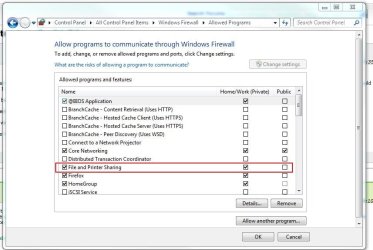
I've got printer sharing enabled on the PC and have tried so many things that I'd rather not post everything here.
If there is anybody that knows of a surefire way to get this working, I would appreciate it
Steve
I have been struggling with this for quite some time. I've read tons of posts and articles and have gotten nowhere.
Does anyone have any idea how to get a Mac Powerbook (10.4.11) to connected to a Printer (HP Officejet 4215) that is connected to a PC (Windows 7100) through a Linksys Router (WRT54GS)?
I've got printer sharing enabled on the PC and have tried so many things that I'd rather not post everything here.
If there is anybody that knows of a surefire way to get this working, I would appreciate it
Steve
My Computer
At a glance
Windows 7.1
- OS
- Windows 7.1



 ASSWORD@WINDOWSDOMAINNAME/PRINTSERVER/PRINTERSHARENAME or