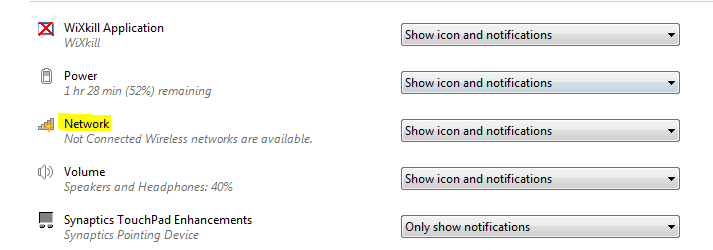
Does anyone know how to change this icon back to a WiFi icon? This is on my laptop and it is really annoying that I see this instead of the signal strength of the network I am connected to. Also, whenever I move the mouse over the icon to see the network I am connected to (I have two) it always displays the wrong router name until I click on the button that opens the WiFi connect window. I don't know why this is like this but it seemed to have happened after I plugged in my Ethernet to transfer some files to my Xbox. It has never returned to the original icon since then.
System Manufacturer/Model Number Custom, HP Pavilion g6, HP ProBook 4530s OS Windows 7 Ultimate x64, Windows 7 Pro x64 (both laptops) CPU Intel i7-3770K (OC 4.7GHz),Intel i3-380M, i3 2350M Motherboard Asus P8P67 (REV 3.1) Memory 8GB Corsair Vengeance, 6GB SK Hynix, 4GB SK Hynix Graphics Card EVGA GeForce GTX 660 2GB, Intel HD Graphics (both laptops) Sound Card Realtek Integrated, IDT (both laptops) Monitor(s) Displays Samsung S22C200B 21.5" Screen Resolution 1920x1080, 1366x768 (both laptops)
Keyboard Logitech K360 Mouse Logitech M305 PSU Coolmax CUL-850B Case Thermaltake Element G Cooling Corsair H60 Hard Drives Crucial 128GB
Seagate 320GB
Western Digital 1TB,
Seagate 500GB,
Toshiba 500GB Internet Speed 18Mbps Other Info I have three systems (2 laptops) listed in the specs area. Some use the same hardware.
Is there an arrow just on the left of the icons ? If so, click that and it should show the full range of icons available, one of which should be your signal strength. What you are seeing is the icon for your ethernet connection status(not connected at present)
I thought the same thing until I relized that is the same icon for all network adapters. Like I said, when I click on the icon it shows the local wifi networks.
System Manufacturer/Model Number Custom, HP Pavilion g6, HP ProBook 4530s OS Windows 7 Ultimate x64, Windows 7 Pro x64 (both laptops) CPU Intel i7-3770K (OC 4.7GHz),Intel i3-380M, i3 2350M Motherboard Asus P8P67 (REV 3.1) Memory 8GB Corsair Vengeance, 6GB SK Hynix, 4GB SK Hynix Graphics Card EVGA GeForce GTX 660 2GB, Intel HD Graphics (both laptops) Sound Card Realtek Integrated, IDT (both laptops) Monitor(s) Displays Samsung S22C200B 21.5" Screen Resolution 1920x1080, 1366x768 (both laptops)
Keyboard Logitech K360 Mouse Logitech M305 PSU Coolmax CUL-850B Case Thermaltake Element G Cooling Corsair H60 Hard Drives Crucial 128GB
Seagate 320GB
Western Digital 1TB,
Seagate 500GB,
Toshiba 500GB Internet Speed 18Mbps Other Info I have three systems (2 laptops) listed in the specs area. Some use the same hardware.
*Start Menu
*Search "system icons"
*Click first result (should be "Customize icons on the taskbar")
*Click Restore Default Icon Behaviors
*Click Okay.
If you have CC cleaner, you can also use it to clean the "Tray notifications cache"
I'd also try disabling the ethernet adapter and reenable it again
*Go to Device Manager (just search for it at the Start Menu)
*Collapse "Network Adapters"
*Find the one with the name "Ethernet" on it
*Right Click->Disable
System Manufacturer/Model Number Asus G73SW-XN2 OS Windows 2000 5.0 Build 2195 CPU Intel Core i7-2630QM@2GHz(2.9GHz Turbo Boost) [Sandy Bridge] Motherboard Asus G73SW (Intel HM65 Chipset) Memory Kingston DDR3 1333 16GB (4GBx4) Graphics Card nVidia GTX 460m 1.5GB Sound Card EAX Advanced HD 5.0, THX TruStudio Monitor(s) Displays 17.3 in. primary & 23 in. secondary Screen Resolution 1920x1080
Keyboard Built-in 102-Key Backlit Keyboard Hard Drives Seagate Momentus XT (SATA II) 500 GB @ 7200 RPM
Hitachi (SATA II) 500GB @ 7200 RPM
Non Raid because ASUS was crappy to choose an HM65 Chipset Other Info It's a Laptop.
If it has the red X on it that means (it thinks) its not connected to a network. You won't get the signal strength ICON unless its connected. I think I would open the list, click disconnect, and connect to your preferred network again and see what happens. If that doesn't work I might clear the list and setup your connection again.
Computer type PC/Desktop System Manufacturer/Model Number Home Built OS Windows 7 Ultimate AMD64 CPU AMD Phenom II X4 980 Black Edition Deneb 3.7GHz Motherboard Asus M4N68T-M V2 µATX Motherboard Memory 8GB 4GBx2 Kingston PC10600 DDR3 1333 Memory Graphics Card BFG NVIDIA Geforce 220GT 1 Gig DDR2 PCIe Sound Card VIA VT1708s High Definition Audio 8-channel Onboard Monitor(s) Displays 2 x 19" I-INC AG191D TFT Flat Panel Screen Resolution 1280x1024 x 2
Keyboard Logitech Internet 600 Mouse Logitech Wireless Trackman Wheel PSU Retail Plus 465 Watt Case Power Up Black ATX Mid-Tower Case Cooling Stock heatsink and fan Hard Drives 500 Gig WesternDigital SATA-300 Drive Internet Speed 80 Mbps Down 30 Mbps Up Antivirus Microsoft Security Essentials Browser Internet Explorer 10 Other Info HP DVD1040e Lightscribe - External USB2
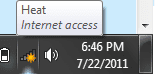
Ok arkhi, I did what you said, disabled the ethernet and vmware network adapter(which I should have mentioned) and now the icon is showing something else. It is still not showing what is suppose to. I also noticed when I opened the customize icon window it said that it was not connected to the network, which it is. As shown in picture 3, when I move over the icon it shows "Heat"(my network name) and "Internet access".
System Manufacturer/Model Number Custom, HP Pavilion g6, HP ProBook 4530s OS Windows 7 Ultimate x64, Windows 7 Pro x64 (both laptops) CPU Intel i7-3770K (OC 4.7GHz),Intel i3-380M, i3 2350M Motherboard Asus P8P67 (REV 3.1) Memory 8GB Corsair Vengeance, 6GB SK Hynix, 4GB SK Hynix Graphics Card EVGA GeForce GTX 660 2GB, Intel HD Graphics (both laptops) Sound Card Realtek Integrated, IDT (both laptops) Monitor(s) Displays Samsung S22C200B 21.5" Screen Resolution 1920x1080, 1366x768 (both laptops)
Keyboard Logitech K360 Mouse Logitech M305 PSU Coolmax CUL-850B Case Thermaltake Element G Cooling Corsair H60 Hard Drives Crucial 128GB
Seagate 320GB
Western Digital 1TB,
Seagate 500GB,
Toshiba 500GB Internet Speed 18Mbps Other Info I have three systems (2 laptops) listed in the specs area. Some use the same hardware.
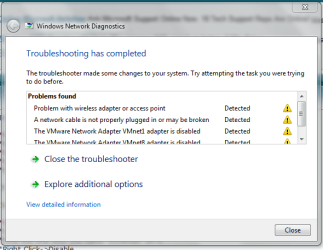
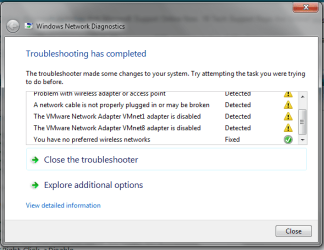
Try right clicking and select the troubleshoot option and see what it comes up with. Generally speaking, when this happens to my beast it just requires a reboot of my router.
System Manufacturer/Model Number Custom, HP Pavilion g6, HP ProBook 4530s OS Windows 7 Ultimate x64, Windows 7 Pro x64 (both laptops) CPU Intel i7-3770K (OC 4.7GHz),Intel i3-380M, i3 2350M Motherboard Asus P8P67 (REV 3.1) Memory 8GB Corsair Vengeance, 6GB SK Hynix, 4GB SK Hynix Graphics Card EVGA GeForce GTX 660 2GB, Intel HD Graphics (both laptops) Sound Card Realtek Integrated, IDT (both laptops) Monitor(s) Displays Samsung S22C200B 21.5" Screen Resolution 1920x1080, 1366x768 (both laptops)
Keyboard Logitech K360 Mouse Logitech M305 PSU Coolmax CUL-850B Case Thermaltake Element G Cooling Corsair H60 Hard Drives Crucial 128GB
Seagate 320GB
Western Digital 1TB,
Seagate 500GB,
Toshiba 500GB Internet Speed 18Mbps Other Info I have three systems (2 laptops) listed in the specs area. Some use the same hardware.
System Manufacturer/Model Number Custom, HP Pavilion g6, HP ProBook 4530s OS Windows 7 Ultimate x64, Windows 7 Pro x64 (both laptops) CPU Intel i7-3770K (OC 4.7GHz),Intel i3-380M, i3 2350M Motherboard Asus P8P67 (REV 3.1) Memory 8GB Corsair Vengeance, 6GB SK Hynix, 4GB SK Hynix Graphics Card EVGA GeForce GTX 660 2GB, Intel HD Graphics (both laptops) Sound Card Realtek Integrated, IDT (both laptops) Monitor(s) Displays Samsung S22C200B 21.5" Screen Resolution 1920x1080, 1366x768 (both laptops)
Keyboard Logitech K360 Mouse Logitech M305 PSU Coolmax CUL-850B Case Thermaltake Element G Cooling Corsair H60 Hard Drives Crucial 128GB
Seagate 320GB
Western Digital 1TB,
Seagate 500GB,
Toshiba 500GB Internet Speed 18Mbps Other Info I have three systems (2 laptops) listed in the specs area. Some use the same hardware.