| Windows 7: Can't delete or rename empty folder due to network problem |
27 Jul 2011
|
#1 | | Windows 7 Professional x32 Antwerp |
Can't delete or rename empty folder due to network problem Hello,
My laptop is attached to a network server (drive H: which is only accessible by me and the admin) On there I have an empty folder that just will not delete. I tried many things and read multiple threads.... This puzzles me.
When I hit delete in Win Explorer simply nothing happens. No error message, nada! The folder stays where it is... on the H: drive.
When I try to rename or cut/paste the folder, I get a dialog box (see attached).
Extra info that may be useful: - The H: drive is synched to my C: drive (a little green circle with yellow arrows can be seen on the H: drive icon) so I can access the H: drive even when I am not on the network. However, even when I am offline I can't do anything with the folder.
- The folder is empty (0 bytes, no hidden files in it)
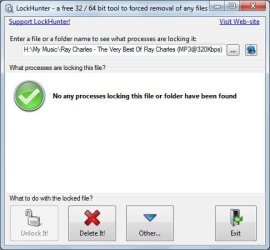
- I tried LockHunter. When I ask if anything is blocking the folder it says no (see attached). When I delete the folder from within LockHunter it says it has been successfully sent to the recycle bin, but the folder stays where it is.
All this is very frustrating. I welcome your thoughts.
Best regards,
Stefan | My System Specs |
| OS Windows 7 Professional x32 |
27 Jul 2011
|
#2 | | Windows 7 Enterprise x64 no SP |
Try unlocker as well, though it seems like the problem is that is a network drive, do you have enough righs over the folder/drive? | My System Specs | | System Manufacturer/Model Number Custom Built PC OS Windows 7 Enterprise x64 no SP CPU Intel(R) Core(TM) i5-2500K CPU @ 3.30GHz 36°C Motherboard Gigabyte Technology Co., Ltd. Z68X-UD3-B3 (Socket 1155) 40°C Memory 4GB Hyperx 1600MHz stock XMP Graphics Card Asus GTS 450 stock or 900-1800, 1804 memory Sound Card Realtek High Definition Audio Monitor(s) Displays Samsung SyncMaster SA350 (SMS24A350H) Screen Resolution 1920x1080 pixels, 32 bits, 60 Hz Keyboard Trust Isla Wired Keyboard Mouse Gigabyte ECO600 (with extended usb wireless adapter) PSU 500W Coolink Case Cooler Master Elite 335 Cooling Cooler Master Hyper 212 Plus single fan Hard Drives 64GB Silicon Power E20 SSD (Intel SRT cache);
488GB Western Digital WDC WD5002AALX-00J37A0 38°C (cached);
733GB SAMSUNG SAMSUNG HD753LJ 27°C; Internet Speed down: 27 Mbps, up: 12 Mbps Other Info Optical Drive: TSSTcorp CDDVDW SH-S223F
Printer: HP Photosmart C5280 All-in-one
Genius G-Pen F610 (PenPad)
Genius 2.0 speakers, JBL speakers, Technics RPF880 Headphones
soft: Gdata, Zemana Antilogger, Nero, MSI Afterburner, Core Temp, CPUZ, Auslogics Disk Defrag |
27 Jul 2011
|
#3 | | Windows 7 Professional x32 Antwerp |
My anti virus program said Unlocker is not safe... However, since I used it before on my home PC, I took your advice and installed it...
However, the same thing occurs as with LockHunter. Unlocker states that nothing blocks the folder. If I choose to delete it, it confirms that the job was done. However the folder is still there. No change! Screen refreshing, rebooting, nothing helps.
I have full rights to the drive/folder where the problematic folder is located. I can add files to that folder and delete them from it. However I can't create any files in the problematic folder itself. When I try, I get an error (see attached). But the folder stays visible at all times. How can this be??
Very strange behaviour... | My System Specs | | OS Windows 7 Professional x32 |
27 Jul 2011
|
#4 | | Windows 7 Enterprise x64 no SP |
You can't use it bacuse it is deleted, I'm surprised that it still shows up for you/server. Is that a paid server that belongs to a company? No idea, it should have gone. | My System Specs | | System Manufacturer/Model Number Custom Built PC OS Windows 7 Enterprise x64 no SP CPU Intel(R) Core(TM) i5-2500K CPU @ 3.30GHz 36°C Motherboard Gigabyte Technology Co., Ltd. Z68X-UD3-B3 (Socket 1155) 40°C Memory 4GB Hyperx 1600MHz stock XMP Graphics Card Asus GTS 450 stock or 900-1800, 1804 memory Sound Card Realtek High Definition Audio Monitor(s) Displays Samsung SyncMaster SA350 (SMS24A350H) Screen Resolution 1920x1080 pixels, 32 bits, 60 Hz Keyboard Trust Isla Wired Keyboard Mouse Gigabyte ECO600 (with extended usb wireless adapter) PSU 500W Coolink Case Cooler Master Elite 335 Cooling Cooler Master Hyper 212 Plus single fan Hard Drives 64GB Silicon Power E20 SSD (Intel SRT cache);
488GB Western Digital WDC WD5002AALX-00J37A0 38°C (cached);
733GB SAMSUNG SAMSUNG HD753LJ 27°C; Internet Speed down: 27 Mbps, up: 12 Mbps Other Info Optical Drive: TSSTcorp CDDVDW SH-S223F
Printer: HP Photosmart C5280 All-in-one
Genius G-Pen F610 (PenPad)
Genius 2.0 speakers, JBL speakers, Technics RPF880 Headphones
soft: Gdata, Zemana Antilogger, Nero, MSI Afterburner, Core Temp, CPUZ, Auslogics Disk Defrag |
27 Jul 2011
|
#5 | | Windows 7 Professional x32 Antwerp |
I will have a word with our network administrator... I have a feeling it has to do with the synching to my laptop which is corrupted or so. Still it is strange because I have full read/write access to that part of the server. | My System Specs | | OS Windows 7 Professional x32 |
27 Jul 2011
|
#6 | | Windows 7 Enterprise x64 no SP |
You could run Ccleaner, to remove any temporary files from the computer then restart it. Reconnect your router manually (turn router off/on for a minute) | My System Specs | | System Manufacturer/Model Number Custom Built PC OS Windows 7 Enterprise x64 no SP CPU Intel(R) Core(TM) i5-2500K CPU @ 3.30GHz 36°C Motherboard Gigabyte Technology Co., Ltd. Z68X-UD3-B3 (Socket 1155) 40°C Memory 4GB Hyperx 1600MHz stock XMP Graphics Card Asus GTS 450 stock or 900-1800, 1804 memory Sound Card Realtek High Definition Audio Monitor(s) Displays Samsung SyncMaster SA350 (SMS24A350H) Screen Resolution 1920x1080 pixels, 32 bits, 60 Hz Keyboard Trust Isla Wired Keyboard Mouse Gigabyte ECO600 (with extended usb wireless adapter) PSU 500W Coolink Case Cooler Master Elite 335 Cooling Cooler Master Hyper 212 Plus single fan Hard Drives 64GB Silicon Power E20 SSD (Intel SRT cache);
488GB Western Digital WDC WD5002AALX-00J37A0 38°C (cached);
733GB SAMSUNG SAMSUNG HD753LJ 27°C; Internet Speed down: 27 Mbps, up: 12 Mbps Other Info Optical Drive: TSSTcorp CDDVDW SH-S223F
Printer: HP Photosmart C5280 All-in-one
Genius G-Pen F610 (PenPad)
Genius 2.0 speakers, JBL speakers, Technics RPF880 Headphones
soft: Gdata, Zemana Antilogger, Nero, MSI Afterburner, Core Temp, CPUZ, Auslogics Disk Defrag |
05 Aug 2011
|
#7 | | Windows 7 Professional x32 Antwerp |
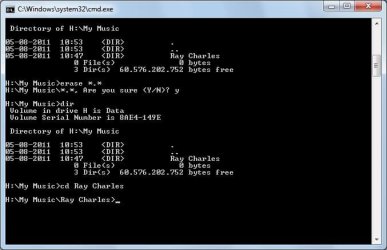
CCleaner didn't help... The folder is still showing up. I can even double-click to open it. It then says the folder is empty. Still can't delete the folder. When I look at its properties (so it still has properties) it shows up as 0 bytes. After fiddling with the Sync Now button I managed to RENAME the folder... So I believe it's still there. I tried to erase *.* in the parent folder. See attached screen shot. It has NO effect! This is really giving me headaches... Any other suggestions? | My System Specs | | OS Windows 7 Professional x32 |
05 Aug 2011
|
#8 | | Windows 7 Enterprise x64 no SP |
If you still have unlocker installed...
It says that nothing blocks the access to it, but if you click whatever (the other option) a new little screen will come up, where you can select delete at the bottom then click ok! try it | My System Specs | | System Manufacturer/Model Number Custom Built PC OS Windows 7 Enterprise x64 no SP CPU Intel(R) Core(TM) i5-2500K CPU @ 3.30GHz 36°C Motherboard Gigabyte Technology Co., Ltd. Z68X-UD3-B3 (Socket 1155) 40°C Memory 4GB Hyperx 1600MHz stock XMP Graphics Card Asus GTS 450 stock or 900-1800, 1804 memory Sound Card Realtek High Definition Audio Monitor(s) Displays Samsung SyncMaster SA350 (SMS24A350H) Screen Resolution 1920x1080 pixels, 32 bits, 60 Hz Keyboard Trust Isla Wired Keyboard Mouse Gigabyte ECO600 (with extended usb wireless adapter) PSU 500W Coolink Case Cooler Master Elite 335 Cooling Cooler Master Hyper 212 Plus single fan Hard Drives 64GB Silicon Power E20 SSD (Intel SRT cache);
488GB Western Digital WDC WD5002AALX-00J37A0 38°C (cached);
733GB SAMSUNG SAMSUNG HD753LJ 27°C; Internet Speed down: 27 Mbps, up: 12 Mbps Other Info Optical Drive: TSSTcorp CDDVDW SH-S223F
Printer: HP Photosmart C5280 All-in-one
Genius G-Pen F610 (PenPad)
Genius 2.0 speakers, JBL speakers, Technics RPF880 Headphones
soft: Gdata, Zemana Antilogger, Nero, MSI Afterburner, Core Temp, CPUZ, Auslogics Disk Defrag Can't delete or rename empty folder due to network problem problems? All times are GMT -5. The time now is 02:52 AM. | |