Solved Can't connect to wireless router! Hasn't worked for days!

jwang217

New member
Not sure if I'm in the right forum but a couple days ago, my one year old Dell Studio 1558 laptop running windows 7 64bit couldn't connect to my Linksys Router. I think the router model is WRT54G or something like that. But i never had problems before connecting to wifi. It is not the router's issue because my other computers can connect to it just fine. I have already contacted the linksys and they've confirmed it's not their issue although they told me they would fix my computer for $10. I called Dell and they were no help at all. They only told me I had to pay $60 for them to fix it.

I'm generally pretty good with computers and I'm pretty sure there is nothing wrong with my laptop itself. I'm hoping that there's just some setting that changed all of a sudden and if I could reset it, the problem would be fixed. I also hotwired the modem to my laptop and the internet worked just fine so its just something going on with my computer.

Please help! Dying without wifi! Thanks a bunch!
 

My Computer

OS
Windows 7 Home Premium 64bit
Hi jwang217, welcom to Seven Forums.
I realize this might sound silly, is the wireless switch on the laptop active ?
 

My Computer

Computer Manufacturer/Model Number
Look in my Signature.
OS
Win7 H.Prem. 32bit+SP1
Hi jwang217, welcom to Seven Forums.
I realize this might sound silly, is the wireless switch on the laptop active ?

yes the wireless switch is on! i've been through all the checking stuff with both linksys and dell on the phone.

but what is device manager? where do i find that?

anybody else have some advanced things i should check?
 

My Computer

OS
Windows 7 Home Premium 64bit
Thank you. I have made sure that it is running properly. However when I try to connect to my network, it still says "windows was unable to connect". Trouble shooting gets me nowhere either. Other ideas?
 

My Computer

OS
Windows 7 Home Premium 64bit
Is the SSID & password in your laptop ok.
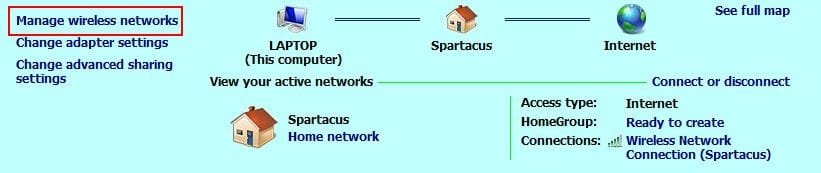
Right click taskbar wireless icon, open network etc. Click as red box, delete all connections, reboot then re input password.

RR.JPG
 

My Computer

Computer Manufacturer/Model Number
Look in my Signature.
OS
Win7 H.Prem. 32bit+SP1
Is the SSID & password in your laptop ok.
Right click taskbar wireless icon, open network etc. Click as red box, delete all connections, reboot then re input password.

View attachment 172927

The rep at linksys had my do everything except the reboot part. Think it would make a difference?

Thanks a lot for your input
 

My Computer

OS
Windows 7 Home Premium 64bit
Your very welcome, thanks for posting back.
Now to find somebody else to keep me amused I mean busy.
 

My Computer

Computer Manufacturer/Model Number
Look in my Signature.
OS
Win7 H.Prem. 32bit+SP1
Are the other pc's connected wireless or wired?

If you look at the Details of your wireless connection, is the IP that you got through DHCP in your normal range?
Sometimes the dhcp through wireless gets messed up and it could help to reset the wireless by disconnecting its power for 30 seconds and turning on again...
 

My Computer

Computer Manufacturer/Model Number
custom build
OS
Windows 7 64b Ultimate
CPU
I7-2600 3.40GHz - testing various OC levels..
Motherboard
ASUS Sabretooth
Memory
2x 4Gb DDR3/1333
Graphics Card(s)
GTX570 - testing OC levels
Sound Card
motherboard 7.1 DIG.
Monitor(s) Displays
2x Ilyama 24" E2409HDS-B1 2ms/DVI
Screen Resolution
1920 x 1080
Hard Drives
120 GB Intel Elmcrest SSD
1 TB SATAII 7200RPM/32MB
External 2TB USB3
PSU
Corsair Pro HX850W
Cooling
Coolermaster Hyper V8
Keyboard
Logitech G110
Mouse
Logitech G700
Internet Speed
25Mb
Other Info
CPU: 7,7 RAM: 7,7 GTX: 7,9 GTX 3D : 7,9 SSD 7,6
Overall 7,6 ...... now to speed up the SSD... ;)

Also use a Dell XPS M1710 on Vista 32b
Asus LT on Vista 32
3 older machines still doing fine on Linux/ubuntu but not used much anymore...
Are the other pc's connected wireless or wired?

If you look at the Details of your wireless connection, is the IP that you got through DHCP in your normal range?
Sometimes the dhcp through wireless gets messed up and it could help to reset the wireless by disconnecting its power for 30 seconds and turning on again...

I have no idea where to find my IP. Could You help me with that?
And I have already unplugged and replugged my router for hours to no avail. The other computers are also connected wirelessly.
 

My Computer

OS
Windows 7 Home Premium 64bit
Mmmm if the others are wireless and work fine after reset but this one doesn't... It is somehing else.

Reboot in Safe mode w/networking to see if that works? Press F8 repeatedly while booting, to get the safe mode choices...
 

My Computer

Computer Manufacturer/Model Number
custom build
OS
Windows 7 64b Ultimate
CPU
I7-2600 3.40GHz - testing various OC levels..
Motherboard
ASUS Sabretooth
Memory
2x 4Gb DDR3/1333
Graphics Card(s)
GTX570 - testing OC levels
Sound Card
motherboard 7.1 DIG.
Monitor(s) Displays
2x Ilyama 24" E2409HDS-B1 2ms/DVI
Screen Resolution
1920 x 1080
Hard Drives
120 GB Intel Elmcrest SSD
1 TB SATAII 7200RPM/32MB
External 2TB USB3
PSU
Corsair Pro HX850W
Cooling
Coolermaster Hyper V8
Keyboard
Logitech G110
Mouse
Logitech G700
Internet Speed
25Mb
Other Info
CPU: 7,7 RAM: 7,7 GTX: 7,9 GTX 3D : 7,9 SSD 7,6
Overall 7,6 ...... now to speed up the SSD... ;)

Also use a Dell XPS M1710 on Vista 32b
Asus LT on Vista 32
3 older machines still doing fine on Linux/ubuntu but not used much anymore...
Mmmm if the others are wireless and work fine after reset but this one doesn't... It is somehing else.

Reboot in Safe mode w/networking to see if that works? Press F8 repeatedly while booting, to get the safe mode choices...

Right, I'm positive its something else. And ok what should I do in safe mode?
 

My Computer

OS
Windows 7 Home Premium 64bit
Jwang,
From the time wi-fi was working and you noticed that it wasn't, did you install/uninstall anything or make any hardware changes?
 

My Computer

Computer Manufacturer/Model Number
Custom System
OS
Win7-64 Home Premium
CPU
AMD Phenom 9500 Quad core 2.2
Motherboard
MSI K9N2 SLI
Memory
4g
Graphics Card(s)
Geforce GTX560Ti OC
Monitor(s) Displays
2x-Dynex 22" lcd
Screen Resolution
1680-1050x2
Hard Drives
1-seagate 500g
1-WD 1TB
PSU
850w
Internet Speed
6mb DSL
Jwang,
From the time wi-fi was working and you noticed that it wasn't, did you install/uninstall anything or make any hardware changes?

Good question. I did not do anything at all. I even just disabled my mcafee firewall but to no avail. I really don't wanna pay someone to fix it over the phone...
 

My Computer

OS
Windows 7 Home Premium 64bit
I fixed it!!!! Oh my goodness I'm so happy! For anyone else who possibly has or will have this problem I hope they find this thread! Just search "reconfigure linksys router" on google (make sure u find your own model). Follow their instructions and RENAME your router, enter the password and you're good!!
 

My Computer

OS
Windows 7 Home Premium 64bit
Congrats on getting it fixed.
 

My Computer

Computer Manufacturer/Model Number
Custom System
OS
Win7-64 Home Premium
CPU
AMD Phenom 9500 Quad core 2.2
Motherboard
MSI K9N2 SLI
Memory
4g
Graphics Card(s)
Geforce GTX560Ti OC
Monitor(s) Displays
2x-Dynex 22" lcd
Screen Resolution
1680-1050x2
Hard Drives
1-seagate 500g
1-WD 1TB
PSU
850w
Internet Speed
6mb DSL
Congrats! Haven't read that thread yet but let's hope you don't have to rename a router all the time when 1 of 3 pc's don't reach it anymore....:confused:
 

My Computer

Computer Manufacturer/Model Number
custom build
OS
Windows 7 64b Ultimate
CPU
I7-2600 3.40GHz - testing various OC levels..
Motherboard
ASUS Sabretooth
Memory
2x 4Gb DDR3/1333
Graphics Card(s)
GTX570 - testing OC levels
Sound Card
motherboard 7.1 DIG.
Monitor(s) Displays
2x Ilyama 24" E2409HDS-B1 2ms/DVI
Screen Resolution
1920 x 1080
Hard Drives
120 GB Intel Elmcrest SSD
1 TB SATAII 7200RPM/32MB
External 2TB USB3
PSU
Corsair Pro HX850W
Cooling
Coolermaster Hyper V8
Keyboard
Logitech G110
Mouse
Logitech G700
Internet Speed
25Mb
Other Info
CPU: 7,7 RAM: 7,7 GTX: 7,9 GTX 3D : 7,9 SSD 7,6
Overall 7,6 ...... now to speed up the SSD... ;)

Also use a Dell XPS M1710 on Vista 32b
Asus LT on Vista 32
3 older machines still doing fine on Linux/ubuntu but not used much anymore...
Back
Top