Windows 7 Forums


Windows 7: Downloads from Microsoft

19 Sep 2011   #11

Main - Windows 7 Pro SP1 64-Bit; 2nd - Windows Server 2008 R2
Westlake, Ohio


If you have multiple computers you could turn off Automatic Updates and just download the standalone patches, then install them on all the machines manually. You'd need to be organized and consistent, though.

My System SpecsSystem Spec

20 Sep 2011   #12

Windows home 64 bit


Thanks for everyones feedback.
The connection is a microsoft related IP address or one of their many ! so it wont be updates for the likes of Kaspersky.
This morning it connected as follows

LOCAL PORT 49525
EXTERNAL PORT 80
IP 213.199.148.235

It downloaded 45.6mb and did another 50mb tonight

Any thoughts ?
My System SpecsSystem Spec
20 Sep 2011   #13

Win7 Pro x64
Stage 5.0 (26 Dimensional Jump)


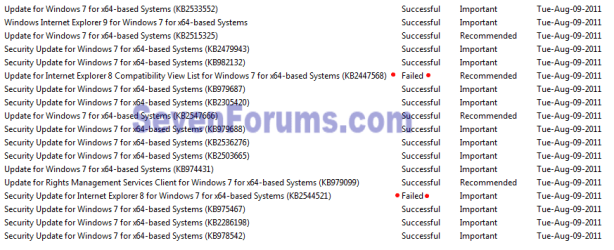
When you open up Windows Updates, what do you see? Mine looks like this:

Downloads from Microsoft-win7_updates.jpg

Do you have anything in your updates screen? When's the last time it says it checked for updates, or installed anything?

Other than updates, I seriously don't see what else from MS that would be downloading. Especially not on a consistent daily basis.

Just to clarify, we're talking about ONE computer here, connecting via a mobile broadband dongle you attach to it, right? You don't happen to be on a network, with other PCs sharing the internet connection?
My System SpecsSystem Spec
.


23 Sep 2011   #14

Windows home 64 bit


I have MS updates set to check but then prompt me before downloading so it cannot really be that.
I am beginning to wonder if its the version of office I have which is office starter. I read about a problem with something called click2run which was causing problems with office - I wondered if a download was failing each time meaning I never get past the update itself - leading to daily attempts.
My System SpecsSystem Spec
23 Sep 2011   #15

Windows home 64 bit


Sorry I should have added its a single PC
My System SpecsSystem Spec
24 Sep 2011   #16

Windows 7 Home Premium 64 bit. SP-1
Northern Ohio


Look in you Windows up date history and see if their is a pattern of unsuccessful installs.
My System SpecsSystem Spec
24 Sep 2011   #17

Windows home 64 bit


I have checked updates - which are switched to only checking anyway so I can see whats happening. I dont see any regular update failures. This very evening my laptop did a 50mb download from Microsoft but who knows of what or why !
My System SpecsSystem Spec
24 Sep 2011   #18

Main - Windows 7 Pro SP1 64-Bit; 2nd - Windows Server 2008 R2
Westlake, Ohio


Are you using any of the Windows Cloud services?
My System SpecsSystem Spec
24 Sep 2011   #19

Windows 7 Home Premium X64 SP1


I know you think the d/l is from Microsoft but have you checked any file/folders to see if there is something you weren't aware of?
My System SpecsSystem Spec
24 Sep 2011   #20

Windows 7 Ultimate X64 SP1
Mt. Crumpit/Whoville


I don't think any valid program would need ~100MB daily update. Download and update the 3 security items in my sig, then run full back-to-back scans with each. Although the IP seems to be from MS, they can be spoofed, a common malware trick. someone using a simple proxy could do it.
Someone or something could be using your PC in a botnet for nefarious purposes.
It does seem to be from Microsoft Limited, an ISP in Reading England.
Downloads from Microsoft-ip-trace.png Downloads from Microsoft-rev-ip.png

Last edited by Britton30; 24 Sep 2011 at 06:48 PM..
My System SpecsSystem Spec
Reply

 Downloads from Microsoft problems?


Thread Tools


Similar help and support threads for: Downloads from Microsoft
Thread Forum
Solved Microsoft Downloads General Discussion
Microsoft: One in 14 Downloads Come Laced with Malware Security News
48 best free software downloads from Microsoft Chillout Room
15 Must Have Free Microsoft Downloads. Chillout Room
MSE Downloads available again from Microsoft Connect News


All times are GMT -5. The time now is 07:49 AM.


Seven Forums Android App Seven Forums IOS App Follow us on Facebook

Windows 7 Forums is an independent web site and has not been authorized,
sponsored, or otherwise approved by Microsoft Corporation.
"Windows 7" and related materials are trademarks of Microsoft Corp.
© Designer Media Ltd
  

1 2 3 4 5 6 7 8 9 10 11 12 13 14 15 16 17 18 19 20 21 22 23 24 25 26 27 28 29 30 31 32