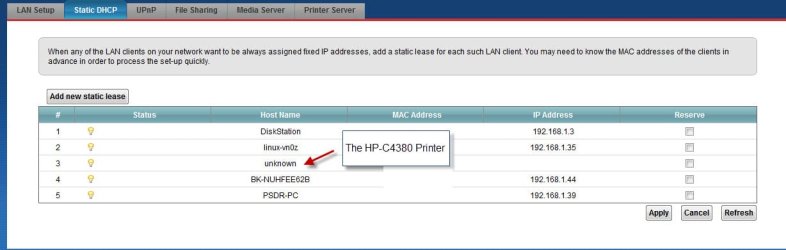
Hi.
I'm running windows 7 ultimtae 32bit.
I would get my HP C4380 connected to my computer.
I can see the MAC address for the printer in the router, but I cannot see it's
IP address.
What could be reason(s) for this behaviour ?
I'm running windows 7 ultimtae 32bit.
I would get my HP C4380 connected to my computer.
I can see the MAC address for the printer in the router, but I cannot see it's
IP address.
What could be reason(s) for this behaviour ?
My Computer
At a glance
Windows 7 UltimateE73004gNVIDIA GeForce 7300 LE
- Computer type
- PC/Desktop
- Computer Manufacturer/Model Number
- Homemade
- OS
- Windows 7 Ultimate
- CPU
- E7300
- Motherboard
- ASUS P5Q DeLuxe
- Memory
- 4g
- Graphics Card(s)
- NVIDIA GeForce 7300 LE
- Sound Card
- N/A
- Monitor(s) Displays
- Acer
- Screen Resolution
- 1600x1200
- Hard Drives
- Samsung HD503HI ATA Device
- PSU
- Seasonic
- Case
- ATX
- Cooling
- FAN
- Keyboard
- Logitech
- Mouse
- HP
- Internet Speed
- 20/2
- Antivirus
- MSE
- Browser
- IE9, Chrome, Firefox