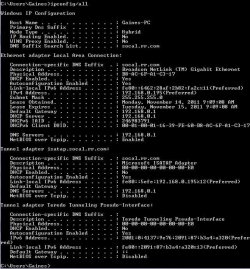
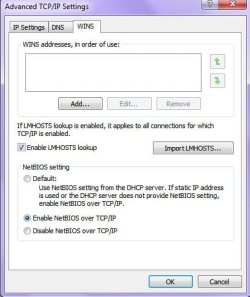
I'm having this issue where in the advanced WINS settings for the Network connections I have enabled the NetBIOS over TCP, but if I run the network information through the command prompt it states that it is disabled. I am also trying to mount shares on my network and I get the error message that it is disabled also. Does anyone know why this is occuring and what can be done to properly enable the setting?
System Manufacturer/Model Number Custom-built OS Windows 7 Professional SP1 32-bit CPU Intel Core 2 Duo E6600 2.4GHz, overclocked to 2.7GHz Motherboard Asus PL5D2 Memory 4GB DDR2-667 (4x1GB in dual-channel config) Graphics Card nVidia GeForce 9800 GT Sound Card Creative X-Fi XtremeMusic Monitor(s) Displays Acer Screen Resolution 1920x1200 (DVI)
Keyboard Standard Mouse Microsoft wireless optical mouse PSU Antec TruePower 2.0 Case Cooler Master Centurion Cooling various fans Hard Drives OCZ SSD Vertex Plus 60GB SATA (Firmware 3.55), 64MB cache
Hitachi HD321KJ SATA, 320GB, 7200rpm, 16MB cache Internet Speed DSL; ~330KB/sec down, ~110KB/sec up Other Info Have a laptop too :) (Compaq CQ60 also with Win7 Pro SP1 32-bit)
Drives in both systems:
C: - Windows 7 + apps. Pagefile is fixed size and located at the very end of the partition.
D: - various temp files/cache for Firefox and apps/games.
E: - videos, music, misc. storage, torrent downloads, etc.
System Manufacturer/Model Number Desktop Replacement Notebook OS Dual Boot: Windows 7 Ultimate x64 & Ubuntu 11.10 x64 CPU Sandy Bridge-Extreme i7 3820 overclock 4.4GHz, 10MB L3 Cache Memory 16GB DDR3 @1600MHz Kingston HyperX Genesis Quad Channel Graphics Card Nvidia GTX 675M 2GB DDR5 Sound Card Sound Blaster X-Fi Monitor(s) Displays 17.3" Full HD LED Screen Resolution 1920 x 1080 (1080p)
Mouse Logitech Performance MX ; MS Arc Touch Case Clevo Cooling IC Diamond Thermal Compound Hard Drives RAID 5: 120GB Intel 520 SSD x 3 Internet Speed DL: 62.10 MBs / UL: 7.98 MBs on 5GHz Other Info Bigfoot Network Killer Wireless-N 1103; 6X Sony Blu-Ray Burner; Astro A40 Audio System
Erm...your ipconfig output shows NetBIOS as enabled for your Broadcom Netlink Ethernet adapter, which is your actual, physical connection to the Internet.
I don't think you need to worry about the other adapters, as these are virtual ones.
I don't actually see anything wrong here.
System Manufacturer/Model Number Custom-built OS Windows 7 Professional SP1 32-bit CPU Intel Core 2 Duo E6600 2.4GHz, overclocked to 2.7GHz Motherboard Asus PL5D2 Memory 4GB DDR2-667 (4x1GB in dual-channel config) Graphics Card nVidia GeForce 9800 GT Sound Card Creative X-Fi XtremeMusic Monitor(s) Displays Acer Screen Resolution 1920x1200 (DVI)
Keyboard Standard Mouse Microsoft wireless optical mouse PSU Antec TruePower 2.0 Case Cooler Master Centurion Cooling various fans Hard Drives OCZ SSD Vertex Plus 60GB SATA (Firmware 3.55), 64MB cache
Hitachi HD321KJ SATA, 320GB, 7200rpm, 16MB cache Internet Speed DSL; ~330KB/sec down, ~110KB/sec up Other Info Have a laptop too :) (Compaq CQ60 also with Win7 Pro SP1 32-bit)
Drives in both systems:
C: - Windows 7 + apps. Pagefile is fixed size and located at the very end of the partition.
D: - various temp files/cache for Firefox and apps/games.
E: - videos, music, misc. storage, torrent downloads, etc.
Erm...your ipconfig output shows NetBIOS as enabled for your Broadcom Netlink Ethernet adapter, which is your actual, physical connection to the Internet.
I don't think you need to worry about the other adapters, as these are virtual ones.
I don't actually see anything wrong here.
Ok, I feel really stupid! I should have looked at the report alot closer. Sorry to waste your time with that. Its just that when I try to mount shares (as noted in my first post) the message in SSH states that it is disabled:
Code:
session request to 192.168.0.195 failed (Called name not present) session request to 192 failed (Called name not present) session request to *SMBSERVER failed (Called name not present) NetBIOS over TCP disabled -- no workgroup available
Last edited by davron94; 15 Nov 2011 at 03:31 PM..
Reason: add more data