Windows 7 Forums


Windows 7: Keep loosing my static IP address

12 Nov 2011   #1

Win 7
 
 
Keep loosing my static IP address

I got a new Netgear 3700 router and I can't figure out why, each time I boot, I loose network connectivity. If I run a 'diagnose', it asks me to apply a fix and it then sets the next IP address. Example....I set it up for 192.168.1.113 and it wants to use .114. .113 works fine until I reboot and I get the same message. If I apply the fix, the very next boot, it wants to go to the next open IP address. I've confirmed that nothing is using this address.
This is on a wired network and 2 other boxes on this network don't have this problem. It's worked fine for years with my Linksys before it crapped out. I'm not sure if it's the router or another problem causing this.
One last thing, when I force the change to .113, it does work but only until the next reboot.
Thanks for any help you can give me.

My System SpecsSystem Spec

12 Nov 2011   #2

Windows 7 Ultimate x64 SP1


Sounds like your static IP address is in the middle of the DHCP range that the router uses to issue out IP addresses. Have you configured your router to either not provide DHCP addresses, or shrunk the range so that your static IP addresses are outside of the DHCP range?
My System SpecsSystem Spec
12 Nov 2011   #3

ultimate 64 sp1


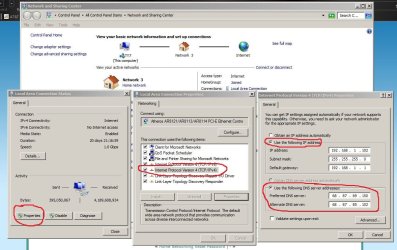
you should be able to give your computer a permanent (static) ip address so:

Keep loosing my static IP address-dhcp2.png

ignore the DNS server settings, and make sure the default gateway is your router.
My System SpecsSystem Spec
.


12 Nov 2011   #4

Win 7


Quote   Quote: Originally Posted by mickey megabyte View Post
you should be able to give your computer a permanent (static) ip address so:

Attachment 183378

ignore the DNS server settings, and make sure the default gateway is your router.
I've set up the static exactly as your image and it's worked for years that way.

Quote   Quote: Originally Posted by kegobeer View Post
Sounds like your static IP address is in the middle of the DHCP range that the router uses to issue out IP addresses. Have you configured your router to either not provide DHCP addresses, or shrunk the range so that your static IP addresses are outside of the DHCP range?

As far as the IP being in the middle of the range, no, it's not. It's very near the beginning. I can change it to be higher and see if that helps.
My System SpecsSystem Spec
12 Nov 2011   #5

win7 ultimate 32bit


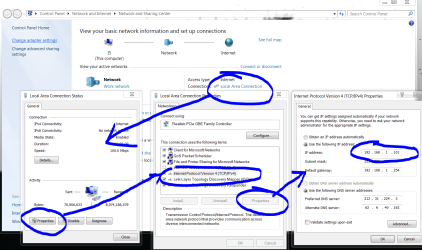
first--read the Router Manual to find out how to setup static IP addresses--then go to control panel 'Network and Sharing Center' to setup static IP (see attached) don't use the numbers in the photo-use the numbers from your router (make sure you select 'use the following IP address' radio button.
Attached Thumbnails
Keep loosing my static IP address-static-ip.jpg  
My System SpecsSystem Spec
12 Nov 2011   #6

Win 7


I've done what you show and my router is set for static IP addresses and other boxes set up the same way work just fine. But not this box.
I'm going to try using an address that's near the end of the address range and see if that makes any difference.
Attached Thumbnails
Keep loosing my static IP address-capture.jpg  
My System SpecsSystem Spec
12 Nov 2011   #7

Windows 7 Ultimate x64 SP1


If you don't need static IP addresses, I'd just let the router assign the IPs. If you do need them, you can still let the router do all of the work - check to see if your router has static DHCP. Basically the router checks the MAC address of the computer attempting to connect, and it assigns the same IP address all the time.
My System SpecsSystem Spec
12 Nov 2011   #8

Windows 7 Ultimate AMD64
Sydney, Nova Scotia


Set your static IP to an address that is outside of the address rang your router gives out via DHCP. If its say 100 to 199 use 99 or lower.
My System SpecsSystem Spec
12 Nov 2011   #9

Win 7


I tried setting a static IP below 100 and it made no difference. After a reboot, I had no connectivity and I once again use 'diagnose' and applied the fix which then set the ip back to 113 where I wanted it. However, I"m sure if I reboot again, it will do the same thing and move the address to 114 and so on.
This is what diagnose said was the problem:
Attached Thumbnails
Keep loosing my static IP address-capture.jpg  
My System SpecsSystem Spec
Reply

 Keep loosing my static IP address problems?


Thread Tools


Similar help and support threads for: Keep loosing my static IP address
Thread Forum
Solved Static IP Address won't stay set Network & Sharing
Static IP Address to Printer Hardware & Devices
How to set static ip address in printer Network & Sharing
Creating a static IP address General Discussion
Static IP Address Network & Sharing


All times are GMT -5. The time now is 09:22 PM.


Seven Forums Android App Seven Forums IOS App Follow us on Facebook

Windows 7 Forums is an independent web site and has not been authorized,
sponsored, or otherwise approved by Microsoft Corporation.
"Windows 7" and related materials are trademarks of Microsoft Corp.
© Designer Media Ltd
  

1 2 3 4 5 6 7 8 9 10 11 12 13 14 15 16 17 18 19 20 21 22 23 24 25 26 27 28 29 30 31 32