astockglausner
New member
I have my work network setup with ALL Windows 7 machines and up until recently I have had no problems mapping network drives. Now, I'm having trouble mapping a network drive but only from a specific computer, my laptop. I have multiple other PC's on my network mapped to the specific drive in question, which is on my PC. I also have 2 other drives on this PC that are shared with all other computers on my network mapped to them. What is weird is that my laptop (the one that I'm having problems with) is able to connect to one of my other shared drives just fine but not the other. One of the drives is an external HD with eSata, which is the one it can connect to. The other 2 drives are internal HD on my computer, those are the 2 drives I cannot connect to because it says I need permission to connect.
The drives are shared with everyone else on my network just fine and I have been through the normal issues, Network Discovery is ON, password protected sharing is OFF, etc. Like I said, all other computers on this network connect to these drives with no problems. We are all in the same workgroup and homegroup.
I'm trying to understand why this one laptop can't connect to 2 specific drives because it says I don't have permission. When trying to map from my PC to the laptop (basically just going the opposite way to test it) I get the same error.
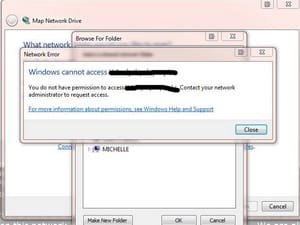
The error message says "Windows cannot access \\PC\Drive" You do not have permission to access _____. Contact your network admin to request access.
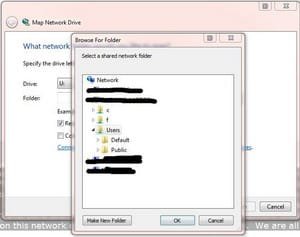
I am able to connect to the Users folder just fine, just not the drive that I need to connect to.
I have attached screenshots of the error messages.
Any help is greatly appreciated!
The drives are shared with everyone else on my network just fine and I have been through the normal issues, Network Discovery is ON, password protected sharing is OFF, etc. Like I said, all other computers on this network connect to these drives with no problems. We are all in the same workgroup and homegroup.
I'm trying to understand why this one laptop can't connect to 2 specific drives because it says I don't have permission. When trying to map from my PC to the laptop (basically just going the opposite way to test it) I get the same error.
The error message says "Windows cannot access \\PC\Drive" You do not have permission to access _____. Contact your network admin to request access.
I am able to connect to the Users folder just fine, just not the drive that I need to connect to.
I have attached screenshots of the error messages.
Any help is greatly appreciated!
Attachments
My Computer
At a glance
Windows 7 Home Premium 64 bitIntel Core i7-2600K 4.6 GHz Overclocked16 gb Corsair VengeanceATI FirePro V4800
- Computer Manufacturer/Model Number
- Custom Built
- OS
- Windows 7 Home Premium 64 bit
- CPU
- Intel Core i7-2600K 4.6 GHz Overclocked
- Motherboard
- ASUS P8P67 Deluxe
- Memory
- 16 gb Corsair Vengeance
- Graphics Card(s)
- ATI FirePro V4800
- Monitor(s) Displays
- Dell 30" UltraSharp, Samsung 28", HAANS-G 28"
- Screen Resolution
- 2560x1600, 1920x1080 x 2
- Hard Drives
- Crucial 128 GB SSD SATA 6Gb/s
- PSU
- Corsair AX850
- Case
- Corsair Graphite Series 600T Mid-Tower Case
- Cooling
- Corsair H60 High Performance Liquid CPU Cooler
- Keyboard
- Logitech Wave
- Mouse
- Logitech G700 Wireless Gaming
- Internet Speed
- Fiber 35mbs