Windows 7 Forums


Windows 7: Clear out Remote Desktop connections

20 Nov 2011   #1

DOS^
 
 
Clear out Remote Desktop connections

Hello,


this may be in the wrong section, please forgive for any mistake.

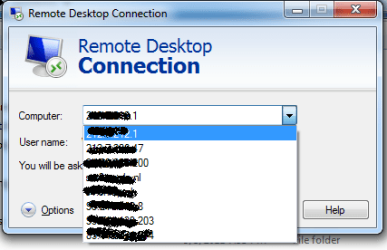
Can someone tell me how to completely clear out all Remote Desktop connections, including credentials.

Basically so when open Remote Desktop it appears you never connected to another system.


Kind regards,

Eldin
My System SpecsSystem Spec

20 Nov 2011   #2

Windows 7 Pro x64 SP1
Rockville, Maryland USA


Quote   Quote: Originally Posted by eldinv View Post
Hello,

this may be in the wrong section, please forgive for any mistake.

Can someone tell me how to completely clear out all Remote Desktop connections, including credentials.

Basically so when open Remote Desktop it appears you never connected to another system.
Kind regards,
Eldin
Eldinv, I had to do this and all I did was search for files with .rdp as the extentsion
and delete them.

Of course you have to make sure that hidden and system files are visible.
and in the search tell it to search for filename, *.rdp

Rich
My System SpecsSystem Spec
19 Dec 2011   #3

DOS^


Hello,

I made sure hidden files are visible and I searched out any *.rdp or .rdp files but can't seem to find any. It's very odd there's no simple clean button to clear previous connections.

Anyone else have a solution?


Kind regards,

Eldin
Attached Thumbnails
Clear out Remote Desktop connections-login.png  
My System SpecsSystem Spec
.


Reply

 Clear out Remote Desktop connections problems?


Thread Tools


Similar help and support threads for: Clear out Remote Desktop connections
Thread Forum
Stopping remote connections Network & Sharing
How to configure Remote Desktop to save frequent connections Network & Sharing
Remote Desktop Connections Network & Sharing
Which Solution: Remote Desktop? Virtual Desktop? Remote Terminal? Network & Sharing
No remote connections Network & Sharing


All times are GMT -5. The time now is 07:44 PM.


Seven Forums Android App Seven Forums IOS App Follow us on Facebook

Windows 7 Forums is an independent web site and has not been authorized,
sponsored, or otherwise approved by Microsoft Corporation.
"Windows 7" and related materials are trademarks of Microsoft Corp.
© Designer Media Ltd
  

1 2 3 4 5 6 7 8 9 10 11 12 13 14 15 16 17 18 19 20 21 22 23 24 25 26 27 28 29 30 31 32