Can't connect to internet thru Wireless or LAN, stuck on Identifying

RWLarsen

New member
Local time
4:56 PM
Messages
8
My netbook (an Asus Eee 1015PX) can't connect to the internet wirelessly, or by LAN. The process sticks at "identifying". I've tried everything I could think of: disabling and enabling both adapters, even uninstalling and reinstalling both. I tried using the built in troubleshooting guide, which gave no results, but suggested going online for help, or having a friend start a remote session.

Anyways, I've had this problem for about a week now, and I figure that now it's time to get some real help. Thanks folks, I appreciate it
 

My Computer My Computer

At a glance

Windows 7 Professional 32bit
OS
Windows 7 Professional 32bit
Hi RWLarsen, Welcome to Seven Forums.
Look in device manager to see what 'Network adapters' your pc uses.
 

My Computer My Computer

At a glance

Win7 H.Prem. 32bit+SP1
Computer Manufacturer/Model Number
Look in my Signature.
OS
Win7 H.Prem. 32bit+SP1
LAN: Atheros AR8152/8158 PCI-E Fast Ethernet Controller (NDIS 6.20)

Wireless: Atheros AR9285 Wireless Network Adapter
 

My Computer My Computer

At a glance

Windows 7 Professional 32bit
OS
Windows 7 Professional 32bit

My Computer My Computer

At a glance

Windows 7 Ultimate x64AMD Sempron Dual Core3GBNVIDIA GeForce 6150SE nForce 430
Computer Manufacturer/Model Number
Compaq Desktop
OS
Windows 7 Ultimate x64
CPU
AMD Sempron Dual Core
Memory
3GB
Graphics Card(s)
NVIDIA GeForce 6150SE nForce 430
Screen Resolution
1024x768
Hard Drives
150GB Sata
LAN: Atheros AR8152/8158 PCI-E Fast Ethernet Controller (NDIS 6.20)

Wireless: Atheros AR9285 Wireless Network Adapter
is their a yellow mark next to it? if so it means no driver is installed.
 

My Computer My Computer

At a glance

Win7 H.Prem. 32bit+SP1
Computer Manufacturer/Model Number
Look in my Signature.
OS
Win7 H.Prem. 32bit+SP1
@ Orbital Shark : Went through and removed the network. There was no change when I reconnected. It still sticks at "identifying"

@ Roderunner : There are no yellow marks anywhere on the device manager screen. Drivers were re-installed when I uninstalled and reinstalled the adapters, anyways.
 

My Computer My Computer

At a glance

Windows 7 Professional 32bit
OS
Windows 7 Professional 32bit
@ Roderunner : There are no yellow marks anywhere on the device manager screen. Drivers were re-installed when I uninstalled and reinstalled the adapters, anyways.
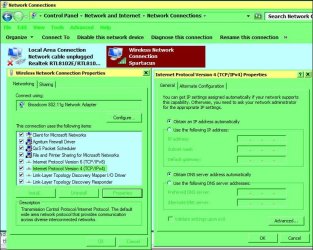
Can you post an image same as mine?

RR.jpg
 

My Computer My Computer

At a glance

Win7 H.Prem. 32bit+SP1
Computer Manufacturer/Model Number
Look in my Signature.
OS
Win7 H.Prem. 32bit+SP1
I would take a screenshot, but there's not really a way to get it from the netbook to here, so (unfortunately) I ended up taking a picture of the screen. Feels like the '90s again.
 

Attachments

  • L6aLw.jpg
    L6aLw.jpg
    100.6 KB · Views: 133

My Computer My Computer

At a glance

Windows 7 Professional 32bit
OS
Windows 7 Professional 32bit
Nice one Rob. Looks to me its your routers wireless settings. If you can access your router, change the SSID and password, use WPA2 if possible. Turn your pc OFF, reboot your router by unplugging it, wait 30 seconds and reconnect, wait till all lights show. While this is being done, go to Manage Wireless Networks, right click NPK38 and delete it, reboot netbook, enter new password and Pray.
 

My Computer My Computer

At a glance

Win7 H.Prem. 32bit+SP1
Computer Manufacturer/Model Number
Look in my Signature.
OS
Win7 H.Prem. 32bit+SP1
I'm not sure about that. If the router settings were causing problems, wouldn't every computer connected to the router be having trouble? And, shouldn't I be able to connect to the internet via LAN? This is the only computer that's having problems, and it only started last week.

I'm starting to seriously consider re-installing Windows, but I'd obviously like to keep that a last resort
 

My Computer My Computer

At a glance

Windows 7 Professional 32bit
OS
Windows 7 Professional 32bit
How many wired wireless pc's connect to the router?
 

My Computer My Computer

At a glance

Win7 H.Prem. 32bit+SP1
Computer Manufacturer/Model Number
Look in my Signature.
OS
Win7 H.Prem. 32bit+SP1
three computers, three phones, and this netbook. We've had the router for months, and never had problems like this before.
 

My Computer My Computer

At a glance

Windows 7 Professional 32bit
OS
Windows 7 Professional 32bit
Hi Rob, I see, said the blind man.
After composing my last post, when I clicked 'Post Quick Reply' box nothing happened. Just by chance, I noticed I had lost Internet Connection. First I looked at my wired PC, thinking it could be my Outpost Firewall Pro. It tends to block everything if something is waiting for my permission. It was not. PC was connected ok. I rebooted my router and came back to my Netbook, it was still not connected and gave a message that it was trying to connect to an IP Addess already in use. 5 minutes later it re connected on it own and has been ok since.
I know this is not helping you, but have a look here.

GB.JPG

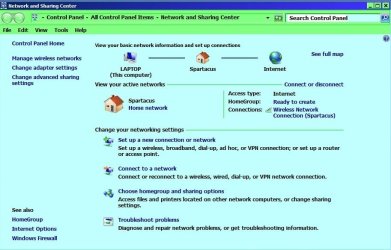
Open Network Sharing Center, when 'Identifying' stops flashing, click it. Post what happens.
 

My Computer My Computer

At a glance

Win7 H.Prem. 32bit+SP1
Computer Manufacturer/Model Number
Look in my Signature.
OS
Win7 H.Prem. 32bit+SP1
I can't click on "identifying" at all, as it does not stop flashing. Also, my settings for TCP/IPv4 are identical.
 

My Computer My Computer

At a glance

Windows 7 Professional 32bit
OS
Windows 7 Professional 32bit
Hi Rob, if it was'nt for bad luck you'd have no luck at all.
Go to Network adapters in device manager, right click them one at a time and select uninstall (Keep the drivers) then reboot your troublesome pc.
If, your still having trouble, it might be your firewall. Is it Windows FW or one you installed.?
 

My Computer My Computer

At a glance

Win7 H.Prem. 32bit+SP1
Computer Manufacturer/Model Number
Look in my Signature.
OS
Win7 H.Prem. 32bit+SP1
Still no dice. I'm using Window's own firewall, and have never installed my own.
 

My Computer My Computer

At a glance

Windows 7 Professional 32bit
OS
Windows 7 Professional 32bit
Back
Top