Windows 7 Forums


Windows 7: Can't connect to internet thru Wireless or LAN, stuck on Identifying

11 Dec 2011  
RWLarsen

Windows 7 Professional 32bit
8 posts
 
 
Can't connect to internet thru Wireless or LAN, stuck on Identifying

My netbook (an Asus Eee 1015PX) can't connect to the internet wirelessly, or by LAN. The process sticks at "identifying". I've tried everything I could think of: disabling and enabling both adapters, even uninstalling and reinstalling both. I tried using the built in troubleshooting guide, which gave no results, but suggested going online for help, or having a friend start a remote session.

Anyways, I've had this problem for about a week now, and I figure that now it's time to get some real help. Thanks folks, I appreciate it

My System SpecsSystem Spec

12 Dec 2011  
Roderunner

Win7 H.Prem. 32bit+SP1
1,780 posts
Scotland


Hi RWLarsen, Welcome to Seven Forums.
Look in device manager to see what 'Network adapters' your pc uses.
My System SpecsSystem Spec
12 Dec 2011  
RWLarsen

Windows 7 Professional 32bit
8 posts


LAN: Atheros AR8152/8158 PCI-E Fast Ethernet Controller (NDIS 6.20)

Wireless: Atheros AR9285 Wireless Network Adapter
My System SpecsSystem Spec
.


12 Dec 2011  
Orbital Shark

Windows 7 Ultimate x64
6,484 posts
Milton Keynes, United Kingdom


Hi,

You may want to try the following

Wireless Network - Remove

It can help with certain Wireless issues but it may also restore some default functionality.


Hope it helps
My System SpecsSystem Spec
12 Dec 2011  
Roderunner

Win7 H.Prem. 32bit+SP1
1,780 posts
Scotland


Quote   Quote: Originally Posted by RWLarsen View Post
LAN: Atheros AR8152/8158 PCI-E Fast Ethernet Controller (NDIS 6.20)

Wireless: Atheros AR9285 Wireless Network Adapter
is their a yellow mark next to it? if so it means no driver is installed.
My System SpecsSystem Spec
12 Dec 2011  
RWLarsen

Windows 7 Professional 32bit
8 posts


@ Orbital Shark : Went through and removed the network. There was no change when I reconnected. It still sticks at "identifying"

@ Roderunner : There are no yellow marks anywhere on the device manager screen. Drivers were re-installed when I uninstalled and reinstalled the adapters, anyways.
My System SpecsSystem Spec
12 Dec 2011  
Roderunner

Win7 H.Prem. 32bit+SP1
1,780 posts
Scotland


Quote   Quote: Originally Posted by RWLarsen View Post
@ Roderunner : There are no yellow marks anywhere on the device manager screen. Drivers were re-installed when I uninstalled and reinstalled the adapters, anyways.
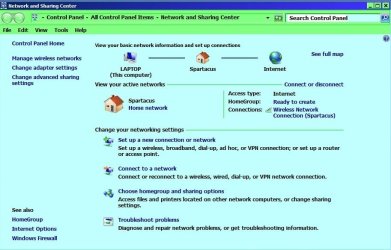
Can you post an image same as mine?

Can't connect to internet thru Wireless or LAN, stuck on Identifying-rr.jpg
My System SpecsSystem Spec
12 Dec 2011  
RWLarsen

Windows 7 Professional 32bit
8 posts


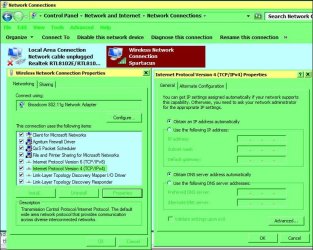
I would take a screenshot, but there's not really a way to get it from the netbook to here, so (unfortunately) I ended up taking a picture of the screen. Feels like the '90s again.
Attached Thumbnails
Can't connect to internet thru Wireless or LAN, stuck on Identifying-l6alw.jpg  
My System SpecsSystem Spec
12 Dec 2011  
Roderunner

Win7 H.Prem. 32bit+SP1
1,780 posts
Scotland


Nice one Rob. Looks to me its your routers wireless settings. If you can access your router, change the SSID and password, use WPA2 if possible. Turn your pc OFF, reboot your router by unplugging it, wait 30 seconds and reconnect, wait till all lights show. While this is being done, go to Manage Wireless Networks, right click NPK38 and delete it, reboot netbook, enter new password and Pray.
My System SpecsSystem Spec
12 Dec 2011  
RWLarsen

Windows 7 Professional 32bit
8 posts


I'm not sure about that. If the router settings were causing problems, wouldn't every computer connected to the router be having trouble? And, shouldn't I be able to connect to the internet via LAN? This is the only computer that's having problems, and it only started last week.

I'm starting to seriously consider re-installing Windows, but I'd obviously like to keep that a last resort
My System SpecsSystem Spec
Reply

 Can't connect to internet thru Wireless or LAN, stuck on Identifying problems?


Thread Tools


Similar help and support threads for: Can't connect to internet thru Wireless or LAN, stuck on Identifying
Thread Forum
Wireless network is stuck in an identifying loop. Pleae help Network & Sharing
How to get laptop to stop "identifying" wireless and connect? Network & Sharing
PC internet stuck on "Identifying". Network & Sharing
Connected to Network but no internet stuck on identifying Network & Sharing
Network is not connecting to internet, stuck on "identifying" & public Network & Sharing


All times are GMT -5. The time now is 05:05 AM.


Windows 7 Forums is an independent web site and has not been authorized,
sponsored, or otherwise approved by Microsoft Corporation.
"Windows 7" and related materials are trademarks of Microsoft Corp.
© Designer Media Ltd