Windows 7 Forums


Windows 7: Realtek RTL 8139/810x Ethernet controller problem.

02 Jan 2012   #1

Windows 7 Home Premium 64Bit
 
 
Realtek RTL 8139/810x Ethernet controller problem.

Hello,I recently reinstalled my Windows 7 Home premium.After the install I noticed "Ethernet Controller" under unknown devices in device manager.I've been installing diffirent drivers and such,but nothing helps.Thank you in advance.

Some Screenies:


My System SpecsSystem Spec

02 Jan 2012   #2

Windows 7 Professional (x64/SP1) / XP Pro
4th planet from the sun


Have a look at these Realtek Drivers

Download the Win 7 version and install manually. Install driver manually
My System SpecsSystem Spec
02 Jan 2012   #3

Windows 7 Ultimate x64 Service Pack 1
Doncaster, UK


Hi Wubz0r and welcome to Windows 7 Forums

Download the driver from Realtek here: Realtek

It is the second option down, Windows 7 Driver. Save the file, called Driver-Win7_6111_10202010.zip, to a suitable location and then right-click on it and choose Extract all... Accept the default location for the extracted files and click Extract.

Now, follow this Tutorial (remember that, although this shows the procedure for an Audio driver, it will in fact work for any driver whose device is listed): Device Manager - Install Driver - Vista Forums

So, in your case, you will need to expand the Network adapters section instead.
My System SpecsSystem Spec
.


02 Jan 2012   #4

Windows 7 Home Premium 64Bit


Quote   Quote: Originally Posted by Dwarf View Post
Hi Wubz0r and welcome to Windows 7 Forums

Download the driver from Realtek here: Realtek

It is the second option down, Windows 7 Driver. Save the file, called Driver-Win7_6111_10202010.zip, to a suitable location and then right-click on it and choose Extract all... Accept the default location for the extracted files and click Extract.

Now, follow this Tutorial (remember that, although this shows the procedure for an Audio driver, it will in fact work for any driver whose device is listed): Device Manager - Install Driver - Vista Forums

So, in your case, you will need to expand the Network adapters section instead.
Followed the same steps you pointed out in the tutorial:


I'll just install windows Vista.Thanks for the help.
My System SpecsSystem Spec
02 Jan 2012   #5

Windows 7 Professional (x64/SP1) / XP Pro
4th planet from the sun


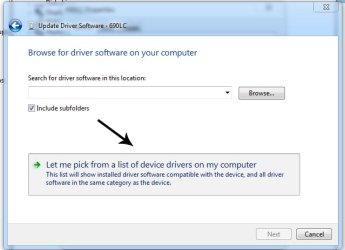
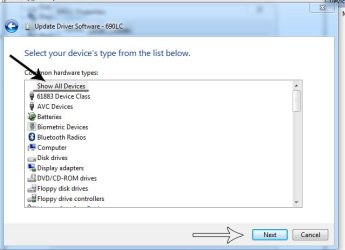
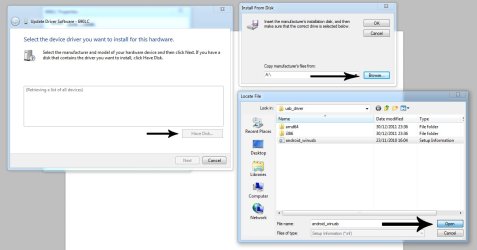
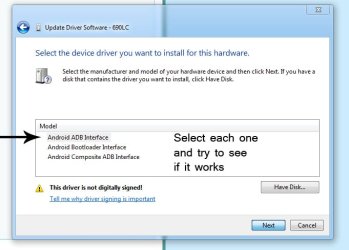
I think your searching for the driver. Did you use the 'Have disk'?

If not follow the same steps but instead of searching for folders on your drive, click 'let me pick'(check the images)

*I know there the wrong drivers on mine but it may work for you*

When browsing for the driver extracting them and place them in a folder in my documents
(it is a .inf file your looking for, keep all files together when extracting)
Attached Thumbnails
Realtek RTL 8139/810x Ethernet controller problem.-manual-install.jpg   Realtek RTL 8139/810x Ethernet controller problem.-manual-install2.jpg   Realtek RTL 8139/810x Ethernet controller problem.-manual-install3.jpg   Realtek RTL 8139/810x Ethernet controller problem.-manual-install4.jpg  
My System SpecsSystem Spec
08 Jan 2012   #6

Windows 7 Home Premium 64Bit


Hello,after messing around i discovered that the device cannot start and there is a driver installed allready? (On a fresh install)

Is the adapter broken?Do i need a new one?I'm jammed..Please help me!

Agin,some pictures..


My System SpecsSystem Spec
Reply

 Realtek RTL 8139/810x Ethernet controller problem. problems?


Thread Tools


Similar help and support threads for: Realtek RTL 8139/810x Ethernet controller problem.
Thread Forum
Ethernet controller problem Network & Sharing
Realtek RTL8139/810x Family Fast Ethernet NIC Drivers
Realtek 8139 drops the network build 7068 Network & Sharing
Realtek RTL8139/810x Family Fast Ethernet NI Drivers
Realtek RTL8139/810x Family Fast Ethernet NIC Drivers


All times are GMT -5. The time now is 08:12 AM.


Windows 7 Forums is an independent web site and has not been authorized,
sponsored, or otherwise approved by Microsoft Corporation.
"Windows 7" and related materials are trademarks of Microsoft Corp.
© Designer Media Ltd