tallship
New member
Hello 
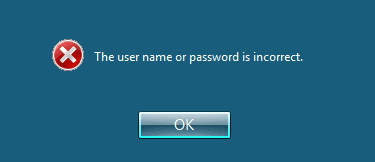
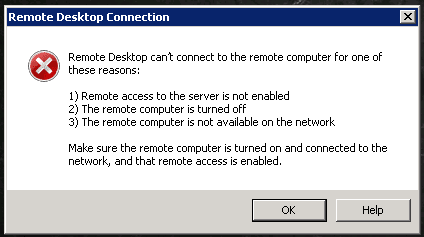
When I try to connect via remote desktop with http:/[email protected] I receive the following:


This occurs when I invoke RDP in the form rdp://[email protected]
Once i click on "OK", Then it shows my login avatar, with a password box, and upon providing my password credentials it returns to the screen above, so I know I'm getting through to the correct machine.
If I attempt to merely connect to the machine w/o providing a username, then I get no login prompt whatsoever.
If I try to connect from another windows box, I get the following:

I've set up RDP many times before, but it's been a while and I can't figure why I can't seem to login to my new Windows 7 Ultimate x64 box.

I've gone through the following pages at:
Why can’t I connect using Remote Desktop Connection?
Allow Remote Desktop connections from outside your home network
and in accordance with our very own tutorial here: http://www.sevenforums.com/tutorials/3922-remote-desktop-connection-rdc-network.html
To be clear, I chose:
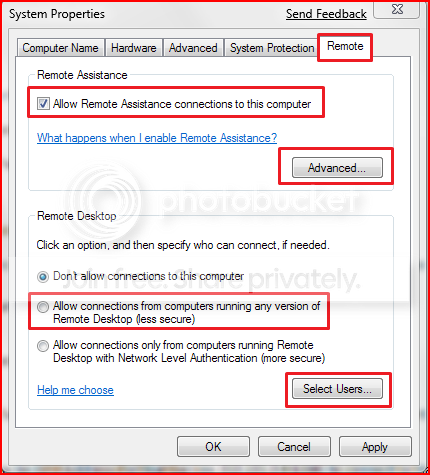
These are all things I know how to do already, but I've double and triple checked my configs to no avail.
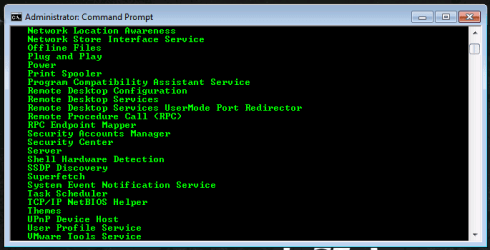
The service is running as per "net start":

The port is open too, as nmap reports below:
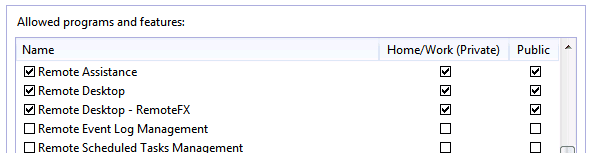
Windows firewall wasn't running, so I started it and enabled RDP connections, as the screenie below indicates:

The machine has a public IP addy, is on a routed network, and other windows machines on that IP block have no problems accepting connections via RDP. I don't know why nmap is reporting that the port is 'filtered' either, since I'm getting a login prompt when I specify the username (I added the user, and created another user and added that user too, to the Administrators, Users, and Remote Desktop Users groups).
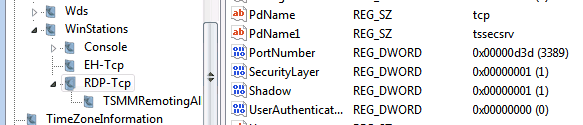
Here's the value for the key in my HKEY_LOCAL_MACHINE\System\CurrentControlSet\Control\TerminalServer\WinStations\RDP-Tcp\PortNumber:

I've installed Mikogo, and VNC server, and can connect to the box via either of those methods without any issues, but want to be able to connect via the native RDP too.
Any assistance would be most appreciated, I'm at a loss to understand why I can't connect.
You're thoughts, comments?
Thanks
.
When I try to connect via remote desktop with http:/[email protected] I receive the following:
This occurs when I invoke RDP in the form rdp://[email protected]
Once i click on "OK", Then it shows my login avatar, with a password box, and upon providing my password credentials it returns to the screen above, so I know I'm getting through to the correct machine.
If I attempt to merely connect to the machine w/o providing a username, then I get no login prompt whatsoever.
If I try to connect from another windows box, I get the following:
I've set up RDP many times before, but it's been a while and I can't figure why I can't seem to login to my new Windows 7 Ultimate x64 box.
I've gone through the following pages at:
Why can’t I connect using Remote Desktop Connection?
Allow Remote Desktop connections from outside your home network
and in accordance with our very own tutorial here: http://www.sevenforums.com/tutorials/3922-remote-desktop-connection-rdc-network.html
To be clear, I chose:
Seen here in this shot:Allow connections from computers running any version of Remote Desktop (less secure)
These are all things I know how to do already, but I've double and triple checked my configs to no avail.
The service is running as per "net start":
The port is open too, as nmap reports below:
Code:
$ nmap -p3389 -PN x.x.x.x # IP Address redacted

Starting Nmap 5.21 ( http://nmap.org ) at 2012-02-01 07:19 PST
Nmap scan report for x.x.x.x
Host is up.
PORT     STATE    SERVICE
3389/tcp filtered ms-term-serv

Nmap done: 1 IP address (1 host up) scanned in 13.29 secondsThe machine has a public IP addy, is on a routed network, and other windows machines on that IP block have no problems accepting connections via RDP. I don't know why nmap is reporting that the port is 'filtered' either, since I'm getting a login prompt when I specify the username (I added the user, and created another user and added that user too, to the Administrators, Users, and Remote Desktop Users groups).
Here's the value for the key in my HKEY_LOCAL_MACHINE\System\CurrentControlSet\Control\TerminalServer\WinStations\RDP-Tcp\PortNumber:
I've installed Mikogo, and VNC server, and can connect to the box via either of those methods without any issues, but want to be able to connect via the native RDP too.
Any assistance would be most appreciated, I'm at a loss to understand why I can't connect.
You're thoughts, comments?
Thanks
.
Attachments
Last edited:
My Computer
At a glance
Windows 7 Ultimate x64
- OS
- Windows 7 Ultimate x64