Windows 7 Forums Search
Welcome to Windows 7 Forums. Our forum is dedicated to helping you find solutions with any problems, errors or issues you are experiencing with Windows 7. The Windows 7 forum also covers news and updates and has an extensive Windows 7 tutorial section that covers a wide range of tips and tricks.


Windows 7 - internet connection setup in Network and Sharing Centre corrupt!

 
02-03-2012   #1


windows 7 Ultimate 32 bit


internet connection setup in Network and Sharing Centre corrupt!

hi all,

I should state first of all i'm a newbie to computers so if you have any responses please write in layman terms.

I connect to the web through a modem which is connected to a D-link router, this worked fine until about 2 weeks ago. I can connect to net but the set up in doing so has completely changed from when I first used the computer.

first the D-link doesnt appear when searching for devices when I try to start a new network connection. Although I'm able to use the web through the modem and router, the other computers no longer see the network via there wi-fi.

My Networking and Sharing Centre seems to have reverted to a basic layout or set up, I can only connect through something called 'Wan Miniport (pppoe)'.
where as when I first setup a connection I was able to set up the following
SSID:
Channel: recommended
Encryption: WPA2-PSK
Password:
I dont have these options any more, not even when I remove all my network connections and try a completely new network.

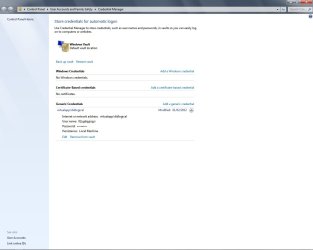
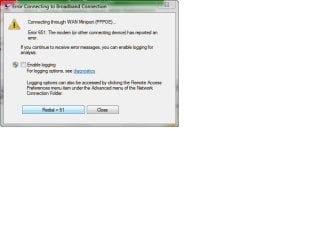
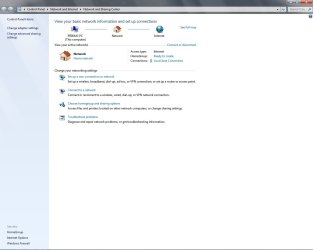
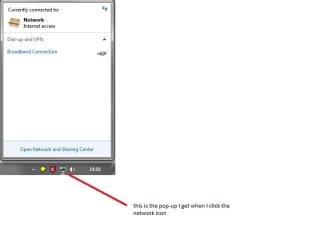
I am trying to explain my problem but I'm not sure if I can, but to help I've added pics.

Note the second picture down, the username and password are not mine!!!


can anyone make sense of my problem, thanks
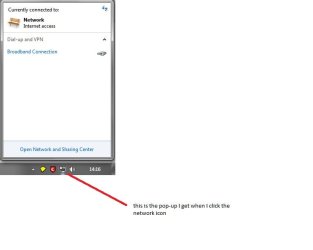

internet connection setup in Network and Sharing Centre corrupt!-network-icon.jpg

internet connection setup in Network and Sharing Centre corrupt!-credential-manager-.jpg

internet connection setup in Network and Sharing Centre corrupt!-connection-error.jpg

Attached Thumbnails
internet connection setup in Network and Sharing Centre corrupt!-wan-miniport-only-option-new-internet-connection.jpg  
My System SpecsSystem Spec
02-03-2012   #2


Windows 7 Home Premium 32-Bit - Build 7600 SP1


Let's start at the beginning. Try unplugging the router from the electric plug and from the PC. Leave it unplugged for about two minutes. Plug the router in the wall and then into your computer. See if that does anything different than what you have now. Let me know if your router is wireless or is connected to your PC. Thanks,
My System SpecsSystem Spec
02-03-2012   #3


Windows 7 Home Premium 64-bit


As bigmck says report back what happens after doing this - however, it sounds like you are using a second hand router with someone elses settings still in it ?
If this is the case you should do a hard reset of the router - there is normally a hole in the back where you push a sharp object into for 10secs so that the router is completely reset to when it left the factory. Then you can add your own information supplied by your ISP (Internet Service Provider).

Let me know what make and type this is so we can help you further, if required.
My System SpecsSystem Spec
.


02-03-2012   #4


Windows 7 Home Premium 64-bit


As bigmck says report back what happens after doing this - however, it sounds like you are using a second hand router with someone elses settings still in it ?
If this is the case you should do a hard reset of the router - this is normally a hole in the back where you push a sharp object into for 10secs so that the router is completely reset to when it left the facory. Then you can add your own information supplied by your ISPO (Internet Service Provider). Let me know what make and type this is so to help you further.
My System SpecsSystem Spec
02-05-2012   #5


windows 7 Ultimate 32 bit


thanks for replies Bigmac, ibshaw. sorry for no immediate replies but connection is a bit iffy.

I've tried to disconecting modem from pc and unplugging from socket this has not worked. Please note what is happening with my internet connection and Network and Sharing Centre wasnt happening 2 weeks ago, then it was all fine, this problem has come about since then and suddenly.


pc connected to wireless router, wireless router connected to modem, both are brand new products supplied as part of a tv, phone and web package from a large company and they were doing what they were supposed to do until about 2weeks ago. i.e laptops could see the name to the wireless network I setup, now they only see the neighbours. Although as i write am running connected through router and through modem.

I'm almost certain the problem isnt with modem or wireless router, its like I'm connected to the internet but windows 7 doesnt know I am or know how I am !

I've reset both router and modem, reinstalled the network setup with D-link cd, but still no change. I phoned isp they said my router seemed fine from their end. It like I said, its like I'm connected to the internet but windows 7 doesnt know I am or know how I am !
My System SpecsSystem Spec
02-05-2012   #6


Windows 7 Home Premium 32-Bit - Build 7600 SP1


Have you started from the beginning and setup your network in windows again?
My System SpecsSystem Spec
02-06-2012   #7


windows 7 Ultimate 32 bit


i have,
the dlink setup which went fine, entered the SSID, password etc, but the problem hasnt gone away

internet connection setup in Network and Sharing Centre corrupt!-network-map.jpg
My System SpecsSystem Spec
02-06-2012   #8


Windows 7 Home Premium 64-bit


Hi again, did you do a hard reset on the router as I suggested earlier - if you have a separate modem and router you may have to do it with both as I am used to a combined unit. From your description of the problem there is clearly a previous setup (i.e. user and password) that is showing up that needs to be removed. Also you need to find out what wireless device your system uses (check the spec on the internet or user manual you got with the system) then uninstall or disable any other that show up in network connections. If you don't know how to do all of this there will be tutorials on this site as there you can find out about it or I can help further.
The aim should be to get a clean install of YOUR user ID and password and any other unique settings you may need for your ISP.
My System SpecsSystem Spec
02-06-2012   #9


windows 7 Ultimate 32 bit


hi ibshaw,
firstly, yes i reset each individually before rerunning the D-link setup
secondly, I dont use a wireless function to connect to internet, the routers wi-fi ability is for every one else in the house.
internet connection setup in Network and Sharing Centre corrupt!-home-network.jpginternet connection setup in Network and Sharing Centre corrupt!-network-icon.jpg

but the network I set up with D-link doesnt appear as it once did
My System SpecsSystem Spec
02-06-2012   #10


Windows 7 Home Premium 64-bit


Not sure I'm completely following this - you have one wired (ethernet cable) system and a few wireless systems right ? The diagrams you are showing above are for the wired one and the icon you see is the standard Windows 7 icon for a cable connected system, so everything looks normal. What I am trying to find out is.... do they all connect to the internet or not? have you got rid of the unknown name and pw that you had before - if not, then the resets havn't worked. I'm trying to help but I'm not exactly sure what the problem is ?
My System SpecsSystem Spec
Reply

 internet connection setup in Network and Sharing Centre corrupt! problems?


Thread Tools


Similar Threads for: internet connection setup in Network and Sharing Centre corrupt!
Thread Forum
Trouble sharing an internet connection through HOC network. Network & Sharing
Internet connection works but network icon shows no network connection Network & Sharing
Bluetooth Network Connection not listed on Internet Sharing tab Network & Sharing
Solved Net Adapter works but not visible in Network and Sharing centre W7 Network & Sharing
Is internet sharing possible with this setup? Network & Sharing


All times are GMT -5. The time now is 04:31 PM.


Windows 7 Forums is an independent web site and has not been authorized,
sponsored, or otherwise approved by Microsoft Corporation.
"Windows 7" and related materials are trademarks of Microsoft Corp.
© Designer Media Ltd
  

1 2 3 4 5 6 7 8 9 10 11 12 13 14 15 16 17 18 19 20 21 22 23 24 25 26 27 28 29 30