Windows 7 Forums


Windows 7: WiFi - No Connections

23 Feb 2012   #1

Windows 7 Home Premium 64bit. + SP1
 
 
WiFi - No Connections

Hi...

A brief description what I was doing to get into this situation.


I've a Dell Studio 1555 running Windows 7 Home Premium 64bit, it's installed with a Dell Wireless mini card 1397 which I've been trying to change to an Intel 533AN_HMW ( type N ) which I was unable to get it to work.
Swopping between the 2 cards wasn't a problem until I removed all the wireless applications, Dell & Broadcom, whilst trying to get the new card working, thinking it shouldn't be a problem because I had all the original drivers.
Now after changing back to the original Dell card I now cannot get that to work, Windows 7 has identified the card & installed 'Dell Wireless 1397 WLAN mini-card' driver, but there are no wireless connections visible.
  • I can connect via wifi to my router with my smartphone so I know that is working.
  • I'm not sure if the WLAN is switched on, normally done using the 'F2' function key.
  • I've tried downloading new drivers from Dell with no change in the state.
  • Tried a system restore but this fails suggesting problems with the AV - turning this off doesn't have any effect.
  • IPCONFIG /all doesn't show the adaptor.

Any further help greatly appreciated. Thanks Mick
My System SpecsSystem Spec

23 Feb 2012   #2

Windows 7 Ultimate 64bit


You need to go to dell website and download driver for your adapter and possibly broadcom.
The dell site lets you enter your system details to search for drivers.

Download drivers from other computer if you can and transfer to the dell.

Hope this works,
My System SpecsSystem Spec
23 Feb 2012   #3

Windows 7 Home Premium 64bit. + SP1


Thanks for the suggestion but I've already tried several different drivers Broadcom & Dell none seem the change the symptoms...

The only other thing I can think of trying is reload Windows 7 but wanted to explore all other options first.
My System SpecsSystem Spec
.


23 Feb 2012   #4

Win7 H.Prem. 32bit+SP1
Scotland


This PDF may look at first to be unrelated to your problem but it might help. Network Unblock.pdf
My System SpecsSystem Spec
23 Feb 2012   #5

Windows 7 Ult, Windows 8 Pro,
San Diego


Quote   Quote: Originally Posted by stormygale View Post
Hi...

A brief description what I was doing to get into this situation.

I've a Dell Studio 1555 running Windows 7 Home Premium 64bit, it's installed with a Dell Wireless mini card 1397 which I've been trying to change to an Intel 533AN_HMW ( type N ) which I was unable to get it to work.
Swopping between the 2 cards wasn't a problem until I removed all the wireless applications, Dell & Broadcom, whilst trying to get the new card working, thinking it shouldn't be a problem because I had all the original drivers.
Now after changing back to the original Dell card I now cannot get that to work, Windows 7 has identified the card & installed 'Dell Wireless 1397 WLAN mini-card' driver, but there are no wireless connections visible.
  • I can connect via wifi to my router with my smartphone so I know that is working.
  • I'm not sure if the WLAN is switched on, normally done using the 'F2' function key.
  • I've tried downloading new drivers from Dell with no change in the state.
  • Tried a system restore but this fails suggesting problems with the AV - turning this off doesn't have any effect.
  • IPCONFIG /all doesn't show the adaptor.
Any further help greatly appreciated. Thanks Mick
This Dell article seems to relate to your problem. It might be worth while to try the suggestions there.

studio 1555 wifi driver problem - Networking, Internet, Wireless Forum - Networking, Internet, Wireless - Dell Community
My System SpecsSystem Spec
23 Feb 2012   #6

Windows 7 Home Premium 64bit. + SP1


Thanks Chev & Roderunner

I'll take a look at your suggestions tomorrow & let you know the outcome.. I'm not at home at present.
My System SpecsSystem Spec
25 Feb 2012   #7

Windows 7 Home Premium 64bit. + SP1


Hi...

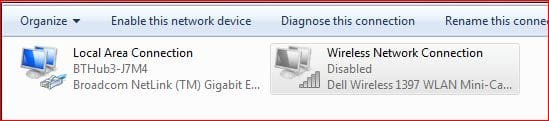
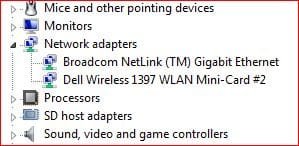
None of the above guides have helped I'm still unable to enable the wireless connection even though device manager is showing the adapter as enabled... I've attached screen shot to show what i mean.
Attached Thumbnails
WiFi - No Connections-networkconns.jpg  
Attached Images
 
My System SpecsSystem Spec
25 Feb 2012   #8

Windows 7 Home Premium 64bit. + SP1


Further update - I've just installed a Belkin usb wifi adapter - this has installed OK & the wireless connection shows as 'enabled'.
The indicator on the adapter is flashing so seems to be working but there are no wireless connections available.

Just for clarification I can connected to my router via the smart-phone & can see my neighbors routers.

Is there something in windows stopping the connections ?
My System SpecsSystem Spec
25 Feb 2012   #9

Win7 H.Prem. 32bit+SP1
Scotland


Check your 'Advanced adapter settings' as in my pdf. File sharing.pdf
My System SpecsSystem Spec
25 Feb 2012   #10

Windows 7 Home Premium 64bit. + SP1


Thanks for the further input, I've already tried the settings but made no difference. Looks as though 's a re-install of Windows 7.
My System SpecsSystem Spec
Reply

 WiFi - No Connections problems?


Thread Tools


Similar help and support threads for: WiFi - No Connections
Thread Forum
How do I get windows to use 2 connections simultaneously? 3g usb+wifi. Network & Sharing
Solved two simultaneous wifi connections on one computer Network & Sharing
Using multiple WiFi connections synchronously beneficial? Network & Sharing
Software to find used WiFi connections Network & Sharing
two different WiFi connections on a single laptop Network & Sharing


All times are GMT -5. The time now is 09:34 AM.


Seven Forums Android App Seven Forums IOS App Follow us on Facebook

Windows 7 Forums is an independent web site and has not been authorized,
sponsored, or otherwise approved by Microsoft Corporation.
"Windows 7" and related materials are trademarks of Microsoft Corp.
© Designer Media Ltd
  

1 2 3 4 5 6 7 8 9 10 11 12 13 14 15 16 17 18 19 20 21 22 23 24 25 26 27 28 29 30 31 32