| Windows 7: Unidentified Network LAN to router won't connect. |
23 Feb 2012
|
#1 | | |
Unidentified Network LAN to router won't connect. I have tried everything I, and others on many forums, can think of to fix this issue. I have tried static network settings, re installing my network card, restarting winsock, disabling bonjour, route delete 0.0.0.0, editing the group policy to change unidentified networks to work networks, and many others. The same PC booting to linux does not have an issue. It connects to the router and I have internet. This problem has exhausted my knowledge and resources. This computer is my fathers and it had a virus that messed with a number of network settings. I removed the virus and have a wireless USB adapter working right at the moment; however I would like to get the LAN working. The LAN won't connect to anything. Not the router, laptop via crossover cable, or cable modem. The PC has Microsoft Windows 7 x64 Ultimate / Ubuntu 11.10. Integrated LAN.
Here is the ifconfig from linuxmint: Code: mint ~ # ifconfig -a
eth0 Link encap:Ethernet HWaddr 00:22:15:ee:ae:d0
inet addr:192.168.1.12 Bcast:192.168.1.255 Mask:255.255.255.0
inet6 addr: fe80::222:15ff:feee:aed0/64 Scope:Link
UP BROADCAST RUNNING MULTICAST MTU:1500 Metric:1
RX packets:1812 errors:0 dropped:0 overruns:0 frame:0
TX packets:1329 errors:0 dropped:0 overruns:0 carrier:0
collisions:0 txqueuelen:1000
RX bytes:2038462 (2.0 MB) TX bytes:149297 (149.2 KB)
Interrupt:18
lo Link encap:Local Loopback
inet addr:127.0.0.1 Mask:255.0.0.0
inet6 addr: ::1/128 Scope:Host
UP LOOPBACK RUNNING MTU:16436 Metric:1
RX packets:20 errors:0 dropped:0 overruns:0 frame:0
TX packets:20 errors:0 dropped:0 overruns:0 carrier:0
collisions:0 txqueuelen:0
RX bytes:1120 (1.1 KB) TX bytes:1120 (1.1 KB)
wlan0 Link encap:Ethernet HWaddr e0:91:f5:1b:ee:8a
UP BROADCAST MULTICAST MTU:1500 Metric:1
RX packets:0 errors:0 dropped:0 overruns:0 frame:0
TX packets:0 errors:0 dropped:0 overruns:0 carrier:0
collisions:0 txqueuelen:1000
RX bytes:0 (0.0 B) TX bytes:0 (0.0 B) Here is my Windows 7 x64 ipconfig /all: Code: C:\Windows\system32>ipconfig /all
Windows IP Configuration
Host Name . . . . . . . . . . . . : Kirby-PC
Primary Dns Suffix . . . . . . . :
Node Type . . . . . . . . . . . . : Hybrid
IP Routing Enabled. . . . . . . . : No
WINS Proxy Enabled. . . . . . . . : No
Wireless LAN adapter Wireless Network Connection 2:
Media State . . . . . . . . . . . : Media disconnected
Connection-specific DNS Suffix . :
Description . . . . . . . . . . . : Microsoft Virtual WiFi Miniport Adapter
Physical Address. . . . . . . . . : E0-91-F5-1B-EE-8A
DHCP Enabled. . . . . . . . . . . : Yes
Autoconfiguration Enabled . . . . : Yes
Wireless LAN adapter Netgear Wireless:
Connection-specific DNS Suffix . :
Description . . . . . . . . . . . : NETGEAR WG111v3 Wireless-G USB Adapter
Physical Address. . . . . . . . . : E0-91-F5-1B-EE-8A
DHCP Enabled. . . . . . . . . . . : Yes
Autoconfiguration Enabled . . . . : Yes
Link-local IPv6 Address . . . . . : fe80::5c18:dd84:d1fa:cddf%19(Preferred)
IPv4 Address. . . . . . . . . . . : 192.168.1.6(Preferred)
Subnet Mask . . . . . . . . . . . : 255.255.255.0
Lease Obtained. . . . . . . . . . : Thursday, February 23, 2012 1:29:04 PM
Lease Expires . . . . . . . . . . : Friday, February 24, 2012 1:29:04 PM
Default Gateway . . . . . . . . . : 192.168.1.1
DHCP Server . . . . . . . . . . . : 192.168.1.1
DHCPv6 IAID . . . . . . . . . . . : 283152885
DHCPv6 Client DUID. . . . . . . . : 00-01-00-01-13-2A-3C-41-00-22-15-EE-AE-D0
DNS Servers . . . . . . . . . . . : 192.168.1.1
NetBIOS over Tcpip. . . . . . . . : Enabled
Ethernet adapter LAN:
Connection-specific DNS Suffix . :
Description . . . . . . . . . . . : Marvell Yukon 88E8001/8003/8010 PCI Gigab
it Ethernet Controller
Physical Address. . . . . . . . . : 00-22-15-EE-AE-D0
DHCP Enabled. . . . . . . . . . . : Yes
Autoconfiguration Enabled . . . . : Yes
Autoconfiguration IPv4 Address. . : 169.254.14.251(Preferred)
Subnet Mask . . . . . . . . . . . : 255.255.0.0
Default Gateway . . . . . . . . . :
NetBIOS over Tcpip. . . . . . . . : Enabled
Tunnel adapter isatap.{921474D8-A698-4C22-A364-F36791C7AA04}:
Media State . . . . . . . . . . . : Media disconnected
Connection-specific DNS Suffix . :
Description . . . . . . . . . . . : Microsoft ISATAP Adapter
Physical Address. . . . . . . . . : 00-00-00-00-00-00-00-E0
DHCP Enabled. . . . . . . . . . . : No
Autoconfiguration Enabled . . . . : Yes
Tunnel adapter Local Area Connection* 11:
Connection-specific DNS Suffix . :
Description . . . . . . . . . . . : Teredo Tunneling Pseudo-Interface
Physical Address. . . . . . . . . : 00-00-00-00-00-00-00-E0
DHCP Enabled. . . . . . . . . . . : No
Autoconfiguration Enabled . . . . : Yes
IPv6 Address. . . . . . . . . . . : 2001:0:4137:9e76:38ac:2919:e78b:6510(Pref
erred)
Link-local IPv6 Address . . . . . : fe80::38ac:2919:e78b:6510%15(Preferred)
Default Gateway . . . . . . . . . : ::
NetBIOS over Tcpip. . . . . . . . : Disabled
Tunnel adapter isatap.{613C2F88-1164-42AC-8877-627B794D5781}:
Media State . . . . . . . . . . . : Media disconnected
Connection-specific DNS Suffix . :
Description . . . . . . . . . . . : Microsoft ISATAP Adapter #3
Physical Address. . . . . . . . . : 00-00-00-00-00-00-00-E0
DHCP Enabled. . . . . . . . . . . : No
Autoconfiguration Enabled . . . . : Yes
C:\Windows\system32> Here is my Windows 7 x64 route print -4: Code: C:\Windows\system32>route print -4
===========================================================================
Interface List
20...e0 91 f5 1b ee 8a ......Microsoft Virtual WiFi Miniport Adapter
19...e0 91 f5 1b ee 8a ......NETGEAR WG111v3 Wireless-G USB Adapter
17...00 22 15 ee ae d0 ......Marvell Yukon 88E8001/8003/8010 PCI Gigabit Ethern
et Controller
1...........................Software Loopback Interface 1
23...00 00 00 00 00 00 00 e0 Microsoft ISATAP Adapter
15...00 00 00 00 00 00 00 e0 Teredo Tunneling Pseudo-Interface
25...00 00 00 00 00 00 00 e0 Microsoft ISATAP Adapter #3
===========================================================================
IPv4 Route Table
===========================================================================
Active Routes:
Network Destination Netmask Gateway Interface Metric
0.0.0.0 0.0.0.0 192.168.1.1 192.168.1.6 25
127.0.0.0 255.0.0.0 On-link 127.0.0.1 306
127.0.0.1 255.255.255.255 On-link 127.0.0.1 306
127.255.255.255 255.255.255.255 On-link 127.0.0.1 306
169.254.0.0 255.255.0.0 On-link 169.254.14.251 276
169.254.14.251 255.255.255.255 On-link 169.254.14.251 276
169.254.255.255 255.255.255.255 On-link 169.254.14.251 276
192.168.1.0 255.255.255.0 On-link 192.168.1.6 281
192.168.1.6 255.255.255.255 On-link 192.168.1.6 281
192.168.1.255 255.255.255.255 On-link 192.168.1.6 281
224.0.0.0 240.0.0.0 On-link 127.0.0.1 306
224.0.0.0 240.0.0.0 On-link 169.254.14.251 276
224.0.0.0 240.0.0.0 On-link 192.168.1.6 281
255.255.255.255 255.255.255.255 On-link 127.0.0.1 306
255.255.255.255 255.255.255.255 On-link 169.254.14.251 276
255.255.255.255 255.255.255.255 On-link 192.168.1.6 281
===========================================================================
Persistent Routes:
None
C:\Windows\system32> | My System Specs |
| System Manufacturer/Model Number Home Made OS Windows 7 CPU Core 2 Duo 3.2GH Motherboard MSI G33-M Memory 4GB Graphics Card GeForce GTX 470 Sound Card HTO Striker 7.1 Monitor(s) Displays LG Flatron Screen Resolution 1680x1050 Keyboard Razer BlackWidow Mouse Razer Lachesis Case Smilodon Cooling Air Hard Drives 4 HDD's Internet Speed 5 Mb/s |
23 Feb 2012
|
#2 | | Windows 7 Ultimate x64 Service Pack 1 Doncaster, UK |
The fact that you can connect when running Linux but not Windows means that the hardware itself is functional. This would probably be a driver issue. In Device Manager, look to see if there is a warning triangle in the Network adapter section. | My System Specs | | System Manufacturer/Model Number Dwarf Dwf/11/2012 OS Windows 7 Ultimate x64 Service Pack 1 CPU Intel Core-i5-3570K 4-core @ 3.4GHz (Ivy Bridge) (OC 4.2GHz) Motherboard ASRock Z77 Extreme4-M Memory 4 x 4GB DDR3-1600 Corsair Vengeance CMZ8GX3M2A1600C9B (16GB) Graphics Card 2 x AMD Radeon HD7770 1GB CrossFired (OC 1100MHz/1250MHz) Sound Card Realtek High Definition on board solution (ALC 898) Monitor(s) Displays ViewSonic VA1912w Widescreen (VGA) Screen Resolution 1440x900 Keyboard Microsoft Comfort Curve Keyboard 3000 (USB) Mouse Microsoft Comfort Mouse 3000 for Business (USB) PSU XFX Pro Series 850W Semi-Modular Case Gigabyte IF233 Cooling 1 x 120mm Front Inlet 1 x 120mm Rear Exhaust Hard Drives OCZ Agility 3 SSD 120GB SATA III x2 (RAID 0)
Samsung HD501LJ 500GB SATA II x2
Hitachi HDS721010CLA332 1TB SATA II
Iomega 1.5TB Ext USB 2.0
WD 2.0TB Ext USB 3.0 Internet Speed NetGear DG834Gv3 ADSL Modem/Router (Ethernet) ~4.0 Mb/s (O2) Antivirus Avast! 7.0.1474 Browser IE 9 Other Info Optical Drive: HL-DT-ST BD-RE BH10LS30 SATA Bluray
Lexmark S305 Printer/Scanner/Copier (USB)
CTF-430 Tablet & Pen
WEI Score: 7.7/7.9/7.4/7.4/7.9
Asus Eee PC 1011PX Netbook (Windows 7 x86 Starter) |
23 Feb 2012
|
#3 | | |
The driver is functioning normally according to the manager. I have reinstalled the driver a dozen times with the manufacturer and windows update drivers. Neither seem to help. | My System Specs | | System Manufacturer/Model Number Home Made OS Windows 7 CPU Core 2 Duo 3.2GH Motherboard MSI G33-M Memory 4GB Graphics Card GeForce GTX 470 Sound Card HTO Striker 7.1 Monitor(s) Displays LG Flatron Screen Resolution 1680x1050 Keyboard Razer BlackWidow Mouse Razer Lachesis Case Smilodon Cooling Air Hard Drives 4 HDD's Internet Speed 5 Mb/s |
24 Feb 2012
|
#4 | | Windows 7 Ultimate x64 Service Pack 1 Doncaster, UK |
Just noticed that the assigned address is in the 169.XXX.XXX.XXX range. This indicates that the DHCP server was unable to provide an address, and so Windows automatically issued one in the above range.
See if the following videos (note that the audio on the first one is not very loud) help: | My System Specs | | System Manufacturer/Model Number Dwarf Dwf/11/2012 OS Windows 7 Ultimate x64 Service Pack 1 CPU Intel Core-i5-3570K 4-core @ 3.4GHz (Ivy Bridge) (OC 4.2GHz) Motherboard ASRock Z77 Extreme4-M Memory 4 x 4GB DDR3-1600 Corsair Vengeance CMZ8GX3M2A1600C9B (16GB) Graphics Card 2 x AMD Radeon HD7770 1GB CrossFired (OC 1100MHz/1250MHz) Sound Card Realtek High Definition on board solution (ALC 898) Monitor(s) Displays ViewSonic VA1912w Widescreen (VGA) Screen Resolution 1440x900 Keyboard Microsoft Comfort Curve Keyboard 3000 (USB) Mouse Microsoft Comfort Mouse 3000 for Business (USB) PSU XFX Pro Series 850W Semi-Modular Case Gigabyte IF233 Cooling 1 x 120mm Front Inlet 1 x 120mm Rear Exhaust Hard Drives OCZ Agility 3 SSD 120GB SATA III x2 (RAID 0)
Samsung HD501LJ 500GB SATA II x2
Hitachi HDS721010CLA332 1TB SATA II
Iomega 1.5TB Ext USB 2.0
WD 2.0TB Ext USB 3.0 Internet Speed NetGear DG834Gv3 ADSL Modem/Router (Ethernet) ~4.0 Mb/s (O2) Antivirus Avast! 7.0.1474 Browser IE 9 Other Info Optical Drive: HL-DT-ST BD-RE BH10LS30 SATA Bluray
Lexmark S305 Printer/Scanner/Copier (USB)
CTF-430 Tablet & Pen
WEI Score: 7.7/7.9/7.4/7.4/7.9
Asus Eee PC 1011PX Netbook (Windows 7 x86 Starter) |
24 Feb 2012
|
#5 | | |
I have done the steps in the videos before, however I did them again hoping they would work this time. Unfortunately it did not. | My System Specs | | System Manufacturer/Model Number Home Made OS Windows 7 CPU Core 2 Duo 3.2GH Motherboard MSI G33-M Memory 4GB Graphics Card GeForce GTX 470 Sound Card HTO Striker 7.1 Monitor(s) Displays LG Flatron Screen Resolution 1680x1050 Keyboard Razer BlackWidow Mouse Razer Lachesis Case Smilodon Cooling Air Hard Drives 4 HDD's Internet Speed 5 Mb/s |
24 Feb 2012
|
#6 | | |
It seems it won't connect to the router at all. It says that it cannot get an ip address and that the default gateway does not exist. I would suspect the dhcp service isn't working, restarting the service then plugging in the LAN cable gets a home network to show up with Internet access, but it's just saying that. It doesn't have Internet access or connectivity to the router (cannot ping gateway). It later reflects that in the network and sharing center.
Ps. The router is brand new and working fine. I have tested it with numerous devices on all ports. | My System Specs | | System Manufacturer/Model Number Home Made OS Windows 7 CPU Core 2 Duo 3.2GH Motherboard MSI G33-M Memory 4GB Graphics Card GeForce GTX 470 Sound Card HTO Striker 7.1 Monitor(s) Displays LG Flatron Screen Resolution 1680x1050 Keyboard Razer BlackWidow Mouse Razer Lachesis Case Smilodon Cooling Air Hard Drives 4 HDD's Internet Speed 5 Mb/s |
24 Feb 2012
|
#7 | | Windows 7 Ultimate x64 Service Pack 1 Doncaster, UK |
So you're saying that you can connect OK via LAN whilst in Linux, but not Windows? That means that the hardware is working OK, and also that you don't need to perform a factory reset on your router (which is another thing you could have tried, after making sure that you had the configuration information from your ISP to plug back in to it afterwards).
It is possible that this malware that you have had on this machine still has some foothold on it, and is causing the problem. You say that you have removed the virus, but have you managed to eradicate it fully? I'm going to request our malware specialists to have a look. They might require you to download and run various tools, so please do as requested and post back with any files/documents that they ask for. | My System Specs | | System Manufacturer/Model Number Dwarf Dwf/11/2012 OS Windows 7 Ultimate x64 Service Pack 1 CPU Intel Core-i5-3570K 4-core @ 3.4GHz (Ivy Bridge) (OC 4.2GHz) Motherboard ASRock Z77 Extreme4-M Memory 4 x 4GB DDR3-1600 Corsair Vengeance CMZ8GX3M2A1600C9B (16GB) Graphics Card 2 x AMD Radeon HD7770 1GB CrossFired (OC 1100MHz/1250MHz) Sound Card Realtek High Definition on board solution (ALC 898) Monitor(s) Displays ViewSonic VA1912w Widescreen (VGA) Screen Resolution 1440x900 Keyboard Microsoft Comfort Curve Keyboard 3000 (USB) Mouse Microsoft Comfort Mouse 3000 for Business (USB) PSU XFX Pro Series 850W Semi-Modular Case Gigabyte IF233 Cooling 1 x 120mm Front Inlet 1 x 120mm Rear Exhaust Hard Drives OCZ Agility 3 SSD 120GB SATA III x2 (RAID 0)
Samsung HD501LJ 500GB SATA II x2
Hitachi HDS721010CLA332 1TB SATA II
Iomega 1.5TB Ext USB 2.0
WD 2.0TB Ext USB 3.0 Internet Speed NetGear DG834Gv3 ADSL Modem/Router (Ethernet) ~4.0 Mb/s (O2) Antivirus Avast! 7.0.1474 Browser IE 9 Other Info Optical Drive: HL-DT-ST BD-RE BH10LS30 SATA Bluray
Lexmark S305 Printer/Scanner/Copier (USB)
CTF-430 Tablet & Pen
WEI Score: 7.7/7.9/7.4/7.4/7.9
Asus Eee PC 1011PX Netbook (Windows 7 x86 Starter) |
24 Feb 2012
|
#8 | | Windows 7 Professional SP1 64-bit Virginia |
It's more than likely that part of the virus you meantioned or another virus still exist on the computer. I would run a scan with Malwarebytes and SuperAntiSpyware. I would also run CCleaner to clean up all temp files and clear the DNS cache. While I'm on the topic of the DNS cache, you can try copying and pasting what I have below into notepad and saving it as flush.bat to your desktop. right-click the bat file and select "Run as Administor" to run it. It might get the internet working again without having to do what I mentioned already. Quote: @Echo on
pushd\windows\system32\drivers\etc
attrib -h -s -r hosts
echo 127.0.0.1 localhost>HOSTS
attrib +r +h +s hosts
popd
ipconfig /release
ipconfig /renew
ipconfig /flushdns
netsh winsock reset all
netsh int ip reset all
shutdown -r -t 1
del %0
Last edited by Petey7; 24 Feb 2012 at 04:00 PM..
| My System Specs | | System Manufacturer/Model Number Toshiba P775-S7100 OS Windows 7 Professional SP1 64-bit CPU Intel Core i5-2450M @2.5 GHz Memory 6 GB DDR3 1333MHz Graphics Card Intel HD 3000 Monitor(s) Displays Built-in 17.3" LED; 22" Insignia NS-L22Q-10A Screen Resolution 1600x900; 1360x768 Hard Drives 750 GB Hitachi
1TB Seagate FreeAgent External Internet Speed Verizon DSL Speed(Down/Up): 3360 Kbps / 800 Kbps Antivirus MSE and MBAM Pro Browser IE10 RP |
24 Feb 2012
|
#9 | | Windows 7 Ultimate SP1 (x64) South Australia |
Hi,
Presumably this virus was caught using Windows, and not Linux? I'm pretty sure this is not going to deliver anything, but as a precaution lets check for infection inside Linux.
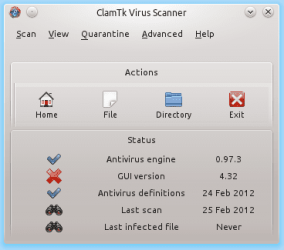
1. Open a terminal in Mint, and run the folliowing to download and install CLAM antivirus and the GUI interface: Code: sudo apt-get install clamav clamtk 2. Now check that the database is up-to-date: Locate the item called Virus Scanner, and run a scan of your system (note that the GUI interface will be marked as outdated, you can ignore that). If it comes up clean, we can cross off an infection in Linux.
CLAMAV screen capture shown below so you know what you are looking for.
Regards,
Golden
Last edited by Golden; 24 Feb 2012 at 07:40 PM..
| My System Specs | | Computer type PC/Desktop System Manufacturer/Model Number Golden Mk. I.3 OS Windows 7 Ultimate SP1 (x64) CPU Intel i7 860 @ 2.80 GHz Motherboard Gigabyte P55A-UD3R Rev.1. Award BIOS F13 Memory 16GB Corsair Vengance DDR3 @ 661 MHz Dual Channel (9-9-9-24) Graphics Card EVGA NVidia GTX 560 1024MB Sound Card Realtek Integrated Monitor(s) Displays Dual Samsung SyncMaster 2494HS Screen Resolution 1920*1080 and 1920*1080 Keyboard Logitech G110 Mouse Logitech MX518 PSU Thermaltake ToughPower QFan 750W Case Thermaltake Element S VK60001W2Z Cooling Corsair H60 Water Cooling, 2*230mm and 2*80mm case fans Hard Drives 1*OCZ Vertex 2 60GB SSD;
2*Samsung F3 SpinPoint 1TB in RAID0;
3*Samsung F1 SpinPoint 1TB in RAID5;
1*Western Digital 500GB External USB 3.0
1*Seagate 500GB External USB 2.0 Internet Speed Not fast enough!!! Antivirus MSE and Malwarebytes Pro Browser Chrome Version 25 Other Info Laptop: ASUS X54C, Intel Core i3-2330M @ 2.0Ghz, 4GB RAM, Intel HD on-board graphics, Windows 7 Professional SP1 (x64), LinuxMint 14 (x64), PepperMint 3 (x86) |
24 Feb 2012
|
#10 | | Windows 7 Pro-x64 South Texas |
If the virus corrupted settings in the Tcpip Parameters, Windows may not even be looking for a router. I see that your DNS Suffix Search List is not present. In a standalone homegroup LAN this should specify "Router". Take a quick look at the Tcpip Parameters located at:
HKEY_LOCAL_MACHINE\SYSTEM\CurrentControlSet\services\Tcpip\Parameters
I've attached a copy of my settings to compare. | My System Specs | | Computer type PC/Desktop System Manufacturer/Model Number Built 2/11/2011 OS Windows 7 Pro-x64 CPU i7-2600 3.4GHz - 3.8GHz Turbo Motherboard Intel DH67BL-B3 Memory 8Gb - 2x4GB, Muskin 991770 PC3-1333 Graphics Card Integrated Intel HD 2000 Sound Card Integrated Intel 10.1 HD, RealTek ALC892 Monitor(s) Displays Asus LCD VH222H, Haier HL24XSL2a Screen Resolution 1920x1080, 1920x1080 Keyboard Logitech EX100 Wireless Mouse Logitech EX100 Wireless PSU Seasonic 650W 80+ Gold Modular Case Rosewill Defender Cooling Stock CPU, Four 120mm case fans, PCH fan added Hard Drives Crucial C300-128Gb,
Western Digital WD5002AALX - 500Gb,
Western Digital WD7501AALS - 750Gb Internet Speed 2.5/1.5 Mbs Antivirus Microsoft Security Essentials Browser Microsoft Internet Explorer 10 Other Info Antec Veris Premier-Multimedia IR Station,
Cyber Accoustics-3602 Speakers,
AFT XM-5U Card Reader,
Hauppauge TV-HVR-2250,
Sony LX300 USB Turntable Unidentified Network LAN to router won't connect. problems? All times are GMT -5. The time now is 08:11 PM. | |