| Windows 7: Can access folders elsewhere w/W7; cant access W7 from elsewhere |
27 Feb 2012
|
#1 | | |
Can access folders elsewhere w/W7; cant access W7 from elsewhere Hi all.
Three computers on my network. Windows 7 .100, Vista .101, and XP .102.
When I am on my Windows 7 computer, I can access any shared folder on either the Vista and/or XP computers. I can not, however, access Windows 7 shared folders from either the Vista nor XP computers. I can see the folders, but cant access them. I keep getting a box that pops up asking me for a username and password. My Windows 7 does not have a username and pword, but of course, it has a computer name.
What should I do? Thanks! | My System Specs |
| |
27 Feb 2012
|
#2 | | Windows 7 Enterprise x64 SP1 Version 6.1 Build 7601 |
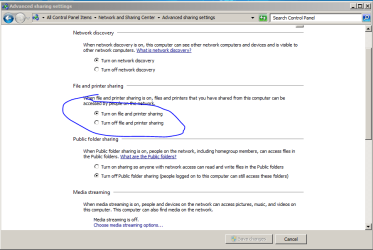
goto Control Panel\All Control Panel Items\Network and Sharing Center\Advanced sharing settings
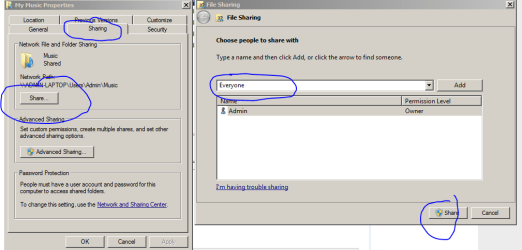
see if folder sharing is enabled?
also turn off password protection: | My System Specs | | System Manufacturer/Model Number Toshiba Satelite P300D 13J (Short model No: PSPDCE) OS Windows 7 Enterprise x64 SP1 Version 6.1 Build 7601 CPU x64bit AMD Turion(tm) X2 Ultra Dual-Core Mobile ZM-82 Memory 4096 (2048 + 2048) MB, DDR2 RAM (800 MHz), max 8,192 MB Graphics Card ATI Mobility Radeon™ HD 3650+HyperMemory™(512MB VRAM+2302MB) Sound Card Manufacturer: harman/kardon Monitor(s) Displays Generic PnP Monitor (MONITOR\LPLA101) Screen Resolution 1440 x 900 (19" LCD) Keyboard USB Logitech S520 Mouse USB Logitech S520 PSU Batery: technology : lithium-ion Cooling integrated cooler + 3x external cooler Hard Drives HDD1: TOSHIBA MK3252GSX ATA Device (IDE 320 GB 5,400 o/min) ,
HDD2: Msft Virtual Disk SCSI Disk Device (Virtual Hard Drive),
HDD3: TOSHIBA MK3263GSX USB Device (USB Mobile HDD) (TakeMS MemLine) Internet Speed WAN: 7,2 Mbit/sec, WLAN: 54 Mbit/sec + Bluetooth® |
27 Feb 2012
|
#3 | | |
Thanks for the reply.
Turn on file printer sharing is set to on
Turn on pword protected sharing is set to on
However, Turn on Netowrk Discovery is off, and I cant turn it on. Is that the problem? | My System Specs | | |
27 Feb 2012
|
#4 | | Windows 7 Enterprise x64 SP1 Version 6.1 Build 7601 |
network discovery shall not be a problem since you can see Windows 7 machine from other machines and vice versa.
turn off password protected sharing and see if that helps.
to turn on network discovery you must be loged in as administrator,
also settings for your adapter should have network discovery enabled. Control Panel\Network and Internet\Network Connections >> right click on adapter >> properties and make sure last two checkBoxes are checked. | My System Specs | | System Manufacturer/Model Number Toshiba Satelite P300D 13J (Short model No: PSPDCE) OS Windows 7 Enterprise x64 SP1 Version 6.1 Build 7601 CPU x64bit AMD Turion(tm) X2 Ultra Dual-Core Mobile ZM-82 Memory 4096 (2048 + 2048) MB, DDR2 RAM (800 MHz), max 8,192 MB Graphics Card ATI Mobility Radeon™ HD 3650+HyperMemory™(512MB VRAM+2302MB) Sound Card Manufacturer: harman/kardon Monitor(s) Displays Generic PnP Monitor (MONITOR\LPLA101) Screen Resolution 1440 x 900 (19" LCD) Keyboard USB Logitech S520 Mouse USB Logitech S520 PSU Batery: technology : lithium-ion Cooling integrated cooler + 3x external cooler Hard Drives HDD1: TOSHIBA MK3252GSX ATA Device (IDE 320 GB 5,400 o/min) ,
HDD2: Msft Virtual Disk SCSI Disk Device (Virtual Hard Drive),
HDD3: TOSHIBA MK3263GSX USB Device (USB Mobile HDD) (TakeMS MemLine) Internet Speed WAN: 7,2 Mbit/sec, WLAN: 54 Mbit/sec + Bluetooth® |
27 Feb 2012
|
#5 | | |

Quote: Originally Posted by codekiddy also settings for your adapter should have network discovery enabled. Control Panel\Network and Internet\Network Connections >> right click on adapter >> properties and make sure last two checkBoxes are checked. You mean the Link Layer Topology boxes? Yes, those are checked.
Turned off pword protected sharing. Now, instead of that box asking for my username and pword, I get an 'Access Denied' error.
Here's the wierd thing:
In the Network and Sharing Center > Choose homegroup and sharing options page, 'printers' is checked, and everything else is unchecked. Well, I can access the printers folder from my Vista and XP computers. However, I can not check the other boxes (Pics, Docs, etc.). I can check them, but I cant save those changes. | My System Specs | | |
27 Feb 2012
|
#6 | | Windows 7 Enterprise x64 SP1 Version 6.1 Build 7601 |

Quote: Originally Posted by jasong1968 In the Network and Sharing Center > Choose homegroup and sharing options page, 'printers' is checked, and everything else is unchecked. Well, I can access the printers folder from my Vista and XP computers. However, I can not check the other boxes (Pics, Docs, etc.). I can check them, but I cant save those changes.  Well it looks you found a problem
turn pasword protected sharing back on.
Pics, Docs, etc. must be checked.
are you loged in as admin? | My System Specs | | System Manufacturer/Model Number Toshiba Satelite P300D 13J (Short model No: PSPDCE) OS Windows 7 Enterprise x64 SP1 Version 6.1 Build 7601 CPU x64bit AMD Turion(tm) X2 Ultra Dual-Core Mobile ZM-82 Memory 4096 (2048 + 2048) MB, DDR2 RAM (800 MHz), max 8,192 MB Graphics Card ATI Mobility Radeon™ HD 3650+HyperMemory™(512MB VRAM+2302MB) Sound Card Manufacturer: harman/kardon Monitor(s) Displays Generic PnP Monitor (MONITOR\LPLA101) Screen Resolution 1440 x 900 (19" LCD) Keyboard USB Logitech S520 Mouse USB Logitech S520 PSU Batery: technology : lithium-ion Cooling integrated cooler + 3x external cooler Hard Drives HDD1: TOSHIBA MK3252GSX ATA Device (IDE 320 GB 5,400 o/min) ,
HDD2: Msft Virtual Disk SCSI Disk Device (Virtual Hard Drive),
HDD3: TOSHIBA MK3263GSX USB Device (USB Mobile HDD) (TakeMS MemLine) Internet Speed WAN: 7,2 Mbit/sec, WLAN: 54 Mbit/sec + Bluetooth® |
27 Feb 2012
|
#7 | | |
"Pics, Docs, etc. must be checked."
Yeah - I figured as much.
Turning pword protected sharing back on does not allow me to check and save those boxes.
Am I logged in as admin? Umm, yeah, I dont see why I wouldnt be. I am the one who installed the OS, and am the only user.
--edit-- ok, forund this: Open User Accounts by clicking the Start button , clicking Control Panel, clicking User Accounts and Family Safety, clicking User Accounts, and then clicking Manage another account. If you're prompted for an administrator password or confirmation, type the password or provide confirmation. Your account type is displayed below your user name. If your account type is Administrator, then you are currently logged on as an administrator. Ok, the acct type IS admin... | My System Specs | | |
27 Feb 2012
|
#8 | | Windows 7 Enterprise x64 SP1 Version 6.1 Build 7601 |
I'm out of ideas.
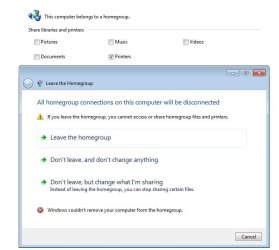
how about leaving a homegroup in windows 7 and setting a homegroup back and then check all those boxes while in setup process.
EDIT:
just guessing,
is this option turned on? | My System Specs | | System Manufacturer/Model Number Toshiba Satelite P300D 13J (Short model No: PSPDCE) OS Windows 7 Enterprise x64 SP1 Version 6.1 Build 7601 CPU x64bit AMD Turion(tm) X2 Ultra Dual-Core Mobile ZM-82 Memory 4096 (2048 + 2048) MB, DDR2 RAM (800 MHz), max 8,192 MB Graphics Card ATI Mobility Radeon™ HD 3650+HyperMemory™(512MB VRAM+2302MB) Sound Card Manufacturer: harman/kardon Monitor(s) Displays Generic PnP Monitor (MONITOR\LPLA101) Screen Resolution 1440 x 900 (19" LCD) Keyboard USB Logitech S520 Mouse USB Logitech S520 PSU Batery: technology : lithium-ion Cooling integrated cooler + 3x external cooler Hard Drives HDD1: TOSHIBA MK3252GSX ATA Device (IDE 320 GB 5,400 o/min) ,
HDD2: Msft Virtual Disk SCSI Disk Device (Virtual Hard Drive),
HDD3: TOSHIBA MK3263GSX USB Device (USB Mobile HDD) (TakeMS MemLine) Internet Speed WAN: 7,2 Mbit/sec, WLAN: 54 Mbit/sec + Bluetooth® |
27 Feb 2012
|
#9 | | |
Yes, that option in your pic is checked.
Cant leave the homegroup: | My System Specs | | |
27 Feb 2012
|
#10 | | Windows 7 Enterprise x64 SP1 Version 6.1 Build 7601 |
see this thread to solve this: Cannot leave Homegroup | My System Specs | | System Manufacturer/Model Number Toshiba Satelite P300D 13J (Short model No: PSPDCE) OS Windows 7 Enterprise x64 SP1 Version 6.1 Build 7601 CPU x64bit AMD Turion(tm) X2 Ultra Dual-Core Mobile ZM-82 Memory 4096 (2048 + 2048) MB, DDR2 RAM (800 MHz), max 8,192 MB Graphics Card ATI Mobility Radeon™ HD 3650+HyperMemory™(512MB VRAM+2302MB) Sound Card Manufacturer: harman/kardon Monitor(s) Displays Generic PnP Monitor (MONITOR\LPLA101) Screen Resolution 1440 x 900 (19" LCD) Keyboard USB Logitech S520 Mouse USB Logitech S520 PSU Batery: technology : lithium-ion Cooling integrated cooler + 3x external cooler Hard Drives HDD1: TOSHIBA MK3252GSX ATA Device (IDE 320 GB 5,400 o/min) ,
HDD2: Msft Virtual Disk SCSI Disk Device (Virtual Hard Drive),
HDD3: TOSHIBA MK3263GSX USB Device (USB Mobile HDD) (TakeMS MemLine) Internet Speed WAN: 7,2 Mbit/sec, WLAN: 54 Mbit/sec + Bluetooth® Can access folders elsewhere w/W7; cant access W7 from elsewhere problems? All times are GMT -5. The time now is 10:32 AM. | |