| Windows 7: I cant Enable my public folder |
22 Aug 2009
|
#1 | | |
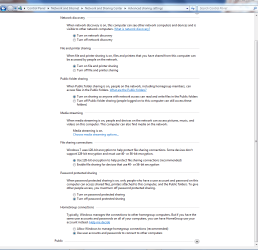
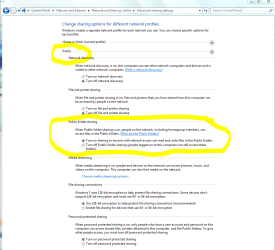
I cant Enable my public folder When i go into the sharing settings and i click on turn on sharing so that anyone with network acsess it selects, i save it then when i come back it isnt selected and i cant see my computer on my other machine. Please help.(im trying to get files from my xp machine) | My System Specs |
| System Manufacturer/Model Number HP OS windows 7 CPU 2.6 ghz something Motherboard nvidia uh... Memory 3 bg Graphics Card nvidia 9500 gt Screen Resolution 1024x768 Internet Speed wifi |
22 Aug 2009
|
#2 | | |
go to Admin tools > Local security policy and enable the "Guest account status" and change Network access: Sharing and Security model to "Guest Only".
disable password protected sharing in Network and Sharing center
If you right-click on a folder and go to sharing it will tell you whether or not the share is password protected. | My System Specs | | System Manufacturer/Model Number Too many to list. OS XP, Seven, 2008R2 CPU AMD, Intel, VIA Motherboard Various Memory Corsair, Kingston, etc. Graphics Card ATI, NVIDIA Monitor(s) Displays Samsung Keyboard qwerty Hard Drives Maxtor, Western Digital Internet Speed 22 Mb/s @ home, 1 Gb/s @ server Other Info All of my systems still run fastest on XP 32-bit for the most part. Win7 is fun to play with, but I still prefer XP for raw speed, security, and functionality. |
22 Aug 2009
|
#3 | | |
i dont see guest account status | My System Specs | | System Manufacturer/Model Number HP OS windows 7 CPU 2.6 ghz something Motherboard nvidia uh... Memory 3 bg Graphics Card nvidia 9500 gt Screen Resolution 1024x768 Internet Speed wifi |
22 Aug 2009
|
#4 | | |
Accounts: Guest account status
This security setting determines if the Guest account is enabled or disabled.
Default: Disabled.
Note:
If the Guest account is disabled and the security option Network Access: Sharing and Security Model for local accounts is set to Guest Only, network logons, such as those performed by the Microsoft Network Server (SMB Service), will fail. | My System Specs | | System Manufacturer/Model Number Too many to list. OS XP, Seven, 2008R2 CPU AMD, Intel, VIA Motherboard Various Memory Corsair, Kingston, etc. Graphics Card ATI, NVIDIA Monitor(s) Displays Samsung Keyboard qwerty Hard Drives Maxtor, Western Digital Internet Speed 22 Mb/s @ home, 1 Gb/s @ server Other Info All of my systems still run fastest on XP 32-bit for the most part. Win7 is fun to play with, but I still prefer XP for raw speed, security, and functionality. |
22 Aug 2009
|
#5 | | |
BTW, I am assuming you are changing these settings on the Windows 7 box. I've already tested it on my network and it works. I can access the Public folder from my XP computer and upload files to the Windows 7 machine. | My System Specs | | System Manufacturer/Model Number Too many to list. OS XP, Seven, 2008R2 CPU AMD, Intel, VIA Motherboard Various Memory Corsair, Kingston, etc. Graphics Card ATI, NVIDIA Monitor(s) Displays Samsung Keyboard qwerty Hard Drives Maxtor, Western Digital Internet Speed 22 Mb/s @ home, 1 Gb/s @ server Other Info All of my systems still run fastest on XP 32-bit for the most part. Win7 is fun to play with, but I still prefer XP for raw speed, security, and functionality. |
22 Aug 2009
|
#6 | | |

I cant find any of that at all.im so confused ha | My System Specs | | System Manufacturer/Model Number HP OS windows 7 CPU 2.6 ghz something Motherboard nvidia uh... Memory 3 bg Graphics Card nvidia 9500 gt Screen Resolution 1024x768 Internet Speed wifi |
22 Aug 2009
|
#7 | | |
it's under local policies, security settings. | My System Specs | | System Manufacturer/Model Number Too many to list. OS XP, Seven, 2008R2 CPU AMD, Intel, VIA Motherboard Various Memory Corsair, Kingston, etc. Graphics Card ATI, NVIDIA Monitor(s) Displays Samsung Keyboard qwerty Hard Drives Maxtor, Western Digital Internet Speed 22 Mb/s @ home, 1 Gb/s @ server Other Info All of my systems still run fastest on XP 32-bit for the most part. Win7 is fun to play with, but I still prefer XP for raw speed, security, and functionality. |
22 Aug 2009
|
#8 | | |
There is a bunch of stuff under security settings,there are a bunch of different folders and i dont see anything in anyone of these folders that says anything about guest or sharing.Sorry about needing step by step instructions | My System Specs | | System Manufacturer/Model Number HP OS windows 7 CPU 2.6 ghz something Motherboard nvidia uh... Memory 3 bg Graphics Card nvidia 9500 gt Screen Resolution 1024x768 Internet Speed wifi |
22 Aug 2009
|
#9 | | |
fire up Teamviewer, PM me your ID and I'll show you. | My System Specs | | System Manufacturer/Model Number Too many to list. OS XP, Seven, 2008R2 CPU AMD, Intel, VIA Motherboard Various Memory Corsair, Kingston, etc. Graphics Card ATI, NVIDIA Monitor(s) Displays Samsung Keyboard qwerty Hard Drives Maxtor, Western Digital Internet Speed 22 Mb/s @ home, 1 Gb/s @ server Other Info All of my systems still run fastest on XP 32-bit for the most part. Win7 is fun to play with, but I still prefer XP for raw speed, security, and functionality. System Manufacturer/Model Number HP OS windows 7 CPU 2.6 ghz something Motherboard nvidia uh... Memory 3 bg Graphics Card nvidia 9500 gt Screen Resolution 1024x768 Internet Speed wifi I cant Enable my public folder problems? All times are GMT -5. The time now is 02:34 AM. | |