- Local time
- 12:58 PM
- Messages
- 135
Hi all
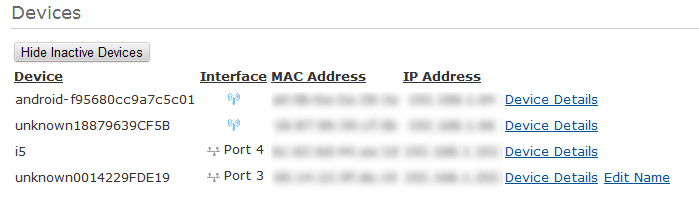
I would really like to know how to see all the devices that are connected to a specific router. I know in windows, command prompt, you say: net view, and it will display all the pc's connected to the router/in the LAN, but it DOES NOT SHOW the smartphones connected to that same router.
I have 3 laptops connected via WiFi, I can see them, but I cannot see the 4 smartphones I have that is also connected to the LAN. How can I see them as well?
I know that they have IPv6 addresses assigned to them, is that the problem(that they do not have IPv4 adressess?)
Thanks
I would really like to know how to see all the devices that are connected to a specific router. I know in windows, command prompt, you say: net view, and it will display all the pc's connected to the router/in the LAN, but it DOES NOT SHOW the smartphones connected to that same router.
I have 3 laptops connected via WiFi, I can see them, but I cannot see the 4 smartphones I have that is also connected to the LAN. How can I see them as well?
I know that they have IPv6 addresses assigned to them, is that the problem(that they do not have IPv4 adressess?)
Thanks
My Computer
At a glance
Windows 7 Ultimate x32Intel Core 2 Quad Q9400 @ 2.66GHz2048MBNVIDIA GeForce GTX 275
- Computer Manufacturer/Model Number
- MSI
- OS
- Windows 7 Ultimate x32
- CPU
- Intel Core 2 Quad Q9400 @ 2.66GHz
- Motherboard
- MSI
- Memory
- 2048MB
- Graphics Card(s)
- NVIDIA GeForce GTX 275
- Monitor(s) Displays
- Generic PnP Monitor
- Hard Drives
- 2x HDD Drives (ATA Devices) 140GB and 368GB
- Cooling
- Fans