
| Windows 7: W7 Network map tree with "?" between laptop and wireless router |
21 Mar 2012
|
#1 | | Windows 7 Home Premium Service Pack 1 64-bit Michigan, USA |
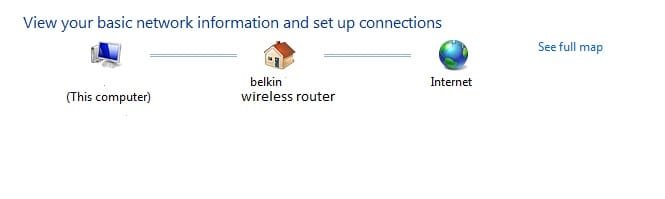
W7 Network map tree with "?" between laptop and wireless router While flying through my computer. I found this instance that has me confused. I was looking at my network. Decided to go to the map and saw the basic map. (image 1). 
When I clicked on "see full map" link it showed the network map, only between my computer and my wireless router there is a connection to a "?". (image 2) 
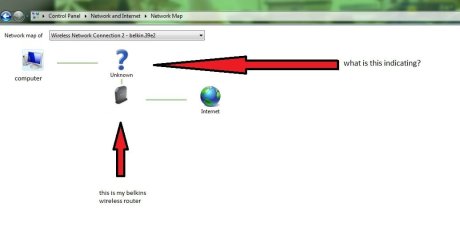
I am wondering why this is so. I tried right clicking on it, no option available. And when I put my mouse over the pictures of computer and router, a link option is available to click. When I put mouse over "?" there is no link hand. I was wondering should I be concerned. Any explanation would be helpful. I am using a belkin wireless router. | My System Specs |
| System Manufacturer/Model Number ACER/Aspire 5733Z-4851 OS Windows 7 Home Premium Service Pack 1 64-bit CPU Dual-Core Intel(R) Pentium(R) CPU P6200 @ 2.13 GHz 2.13 Ghz Memory 4.00 GB (3.68 GB usable) Graphics Card Intel HD Graphics Sound Card Realtek High Definition Audio Mouse Logitech USB wireless mouse Hard Drives 500 GB HDD Internet Speed Link Speed 150 Mbps |
23 Mar 2012
|
#2 | | |
I've been watching this thread in the hopes that someone would answer your question. Since that has not happened yet, I'll repeat some of what I've read about this. Some people have speculated that the mapping process is seeing two separate networking devices (a wireless access point and a router/switch), but it does not want to assign the same name to both devices... so one of the two devices just gets a question mark.
I have no idea if the info above is correct. I would be interested in hearing the thoughts of others on this topic. | My System Specs | | System Manufacturer/Model Number Employer provided Dell E6430 OS W7 Pro SP1 64bit CPU i5 3320M @ 2.6GHz Motherboard 0CPWYR Memory 4GB Graphics Card Intel HD Graphics 4000 Screen Resolution 1600 x 900 Hard Drives 119GB LITEONIT SSD Antivirus Employer mandated Symantec Endpoint Protection Browser Firefox, IE9 & IE8 via VM |
23 Mar 2012
|
#3 | | Windows 7 Home Premium Service Pack 1 64-bit Michigan, USA |
Thank you for your interest. Knowing that I am not the only one who is stumped makes me feel a little better. So, knowing what you have heard, here's a kicker. While looking through some network security suggestions. It led me to router setup page. I decided to change the SSID name of my router, per suggestion of the article, from the default to a unique name. When I applied this change, my laptop's automatic connection disconnected from router since the default name connection no longer existed. A couple seconds later automatic connection recognized renamed ssid and connected, asking for password. I entered password and connection was successful. I then decided to check network map. In the full map, where the mysterious "?" was located, I now saw a map showing my computer connected directly with dashed green lines to newly named router and router connected to internet with solid green lines. So, I assumed that just renaming of the SSID fixed this little bug. However, when I read your post, I decided to check network map again. I now see, a map with my computer connected to "?" connected to router (designated only by model, no new SSID name) then a connection to internet. All connections are designated by solid green lines, no dashed green. This is weird. I have not restarted my computer or renamed the SSID again. I wonder why it reverted back to map with a "?". | My System Specs | | System Manufacturer/Model Number ACER/Aspire 5733Z-4851 OS Windows 7 Home Premium Service Pack 1 64-bit CPU Dual-Core Intel(R) Pentium(R) CPU P6200 @ 2.13 GHz 2.13 Ghz Memory 4.00 GB (3.68 GB usable) Graphics Card Intel HD Graphics Sound Card Realtek High Definition Audio Mouse Logitech USB wireless mouse Hard Drives 500 GB HDD Internet Speed Link Speed 150 Mbps |
23 Mar 2012
|
#4 | | |
I'm following this thread as well, having seen the question mark myself. I've also seen whereupon selecting the "see full map" link opens the network map page, does its search, and results in no map, just a message stating something like "cannot discover any device or computer". Even while being connected via routers/modem to internet, and the "simple" map appearing on the "Network and Sharing Center" page shows as I would expect...
Flaky? Simply not to be relied upon? | My System Specs | | OS Windows 7 Ultimate x64 |
23 Mar 2012
|
#5 | | Windows 7 Home Premium Service Pack 1 64-bit Michigan, USA |
I find it amazing and strangely comforting that you have come across the "cannot discover any device or computer" problem as well. Curious as to what my network map would say today, I checked, and much to my frustration I came across the "cannot discover any device or computer" message as well, this is the first time I have noticed this. My internet connection is active and the basic map shows connections. This seems to be a rather weird issue. I am definitely stumped. Even though I am not having any "problems" with my laptop's performance. I don't like not knowing what is going on. | My System Specs | | System Manufacturer/Model Number ACER/Aspire 5733Z-4851 OS Windows 7 Home Premium Service Pack 1 64-bit CPU Dual-Core Intel(R) Pentium(R) CPU P6200 @ 2.13 GHz 2.13 Ghz Memory 4.00 GB (3.68 GB usable) Graphics Card Intel HD Graphics Sound Card Realtek High Definition Audio Mouse Logitech USB wireless mouse Hard Drives 500 GB HDD Internet Speed Link Speed 150 Mbps |
24 Mar 2012
|
#6 | | |
Hit F5 or click the refresh button. Results may be different each time (device response timing issues?). I looked into this when I first saw it a couple or so years ago. I think I ended up thinking "okay, this mapping thing appears not to be fully reliable" and in the meantime used other tools to verify, and keep it in the back of my mind for future reference (which I guess is why I subscribed to this thread a couple days ago). Like you, I don't like not knowing why something does or doesn't happen like it should, or as I would expect it to...
Do a search for something like "windows 7 network map page shows question mark". Tons of hits, going back for some years. Had never found a definitive answer. At least one hit sends you to this very forum: Windows Network Map | My System Specs | | OS Windows 7 Ultimate x64 |
28 Mar 2012
|
#7 | | Windows 7 Home Premium Service Pack 1 64-bit Michigan, USA |
So I wonder if this is just gonna be another dead-end thread about the "?" in network map. Perhaps, Windows 8 won't have the same issue. It's not a big deal. But big enough to irk me. Hmph. I'm going to leave this thread open hopefully an answer can be found. A definitive, "this is how come", answer. And perhaps even a fix. | My System Specs | | System Manufacturer/Model Number ACER/Aspire 5733Z-4851 OS Windows 7 Home Premium Service Pack 1 64-bit CPU Dual-Core Intel(R) Pentium(R) CPU P6200 @ 2.13 GHz 2.13 Ghz Memory 4.00 GB (3.68 GB usable) Graphics Card Intel HD Graphics Sound Card Realtek High Definition Audio Mouse Logitech USB wireless mouse Hard Drives 500 GB HDD Internet Speed Link Speed 150 Mbps |
28 Mar 2012
|
#8 | | |
Is your router/WAP on this list? | My System Specs | | System Manufacturer/Model Number Employer provided Dell E6430 OS W7 Pro SP1 64bit CPU i5 3320M @ 2.6GHz Motherboard 0CPWYR Memory 4GB Graphics Card Intel HD Graphics 4000 Screen Resolution 1600 x 900 Hard Drives 119GB LITEONIT SSD Antivirus Employer mandated Symantec Endpoint Protection Browser Firefox, IE9 & IE8 via VM |
28 Mar 2012
|
#9 | | Windows 7 Home Premium 64bit Milford,CT USA |
I have a problem with the "?" also. I live in a building of 100+Apts. Usually the "?" is not present when I am actively on-line. If I put the machine into "Hibernate" and come back to it after a couple of hours or most often in the morning, the "?" will be there.
My thought is there is someone using my 'net connection when it is at idle, with no apparent activity on my part.
I say this as there is always the same user name on the list of other SSID names in the area of wireless users in the same building.
The only way for me to kick them off and remove the "?" is to restart the machine. Then the apparent "users" name disappears from the list within a few minutes of doing this.
My biggest worry is someone is up to no good on my 'net line and myself getting into some deep poop and not knowing how to get out of it with the authorities.
So, if someone has a solution to this, I am very interested in listening to it.
My router is a Cisco E-3000. | My System Specs | | Computer type PC/Desktop System Manufacturer/Model Number Self - built OS Windows 7 Home Premium 64bit CPU AMD FX-8350 8 core Motherboard ASUS M5A99X EVO R2.0 Memory 16GB / Corsair XMS3 Graphics Card NVIDIA GeForce 210 1024MB Sound Card on-board Monitor(s) Displays HP 2311x Screen Resolution 1920x1080 Keyboard Logitech Illuminated Mouse M$ - Arc Touch PSU Ultra X4 modular 1050w Case Fractal Define R4 Cooling Cooler Master Gemin II S524 - CPU Cooler Hard Drives SSD: OCZ Vertex 3/120GB;(OS,programs)
HDD's; Hitachi, 1Tb internal,(Data)
SAMSUNG EcoGreen F4 2 Tb external(for B'up) Internet Speed 21Mb down / 2Mb up Antivirus Avast 8 Internet Security Browser Firefox (newest) Other Info Cisco E-3000 router, Logitech Z506, 5.1 speakers. |
28 Mar 2012
|
#10 | | Windows 7 Home Premium Service Pack 1 64-bit Michigan, USA |
Windows 7 Device Compatability 
Quote: Originally Posted by UsernameIssues Is your router/WAP on this list?
I checked the compatibility site you linked to. And, yes, my router model, Belkin Connect N150 Wireless Router, was located. It was listed as "Windows 7 64-bit" compatible.
Thank you for the link. Still not solving my question, but it did inform me of a very useful site that I will be able to use for other purposes. | My System Specs | | System Manufacturer/Model Number ACER/Aspire 5733Z-4851 OS Windows 7 Home Premium Service Pack 1 64-bit CPU Dual-Core Intel(R) Pentium(R) CPU P6200 @ 2.13 GHz 2.13 Ghz Memory 4.00 GB (3.68 GB usable) Graphics Card Intel HD Graphics Sound Card Realtek High Definition Audio Mouse Logitech USB wireless mouse Hard Drives 500 GB HDD Internet Speed Link Speed 150 Mbps W7 Network map tree with "?" between laptop and wireless router problems? All times are GMT -5. The time now is 07:25 AM. | |