| Windows 7: disable all network activities except file and printer sharing |
26 Mar 2012
|
#1 | | Windows: Windows 7 Professional, Version 6.1.7600, , 32 Bit. Internet Explorer: 8.0.7 |
disable all network activities except file and printer sharing Hello everyone
I have 3 computers, all of them running windows 7
I have set up one of them as a print and file server
However, I only want the network access of that particular computer to be limited to print and file server and I don't want it to be able to access the Internet
What I mean to say is, when I turn on that computer, I want to be able to use the USB printer connected to that computer and the shared folder in that computer to be accessible to all my other computers, but I do not want that server computer to be able to use the Internet, which means, if I open a browser in that computer, it should not be able to work, neither should anything else such as automatic windows updates or antivirus updates. Needless to say the printer is not a network printer. It is just a normal printer connected through USB to this computer that I have set up as a server.
Would it be possible to do this?
Please help.
Thank you very much. | My System Specs |
| System Manufacturer/Model Number Dell Inc., Vostro 430 OS Windows: Windows 7 Professional, Version 6.1.7600, , 32 Bit. Internet Explorer: 8.0.7 CPU Intel(R) Core(TM) i5 CPU 760 @ 2.80GHz Motherboard I don't know Memory 4 GB Graphics Card NVIDIA GeForce GT 220 Sound Card Digital Audio (S/PDIF) (High De Monitor(s) Displays Generic PnP monitor (DELL) PSU Don't know Case Don't know Cooling on board fan Hard Drives 500GB + 160 GB Sata |
26 Mar 2012
|
#2 | | |
Just set the default gateway to the wrong address. It will still be able to connect locally to other computers. It will not be able to go to the internet.
Another way would be to block it from the router. | My System Specs | | System Manufacturer/Model Number wi OS windows XP |
26 Mar 2012
|
#3 | | Windows 7 Ult, Windows 8 Pro, San Diego |
But if the default gateway isn't correct you won't be able to access that machine on the network either.
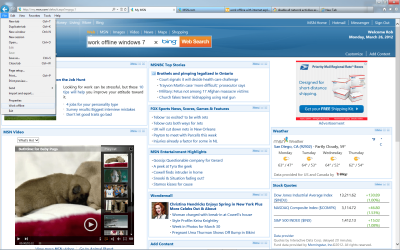
I would think just setting IE to work offline would do the trick, picture below.
You can right click above the tabs to enable the menu bar then just click on file and go down to where it says "Work Offline" and click that. | My System Specs | | System Manufacturer/Model Number Home built OS Windows 7 Ult, Windows 8 Pro, CPU Q9650-4.275GHz, E8600 4.5GHz, E6750-3.8GHz Motherboard Evga 780i FTW Memory G.Skill PC2 9600 1200Mhz 5 5 5 15 2T Graphics Card GTX480 Sound Card Asus Xonar D2 Monitor(s) Displays HannsG Screen Resolution 1680X1050 Keyboard Logitech G15 Mouse Logitech G9 PSU ThermalTake Toughpower 1000Watt modular Case ThermalTake XaserV Cooling Xigmatek S1283 Hard Drives GSkill Phoenix Pro 120GB SSD Internet Speed T1 |
26 Mar 2012
|
#4 | | Windows: Windows 7 Professional, Version 6.1.7600, , 32 Bit. Internet Explorer: 8.0.7 |
actually I was looking for a way to universally block Internet on that machine instead of having to block individual programs that may try to access the Internet in that computer | My System Specs | | System Manufacturer/Model Number Dell Inc., Vostro 430 OS Windows: Windows 7 Professional, Version 6.1.7600, , 32 Bit. Internet Explorer: 8.0.7 CPU Intel(R) Core(TM) i5 CPU 760 @ 2.80GHz Motherboard I don't know Memory 4 GB Graphics Card NVIDIA GeForce GT 220 Sound Card Digital Audio (S/PDIF) (High De Monitor(s) Displays Generic PnP monitor (DELL) PSU Don't know Case Don't know Cooling on board fan Hard Drives 500GB + 160 GB Sata |
26 Mar 2012
|
#5 | | Windows 7 Ult, Windows 8 Pro, San Diego |
That would greatly depend on the types of programs you are trying to block as many of them use certain aspects of IE as a means to connect to the internet.
You could also try blocking those particular programs using Windows firewall but in order to share files and printers you will for certain need to be connected to your router with a proper default gateway. | My System Specs | | System Manufacturer/Model Number Home built OS Windows 7 Ult, Windows 8 Pro, CPU Q9650-4.275GHz, E8600 4.5GHz, E6750-3.8GHz Motherboard Evga 780i FTW Memory G.Skill PC2 9600 1200Mhz 5 5 5 15 2T Graphics Card GTX480 Sound Card Asus Xonar D2 Monitor(s) Displays HannsG Screen Resolution 1680X1050 Keyboard Logitech G15 Mouse Logitech G9 PSU ThermalTake Toughpower 1000Watt modular Case ThermalTake XaserV Cooling Xigmatek S1283 Hard Drives GSkill Phoenix Pro 120GB SSD Internet Speed T1 |
27 Mar 2012
|
#6 | | windows 7 ultimate - 32 bit |
you may set a proxy that contains an illegal destination. | My System Specs | | System Manufacturer/Model Number Intel-DG41WV OS windows 7 ultimate - 32 bit CPU Dual Core - 3GHZ Motherboard Intel-DG41WV Memory 2 GB |
27 Mar 2012
|
#7 | | Windows: Windows 7 Professional, Version 6.1.7600, , 32 Bit. Internet Explorer: 8.0.7 |
I don't have access to the router I can only access that particular server computer | My System Specs | | System Manufacturer/Model Number Dell Inc., Vostro 430 OS Windows: Windows 7 Professional, Version 6.1.7600, , 32 Bit. Internet Explorer: 8.0.7 CPU Intel(R) Core(TM) i5 CPU 760 @ 2.80GHz Motherboard I don't know Memory 4 GB Graphics Card NVIDIA GeForce GT 220 Sound Card Digital Audio (S/PDIF) (High De Monitor(s) Displays Generic PnP monitor (DELL) PSU Don't know Case Don't know Cooling on board fan Hard Drives 500GB + 160 GB Sata |
27 Mar 2012
|
#8 | | Windows 7 Ult, Windows 8 Pro, San Diego |

Quote: Originally Posted by mahaju I don't have access to the router I can only access that particular server computer
If you can't access the router then going offline with IE and using the Windows firewall to block your online programs is about the only solution I can give you. But if you can come up with a better one I'd love to hear it. | My System Specs | | System Manufacturer/Model Number Home built OS Windows 7 Ult, Windows 8 Pro, CPU Q9650-4.275GHz, E8600 4.5GHz, E6750-3.8GHz Motherboard Evga 780i FTW Memory G.Skill PC2 9600 1200Mhz 5 5 5 15 2T Graphics Card GTX480 Sound Card Asus Xonar D2 Monitor(s) Displays HannsG Screen Resolution 1680X1050 Keyboard Logitech G15 Mouse Logitech G9 PSU ThermalTake Toughpower 1000Watt modular Case ThermalTake XaserV Cooling Xigmatek S1283 Hard Drives GSkill Phoenix Pro 120GB SSD Internet Speed T1 disable all network activities except file and printer sharing problems? All times are GMT -5. The time now is 03:53 PM. | |