| Windows 7: How to share win7 drive from winxp pc |
05 Apr 2012
|
#1 | | Win7 Home Basic 32bit India |
How to share win7 drive from winxp pc Dear All, Thanks before for your tech support.
In our office we have 10 winxp pcs, workgroup as workgroup, tcp/ip is set to obtain ip address automatically, with 16port dlink ethernet switch.
Now, we took one new dell pc with Windows 7 home basic. We want d:\ drive in Windows 7 pc should be accessible from all 10 winxp pcs.
New win7hb pc is shown in workgroup of winxp pcs, but when opening d:/drive, access denied error is coming.
Please guide us how to do the drive sharing. Any help reply to mail id (venkat.lanster@gmail.com) is highly appreciated. Thanks again. | My System Specs |
| |
05 Apr 2012
|
#2 | | Windows 7 Pro. 32 bit Oklahoma |
Good afternoon Lanster,
What antivirus are you running? Also I know we had issues with winxp to 7 due to the firewall being on. If you turn if off allow it to be on your network and find the win 7 machine, you can put the firewall back to being on.
thanks,
Sarah | My System Specs | | System Manufacturer/Model Number Dell Vostro 220 mini OS Windows 7 Pro. 32 bit CPU 2.93 GHz E7500 Intel Core 2 Duo Motherboard Dell Memory 2 GB Graphics Card Intel G45/G43 Sound Card Realtek High Def. Monitor(s) Displays 17" acer (I know...its bad) Screen Resolution 1024x768 Keyboard Dell L100 Mouse Dell optical (standard) Hard Drives WD 250 GB Internet Speed 100 Mbps 11.91 dl 12.46 ul Other Info Have questions, just ask. |
05 Apr 2012
|
#3 | | Windows 7 Ult, Windows 8 Pro, San Diego |
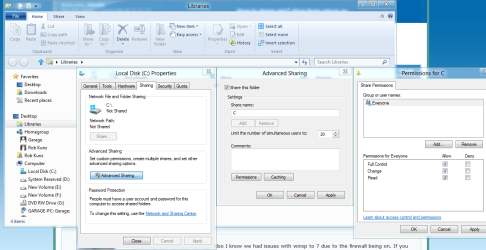
In order to share an entire drive you need to go into the "Security tab" of the drive itself and then add "Everyone" to the permissions share with list. You will also need to set some permissions using the "Sharing Tab" of the drive "picture below".
Do this by right clicking the drive and then choose "Properties" click on the "Security" tab. After that click on the "Edit" button which will bring up the Permissions Security window. Click the "Add" button. Type "Everyone" where it says..."Enter the objects name to select" then click ok. This will take you back to the permissions window where you add check marks for full permissions Second picture. After that hit "Apply" you will be able to share that drive with Everyone now.
This is not a very secure method of sharing because it exposes the shared drives to everyone on your network. As an alternative you can share the entire "User Name" folder and still have access to most every folder on that machine. | My System Specs | | System Manufacturer/Model Number Home built OS Windows 7 Ult, Windows 8 Pro, CPU Q9650-4.275GHz, E8600 4.5GHz, E6750-3.8GHz Motherboard Evga 780i FTW Memory G.Skill PC2 9600 1200Mhz 5 5 5 15 2T Graphics Card GTX480 Sound Card Asus Xonar D2 Monitor(s) Displays HannsG Screen Resolution 1680X1050 Keyboard Logitech G15 Mouse Logitech G9 PSU ThermalTake Toughpower 1000Watt modular Case ThermalTake XaserV Cooling Xigmatek S1283 Hard Drives GSkill Phoenix Pro 120GB SSD Internet Speed T1 |
06 Apr 2012
|
#4 | | Win7 Home Basic 32bit India |

Quote: Originally Posted by ITGIRL Good afternoon Lanster,
What antivirus are you running? Also I know we had issues with winxp to 7 due to the firewall being on. If you turn if off allow it to be on your network and find the win 7 machine, you can put the firewall back to being on.
thanks,
Sarah Dear Ms.Sarah, Hope U R Well & Good! Thanks for your reply.
In Win7HB pc, its AVIRA Antivirus. In Winxp pc, its Kaspersky.
Do I have to turn off Windows 7 firewall or Winxp Firewall or in both pcs.
Awaiting your support reply please.
Last edited by Lanster; 06 Apr 2012 at 01:06 AM..
Reason: typing error
| My System Specs | | |
06 Apr 2012
|
#5 | | Win7 Home Basic 32bit India |
Dear Gold Member Chev65,
Thanks for your reply, thanks for your illustrative image files, thanks for your valuable time & effort spent on this issue. Since today friday, being indian national holiday, i didn't report to work. I would modify the settings as per your instructions & update you monday. Thanks again for your support. | My System Specs | | |
06 Apr 2012
|
#6 | | Windows 7 Ultimate 32bit working in Cambodia |
On Windows 7, you right click the Network icon in taskbar - Open Network and Sharing center - Change advanced sharing settings - Choose the following options: Turn on network discovery + Turn on file and printer sharing | My System Specs | | OS Windows 7 Ultimate 32bit CPU Intel G530 Motherboard MSI H61 E23 B3 Memory Corsair Vengeance 2x2G DDR3 Graphics Card Gigabyte ATI 4670 Monitor(s) Displays ASUS VW190DE PSU Dell 350W Case Roland Hard Drives Hitachi 320 GB |
11 Apr 2012
|
#7 | | Win7 Home Basic 32bit India |

Quote: Originally Posted by chev65 In order to share an entire drive you need to go into the "Security tab" of the drive itself and then add "Everyone" to the permissions share with list. You will also need to set some permissions using the "Sharing Tab" of the drive "picture below".
Do this by right clicking the drive and then choose "Properties" click on the "Security" tab. After that click on the "Edit" button which will bring up the Permissions Security window. Click the "Add" button. Type "Everyone" where it says..."Enter the objects name to select" then click ok. This will take you back to the permissions window where you add check marks for full permissions Second picture. After that hit "Apply" you will be able to share that drive with Everyone now.
This is not a very secure method of sharing because it exposes the shared drives to everyone on your network. As an alternative you can share the entire "User Name" folder and still have access to most every folder on that machine.  Dear Chev65, You are Real Gold Member. I profoundly thank you for helping me in successfully solving this issue. I followed your instructions carefully and implemented sharing Windows 7 D:\drive with WinXP pcs. Also, I request your kind advice, If I connect broadband internet in both or in any of these pcs, (pcs don't have specific ip address) Do these pcs are exposed to outside hacking. To be precise, would any internet user be able to see the data in Windows 7 D:\drive and in WinXP drive. Hope to get your valued reply soon.
Dear Chev65, I am your well wisher. (venkat.lanster@gmail.com) | My System Specs | | |
11 Apr 2012
|
#8 | | Windows 7 Ult, Windows 8 Pro, San Diego |

Quote: Originally Posted by Lanster 
Quote: Originally Posted by chev65 In order to share an entire drive you need to go into the "Security tab" of the drive itself and then add "Everyone" to the permissions share with list. You will also need to set some permissions using the "Sharing Tab" of the drive "picture below".
Do this by right clicking the drive and then choose "Properties" click on the "Security" tab. After that click on the "Edit" button which will bring up the Permissions Security window. Click the "Add" button. Type "Everyone" where it says..."Enter the objects name to select" then click ok. This will take you back to the permissions window where you add check marks for full permissions Second picture. After that hit "Apply" you will be able to share that drive with Everyone now.
This is not a very secure method of sharing because it exposes the shared drives to everyone on your network. As an alternative you can share the entire "User Name" folder and still have access to most every folder on that machine.  Dear Chev65, You are Real Gold Member. I profoundly thank you for helping me in successfully solving this issue. I followed your instructions carefully and implemented sharing Windows 7 D:\drive with WinXP pcs. Also, I request your kind advice, If I connect broadband internet in both or in any of these pcs, (pcs don't have specific ip address) Do these pcs are exposed to outside hacking. To be precise, would any internet user be able to see the data in Windows 7 D:\drive and in WinXP drive. Hope to get your valued reply soon.
Dear Chev65, I am your well wisher. (venkat.lanster@gmail.com) Assuming you are using a router, it would have a built in firewall or gateway that would make it very difficult for a hacker to access your network drive, there is also the Windows 7 firewall preventing this.
Although anyone in your actual network would have access to the contents of the drive you gave permissions for. It would be a bit safer from a security stand point to allow access to the entire User folder rather than the entire drive or you could allow access to only certain folders if you want to set it up that way. | My System Specs | | System Manufacturer/Model Number Home built OS Windows 7 Ult, Windows 8 Pro, CPU Q9650-4.275GHz, E8600 4.5GHz, E6750-3.8GHz Motherboard Evga 780i FTW Memory G.Skill PC2 9600 1200Mhz 5 5 5 15 2T Graphics Card GTX480 Sound Card Asus Xonar D2 Monitor(s) Displays HannsG Screen Resolution 1680X1050 Keyboard Logitech G15 Mouse Logitech G9 PSU ThermalTake Toughpower 1000Watt modular Case ThermalTake XaserV Cooling Xigmatek S1283 Hard Drives GSkill Phoenix Pro 120GB SSD Internet Speed T1 How to share win7 drive from winxp pc problems? All times are GMT -5. The time now is 04:47 PM. | |