Windows 7 Forums


Windows 7: Microsoft Virtual WiFi Miniport Adapter #8 or #9??

26 Apr 2012  
gabriolinari

Windows 7 Ultimate x64
42 posts
 
 
Microsoft Virtual WiFi Miniport Adapter #8 or #9??

hi there guys,

Win 7 Ultimate 64bit...

i would like to know why the Wireless Connection gets weird numbers, i believe it has a reference with the Microsoft Virtual WiFi Miniport Adapter....

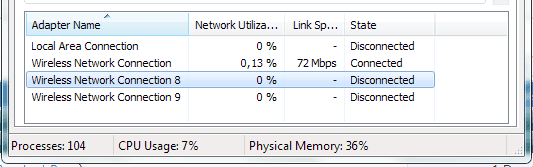
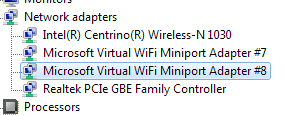
i mean, device manager it says #7 and #8 but from the task manager it says #8 and #9...

not a massive annoyance but what if i wanted to rename them to 1 and 2? it would make me happier..

please see attached screen caps. PC works great, i can totally live with it, but well, just to have things "the right way", if is easy i wouldnt mind to fix it...

thanks
Gab

Attached Thumbnails
Microsoft Virtual WiFi Miniport Adapter #8 or #9??-network.png  
Attached Images
 
My System SpecsSystem Spec

26 Apr 2012  
Teerex

Windows 7 x64 Ultimate SP1
614 posts
Croatia


If you are familiar with regedit, open it and go to key

HKEY_LOCAL_MACHINE\SYSTEM\CurrentControlSet\Control\Network\{xxxxxxxxxxxxxxxxxxxxx}\Descriptions

where xxxx is, I think, a system-specific CLSID number. You will find the names of the network interfaces there, with all the ###s. You can edit them there by clicking modify.
My System SpecsSystem Spec
26 Apr 2012  
chev65

Windows 7 Ult, Windows 8 Pro,
7,893 posts
San Diego


Quote   Quote: Originally Posted by gabriolinari View Post
hi there guys,

Win 7 Ultimate 64bit...

i would like to know why the Wireless Connection gets weird numbers, i believe it has a reference with the Microsoft Virtual WiFi Miniport Adapter....

i mean, device manager it says #7 and #8 but from the task manager it says #8 and #9...

not a massive annoyance but what if i wanted to rename them to 1 and 2? it would make me happier..

please see attached screen caps. PC works great, i can totally live with it, but well, just to have things "the right way", if is easy i wouldnt mind to fix it...

thanks
Gab
If you aren't using the mini port to host a secondary WIFI network then you don't need them. I'm not sure why there are so many but it's best to remove them as the MINI port is famous for causing wireless connection problems. The link below shows you the commands to remove them, it's very simple to do using an Elevated Command Prompt

Uninstall Microsoft Virtual WiFi Miniport Adapter Permanantly
My System SpecsSystem Spec
.


27 Apr 2012  
gabriolinari

Windows 7 Ultimate x64
42 posts


well done, all fixed with Teerex solution..
My System SpecsSystem Spec
Reply

 Microsoft Virtual WiFi Miniport Adapter #8 or #9?? problems?


Thread Tools


Similar help and support threads for: Microsoft Virtual WiFi Miniport Adapter #8 or #9??
Thread Forum
Solved microsoft virtual wifi miniport adapter Hardware & Devices
Microsoft Virtual WiFi Miniport Adapter Network & Sharing
Solved right way to disable Microsoft Virtual Wifi Miniport Adapter? Network & Sharing
Microsoft Virtual Wifi Miniport Adapter not working Drivers


All times are GMT -5. The time now is 01:23 AM.


Windows 7 Forums is an independent web site and has not been authorized,
sponsored, or otherwise approved by Microsoft Corporation.
"Windows 7" and related materials are trademarks of Microsoft Corp.
© Designer Media Ltd