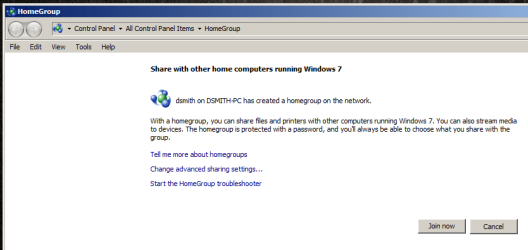
Old Homegroup showing after using Windows Easy Transfer
I used Windows easy transfer to move everything to my profile on my new machine. When trying to join or create a homegroup, the one on an older PC shows up. This machine is no longer active. Can anyone tell me how to remove this connection so I can join a homegroup on my current network? Am enclosing a pic of what I see in Homegroups. Thanks you the help.
System Manufacturer/Model Number HP Pavilion Elite 495UK OS Windows 7 Ultimate SP1 64-Bit CPU Intel Core i7 870 @ 2.93GHz Motherboard MSI 2A9C (CPU1) Memory 8Gb Dual-Channel DDR3 @ 664MHz Graphics Card nVidia GeForce GTX 460 1024MB dedicated RAM Sound Card Realtek HD Audio Monitor(s) Displays HP2310i Screen Resolution 1920 x 1080
Keyboard Logitech K750 solar-powered keyboard Mouse Logitech Wireless M180 mouse PSU 460W Case HP Elite Cooling Air cooled Hard Drives 1x1954GB Hitachi HDS22020ALA 330 (RAID), 1x1954GB Hitachi External for backup and storage Internet Speed 2Mb Other Info Pure Avanti Flow Internet Radio with iPod Dock, 64Gb iPod, HP USB Speakers, Sony MDR-V500 Headphones, Sony Vaio F-Series Laptop
Thanks for the welcome and the response seavixen32.
The old PC was re imaged and given to my mother. I performed a Windows easy transfer copying my settings and files to my wife's desktop machine at that time. There is a different homegroup on her desktop and her laptop currently. I recently built the machine I am on now and once again used the windows easy transfer to copy my files and settings. from her desktop to this machine. My network uses dsl for internet, then to pfSense which is connected to a Linksys Gigabit switch which my machine is connected to. A Cisco/Linksys 5 port switch connects to the gigabit switch. The 5-port has her desktop and a Linksys wireless router (with DHCP turned off) which all of our wireless devices connect to. The Linksys wireless has been reset as well as all switches. pfSense is a new install, which was brought online the same time my new desktop was brought online. This homegroup which is causing the issue has never been used on any of this equipment in my network. It was imported using the Windows Easy Transfer somehow.
System Manufacturer/Model Number HP Pavilion Elite 495UK OS Windows 7 Ultimate SP1 64-Bit CPU Intel Core i7 870 @ 2.93GHz Motherboard MSI 2A9C (CPU1) Memory 8Gb Dual-Channel DDR3 @ 664MHz Graphics Card nVidia GeForce GTX 460 1024MB dedicated RAM Sound Card Realtek HD Audio Monitor(s) Displays HP2310i Screen Resolution 1920 x 1080
Keyboard Logitech K750 solar-powered keyboard Mouse Logitech Wireless M180 mouse PSU 460W Case HP Elite Cooling Air cooled Hard Drives 1x1954GB Hitachi HDS22020ALA 330 (RAID), 1x1954GB Hitachi External for backup and storage Internet Speed 2Mb Other Info Pure Avanti Flow Internet Radio with iPod Dock, 64Gb iPod, HP USB Speakers, Sony MDR-V500 Headphones, Sony Vaio F-Series Laptop
There is one computer on your network that is, has become, the Master Browser for that LAN. It stores the names of computer on the LAN for X amount of time. This is what you are seeing, this is why that computer shows up. Shut down and restart all computer and it should disappear.
The credentials for the rogue Homegroup connection are stored in the credential manager which you can find in the control panel. Choose Credential Manager then choose Windows Credentials then click on the small arrow to the right of the problem credential and choose to remove it.
You may need to leave the Homegroup from all other machines that were involved in the old Homegroup to ensure that it doesn't come back.
The reason for this is because that same credential may still be on one of the old Homegroup machines, as soon as you turn it on the credential will be restored unless all machines leave the original Homegroup.
System Manufacturer/Model Number Home built OS Windows 7 Ult, Windows 8 Pro, CPU Q9650-4.275GHz, E8600 4.5GHz, E6750-3.8GHz Motherboard Evga 780i FTW Memory G.Skill PC2 9600 1200Mhz 5 5 5 15 2T Graphics Card GTX480 Sound Card Asus Xonar D2 Monitor(s) Displays HannsG Screen Resolution 1680X1050
Keyboard Logitech G15 Mouse Logitech G9 PSU ThermalTake Toughpower 1000Watt modular Case ThermalTake XaserV Cooling Xigmatek S1283 Hard Drives GSkill Phoenix Pro 120GB SSD Internet Speed T1
The credentials for the rogue Homegroup connection are stored in the credential manager which you can find in the control panel. Choose Credential Manager then choose Windows Credentials then click on the small arrow to the right of the problem credential and choose to remove it.
You may need to leave the Homegroup from all other machines that were involved in the old Homegroup to ensure that it doesn't come back.
The reason for this is because that same credential may still be on one of the old Homegroup machines, as soon as you turn it on the credential will be restored unless all machines leave the original Homegroup.
Thanks for the response. I checked the credential manager, but only items was my RDP login to my wife's Dual Core.