Windows 7 Forums


Windows 7: Share folder settings not being applied to all files within path

06 May 2012   #1

windows 7 68 bit
 
 
Share folder settings not being applied to all files within path

Hi,

I have an SMB share set up but certain files within the path do not have the same share settings as others.

The path is set up to my TV folder and an example of the issue is below

TV/Walking Dead/Season 1 - this works all files can be seen
TV/Walking Dead/Season 2 - I can see the folder and open it but I can't see any of the files within it.

When I go to the files and look at properties -> security the files I can see and those I can't see have different settings. The files i can see are shared to Everyone, System, My login, Administrators.

The files I can't see are shared with Authenticated users, System, Administrators, Users.

I've tried removing the share from my TV folder than reapplying it, but I get the same result.

If I attempt to view the files over SMB windows to windows it works, but it doesn't work when viewed from my XBMC live install (Linux).

Any ideas on what is happening?

My System SpecsSystem Spec

06 May 2012   #2

Windows 7 Ult, Windows 8 Pro,
San Diego


It sounds like you need to add "Everyone" to either the sharing permissions list or the Security settings.
My System SpecsSystem Spec
06 May 2012   #3

Microsoft Windows 7 Home Premium 64-bit 7600
cornwall UK


Go to properties on the second walking dead folder,security/ advanced and see if you can check a box related to adopting the permisions of the parent folder ,sorry I can't be more specific but I'm posting from my phone
My System SpecsSystem Spec
.


06 May 2012   #4

windows 7 68 bit


Quote   Quote: Originally Posted by boohbah View Post
Go to properties on the second walking dead folder,security/ advanced and see if you can check a box related to adopting the permisions of the parent folder ,sorry I can't be more specific but I'm posting from my phone
There are hardly any options in the advance window and defiantly not anything that looks like it would copy the setting from previous folder.

I can get round it by selecting all the individual files and then sharing them, but it still seems a little strange that they don't have the correct share to start with.

I've found a folder that has some files viewable and some not. It might be that the permissions are set differently on the files at source, before i download them.
My System SpecsSystem Spec
07 May 2012   #5

Windows 7 Ult, Windows 8 Pro,
San Diego


Quote   Quote: Originally Posted by bark01 View Post
Quote   Quote: Originally Posted by boohbah View Post
Go to properties on the second walking dead folder,security/ advanced and see if you can check a box related to adopting the permisions of the parent folder ,sorry I can't be more specific but I'm posting from my phone
There are hardly any options in the advance window and defiantly not anything that looks like it would copy the setting from previous folder.

I can get round it by selecting all the individual files and then sharing them, but it still seems a little strange that they don't have the correct share to start with.

I've found a folder that has some files viewable and some not. It might be that the permissions are set differently on the files at source, before i download them.
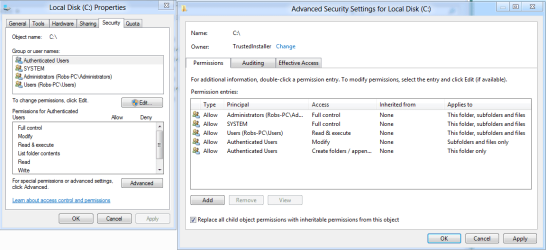
I believe he is referring to the advanced permission settings where you can replace the child object permissions with inheritable permissions as shown in the picture. You have to click on Advanced permissions then use the Change Permissions tab.

It may also be that you need to take ownership of the folders or files first.
Attached Thumbnails
Share folder settings not being applied to all files within path-replace-child-objects.png  
My System SpecsSystem Spec
Reply

 Share folder settings not being applied to all files within path problems?


Thread Tools


Similar help and support threads for: Share folder settings not being applied to all files within path
Thread Forum
Solved Can't apply share attributes to files in folder Network & Sharing
Dual monitor settings won't stay applied Virtualization
Mouse snap to default - applied settings but still doesn't work General Discussion
IE8 Changing Default Folder Path for Temporary Internet Files Browsers & Mail
Consistent folder path creation for network share? Network & Sharing


All times are GMT -5. The time now is 06:54 AM.


Seven Forums Android App Seven Forums IOS App Follow us on Facebook

Windows 7 Forums is an independent web site and has not been authorized,
sponsored, or otherwise approved by Microsoft Corporation.
"Windows 7" and related materials are trademarks of Microsoft Corp.
© Designer Media Ltd
  

1 2 3 4 5 6 7 8 9 10 11 12 13 14 15 16 17 18 19 20 21 22 23 24 25 26 27 28 29 30 31 32