Windows 7 Forums


Windows 7: No internet access- LAN connection - GeForce 6100/nForce 430

19 May 2012   #1

Windows 7 Professional 32bit
 
 
No internet access- LAN connection - GeForce 6100/nForce 430

Dear all,

recently I decided to re-install windows 7 professional 32 bit on my pc. However since I reinstalled it, I haven't been able to connect to the internet. The motherboard is ASUS M2N-VM DH and comes with an integrated GeForce 6100/nForce 430.

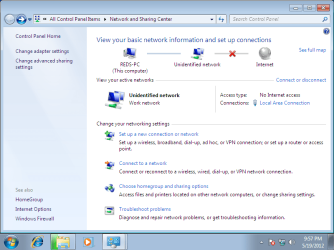
As seen on the 1st screenshot of my network and sharing center, it doesn't identify the network (I even change it's type from public to personal and didn't help).

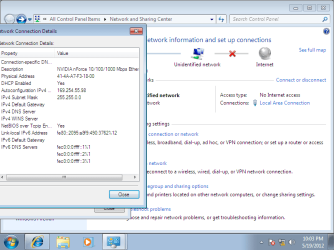
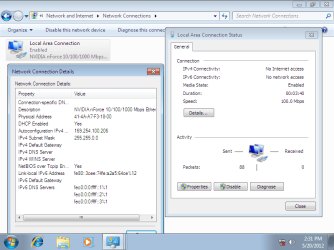
Next I check that the DHCP is enabled however wasn't retrieveing any useful IP adress (see attachment 2)


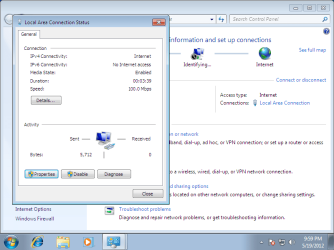
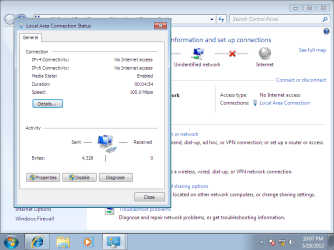
Therefore I decided to introduce manually the IP adress, however it also didn't help (see attachment 3 and 4)

Additionally I tried installing the latest drivers found at nvidia.com 15.49_nforce_winvista_win7_32bit_international_whql.exe

Does anybody may help. I have spent one whole day reading forums and still have no clue what may be the issue, everything was working before re-installing Windows 7.
Attached Thumbnails
No internet access- LAN connection - GeForce 6100/nForce 430-network-sharing-center.png   No internet access- LAN connection - GeForce 6100/nForce 430-dhcp-enabled.png   No internet access- LAN connection - GeForce 6100/nForce 430-inserted-manually-ip-adress.png   No internet access- LAN connection - GeForce 6100/nForce 430-final-result.png  
My System SpecsSystem Spec

20 May 2012   #2

Windows 7 ultimate x64 SP1


Quote   Quote: Originally Posted by reds View Post
Dear all,

recently I decided to re-install windows 7 professional 32 bit on my pc. However since I reinstalled it, I haven't been able to connect to the internet. The motherboard is ASUS M2N-VM DH and comes with an integrated GeForce 6100/nForce 430.

As seen on the 1st screenshot of my network and sharing center, it doesn't identify the network (I even change it's type from public to personal and didn't help).

Next I check that the DHCP is enabled however wasn't retrieveing any useful IP adress (see attachment 2)

Therefore I decided to introduce manually the IP adress, however it also didn't help (see attachment 3 and 4)

Additionally I tried installing the latest drivers found at nvidia.com 15.49_nforce_winvista_win7_32bit_international_whql.exe

Does anybody may help. I have spent one whole day reading forums and still have no clue what may be the issue, everything was working before re-installing Windows 7.
click hereWindows Unidentified network | xpresslearn.com follow instructions;for me worked
My System SpecsSystem Spec
20 May 2012   #3

Windows 7 Professional 32bit


It didn't help
As seen on the screenshot, now the adapter status is enabled, however I still have no network access
Attached Thumbnails
No internet access- LAN connection - GeForce 6100/nForce 430-attempt-1.png  
My System SpecsSystem Spec
.


20 May 2012   #4

Windows 7 ultimate x64 SP1


Quote   Quote: Originally Posted by reds View Post
It didn't help
As seen on the screenshot, now the adapter status is enabled, however I still have no network access
1.open control panel(all items)-->device manager
2.in device manager look for network adapter
3.uninstall network driver
4.install new driver via "windows update"
P.S.:let me know for future problems
My System SpecsSystem Spec
20 May 2012   #5

Windows 7 Professional 32bit


How I may install a new driver via "windows update"?
When I clicked "Check for updates" it gave me error:
Code 8024001F You need to connect to the Internet to check for updates.
My System SpecsSystem Spec
20 May 2012   #6

Windows 7 Ultimate 64bit (Build 7600)
Wales


When you set the IP address manually what did you put in for the IP address, Subnet, gateway & DNS ?
My System SpecsSystem Spec
20 May 2012   #7

Windows 7 Professional 32bit


I used the one my laptop retrieves when I connect it to the same cable.

Last edited by reds; 23 May 2012 at 05:55 AM.. Reason: I erased attachment
My System SpecsSystem Spec
21 May 2012   #8

Windows 7 ultimate x64 SP1


Quote   Quote: Originally Posted by reds View Post
I used the one my laptop retrieves when I connect it to the same cable. (see attachment)
1.first after you uninstall driver via device manager(see my above post) right click on the network adapter and choose "scan for hardware changes"---?widows choose the best driver for you
2.second if the above method not work right click on the network adapter in device manager and choose properties;look for advanced tab and here scroll down and choose last option"WOL&Shutdown link speed"'in the right side you have 3 options avaible and choose the last one "not speed down"
PS sorry my english is not good; write me here for future problems
My System SpecsSystem Spec
23 May 2012   #9

Windows 7 Professional 32bit


Thanks for all your help. However it seems I will need to re-install windows again. It seems I erased some critical file, so now I am not able to enter Windows.

Just this time I will first install windows XP and then upgrade it to windows 7, as I did 3 years ago. Hopefully this will help me
My System SpecsSystem Spec
Reply

 No internet access- LAN connection - GeForce 6100/nForce 430 problems?


Thread Tools


Similar help and support threads for: No internet access- LAN connection - GeForce 6100/nForce 430
Thread Forum
Fallback to second internet connection after internet access loss? Network & Sharing
Limited access signal shows up on wireless internet access connection? Network & Sharing
Hp Dv6000 window 7 64bit and nvidia geforce 6100 go driver problem. Graphic Cards
Graphics driver nvidia geforce go 6100 win7 Drivers
BSOD on Nvidia GeForce 6100 / Nforce 430 BSOD Help and Support


All times are GMT -5. The time now is 10:54 PM.


Seven Forums Android App Seven Forums IOS App Follow us on Facebook

Windows 7 Forums is an independent web site and has not been authorized,
sponsored, or otherwise approved by Microsoft Corporation.
"Windows 7" and related materials are trademarks of Microsoft Corp.
© Designer Media Ltd
  

1 2 3 4 5 6 7 8 9 10 11 12 13 14 15 16 17 18 19 20 21 22 23 24 25 26 27 28 29 30 31 32