Windows 7 Forums


Windows 7: How To Fix "Request Timeout" in My Internet Status

16 Jun 2012   #1

Windows 7 Ultimate x64
PH
 
 
How To Fix "Request Timeout" in My Internet Status

Hi Windows 7 Users,

I'm new to this forum and I would like to open a discussion how to fix my internet problem. I tried to contact the Costumer Support of my ISP but I think they cannot help me with this problem as I submit a lot of tickets and calls already but they are not able to make any steps how to fix this.


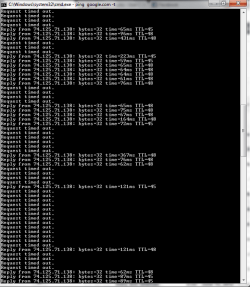
I'm actually having a bad internet connection. I run a Command Prompt (cmd) and type "ping google.com -t" (without quotes) to check my internet status. Here's my problem regarding my internet. See image below...

As you can see, that looks very2x slow and made me really mad most of the time. Does anyone have experience the same problem? Could you provide some helpful suggestions how to fix this?

Please comment below if I'm lacking any information regarding this problem. Will provide anything.

Thanks!

Attached Thumbnails
How To Fix "Request Timeout" in My Internet Status-internet-problem.png  
My System SpecsSystem Spec

16 Jun 2012   #2

Windows 7 Ultimate x64
The Cyberverse


First off can i ask do you have internet connectivity in other words can you surf webpages and download files etc?
My System SpecsSystem Spec
16 Jun 2012   #3

Windows 7 Ultimate x64
PH


Yes, I can download files and surf web pages ONLY IF there's no "Request timed out" on that status. If that "Reply from..." constantly moving that means I have a good internet connection and I can work well or play online games without being disconnected.
My System SpecsSystem Spec
.


17 Jun 2012   #4

Windows 7 Ultimate x64
The Cyberverse


Is this a wired or wireless connection?

Pleas post an ipconfig /al for us to review.

Please download and install xirrus and post a screenshot if it is a wireless connection.

Link below:
Wi-Fi Inspector | Xirrus
My System SpecsSystem Spec
17 Jun 2012   #5

Windows 7 Ultimate x64
PH


I actually have 8 units at home, 6 desktops and 2 laptops. So Im using both on wired and wireless connection, or you mean something more else?

Here's the image you requested...


Anyway, Im not able to DL the Xirrus because I'm having an error on the download page.

Please let me know if there's anything that I could help with.


Thanks
My System SpecsSystem Spec
18 Jun 2012   #6

Windows 7 Ultimate x64
The Cyberverse


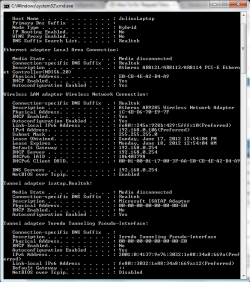
Sorry my post should have read ipconfig /all for us to review please do another one and paste into your next reply.

Try downloading inssider from link belwo an alternative to xirrus.
inSSIDer Download | MetaGeek

Also does the timeouts happen on all machines?
My System SpecsSystem Spec
18 Jun 2012   #7

Windows 7 Ultimate x64
PH


Hi,

Sorry, I missed to attache the image. Here it is..


Yes, it happen the same thing on other computers.

Will follow up the Xirrus

Thanks
Attached Thumbnails
How To Fix "Request Timeout" in My Internet Status-ipconfig-all.png  
My System SpecsSystem Spec
18 Jun 2012   #8

Windows 7 Ultimate x64
The Cyberverse


I will await the inssider screenshot.
My System SpecsSystem Spec
18 Jun 2012   #9

Windows 7 Ultimate x64
PH


I downloaded the software. What should I do next and which one should I take some screenshot.

Let me know, Thanks
My System SpecsSystem Spec
18 Jun 2012   #10

Windows 7 Ultimate x64
The Cyberverse


Use xirrus if you have managed to download and install it rather than inssider.

the first screen what it opens up to is the page we need to see.
My System SpecsSystem Spec
Reply

 How To Fix "Request Timeout" in My Internet Status problems?


Thread Tools


Similar help and support threads for: How To Fix "Request Timeout" in My Internet Status
Thread Forum
Power Options - Add "System unattended sleep timeout" Tutorials
Hard drive crashed, getting "The semaphore timeout period has expired" General Discussion
"Sending request" Internet/browser connection issue. Network & Sharing
"Sending request" Internet/browser issue. Browsers & Mail
Default value of "powercfg-change-monitor-timeout-ac" Performance & Maintenance


All times are GMT -5. The time now is 10:53 PM.


Seven Forums Android App Seven Forums IOS App Follow us on Facebook

Windows 7 Forums is an independent web site and has not been authorized,
sponsored, or otherwise approved by Microsoft Corporation.
"Windows 7" and related materials are trademarks of Microsoft Corp.
© Designer Media Ltd
  

1 2 3 4 5 6 7 8 9 10 11 12 13 14 15 16 17 18 19 20 21 22 23 24 25 26 27 28 29 30 31 32